A CRM can look impressive in a sales presentation. The real test comes on a busy Monday: Can your team find a lead, see the last conversation, plan the next follow-up, and identify deals that need attention?
That is what a CRM free trial is for: testing the software against your team’s actual work.
The best CRM with a free trial is not automatically the one with the longest trial or the most features. It is the one that fits your sales process, is easy for people to adopt, and gives managers a clearer picture of customer activity.
Comparing options? Book a live ConvergeHub demo and ask how the platform could support your team’s workflow.
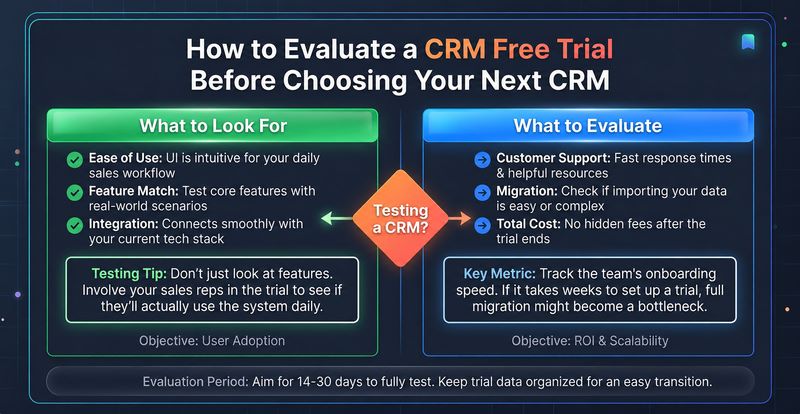
List three to five tasks your CRM must make easier: capture an inquiry, assign it, record interactions, move a deal through the pipeline, and prompt the next follow-up.
Use the same tasks with every vendor so you compare real fit, not just screens and feature lists.
Use one realistic scenario across every CRM you shortlist. Start with a new inquiry, assign it to a rep, record a conversation, create an opportunity, schedule a follow-up, and review the manager’s pipeline view. Ask two users to complete it without coaching. Note where they get stuck, what requires manual work, and whether the next step is obvious. This small exercise will reveal more about day-to-day fit than browsing every menu in the product.
Add sample leads. Check whether you can record the source, assign an owner, update details, and see interactions in one place.
Can a rep understand the prospect’s history without searching spreadsheets and inboxes? The CRM should make information easier to use, not create another silo.
Move a sample opportunity through your real stages. Check that deal value, close date, owner, and next step are easy to update.
The pipeline should guide reps’ next actions and help managers spot stalled deals.
Test reminders, task assignment, and available automation. When a lead is assigned, can the right rep be prompted to follow up? Can routine updates happen automatically?
Automation should reduce repetitive work, not create more work to manage.
Check whether reports answer practical questions: How many opportunities are open? Which deals may close this month? Where are leads stuck?
Reports should be clear and filterable. A dashboard matters when it helps someone make a decision.
Customer relationships continue after a deal closes. Marketing, service, and billing may all need the same customer context.
Test a customer handoff. Can the next team see the history, connect support cases, and manage quotes or invoices without rebuilding the record?
Shared context can reduce duplicate entry and missed handoffs across disconnected tools.
Ask future users to complete basic tasks. Are labels clear? Can they find the next action without help?
A feature has value only when people use it. Include the people who will work in the CRM every day.
List essential tools—email, calendars, accounting software, and lead forms. Verify required integrations and whether they are included in your intended plan.
Test the help experience too. Find documentation or ask a question to understand setup and ongoing support.
Use the same scorecard for every CRM. Give each area a score from 1 to 5, where 1 means “does not meet our needs” and 5 means “works well in our process.”
| What to evaluate | A good result looks like |
| Leads and contacts | Information is easy to capture, find, and maintain |
| Pipeline | Reps can see deal stages and next steps |
| Follow-up | Important tasks are not left to memory |
| Reporting | Managers can get useful answers quickly |
| Handoffs | Teams can work from shared customer context |
| Usability | People can complete everyday tasks confidently |
| Integrations and support | The CRM fits your tools and help is accessible |
Want a ready-made scorecard? Download the 7-point CRM Free Trial Evaluation Checklist to record how each platform performs across these areas. Use the same checklist for every vendor so your final choice is based on evidence, not memory. (Add the checklist landing-page link here before publishing.)
Prioritize the criteria that matter to your business. A straightforward CRM your team uses can be more valuable than a complex platform it avoids.
ConvergeHub brings sales, marketing, service, and billing capabilities together in one CRM environment. Its sales tools cover leads, accounts, contacts, and deals; marketing supports campaigns; service includes cases and a knowledge base; and billing tools include products, quotes, invoices, and payments.
This may suit teams seeking continuity from lead capture through sales and customer support. The deciding question is whether those workflows match your business.
You can explore the ConvergeHub product tour or book a live demo to walk through the processes that matter to your team. ConvergeHub’s website advertises a 14-day free trial with no credit card required. Review the signup page for the current verification and activation steps.
A trial is for hands-on testing; a demo lets an expert walk through a workflow, answer integration questions, and explain setup.
Bring your process, current tools, and biggest problems. Ask the provider to demonstrate those scenarios—not just give a generic tour.
Book a ConvergeHub demo to discuss your team’s requirements and see the platform in context.
A CRM trial is not a button-counting exercise. It should show whether your team can manage leads, move deals, follow up, and serve customers consistently.
Set clear tests, involve daily users, and compare every platform against the same criteria. To explore ConvergeHub, book a live demo and bring your workflows.
Start with the workflow most connected to revenue: capture a lead, assign it, follow up, and move the opportunity through the pipeline.
No. A structured test of real workflows is more useful than a long trial without a plan.
Use sample or anonymized data unless your company has approved the vendor and its data-handling controls.
ConvergeHub advertises a 14-day trial with no credit card required. Check its signup page for verification and activation instructions.
Yes. A demo is a guided walkthrough with the provider; a trial lets your team explore and test the software. Using both can help you understand the platform and judge how well it fits your day-to-day work.
Ask about essential features, user limits, integrations, data migration, customer support, pricing after the trial, and whether the platform can support your existing sales process. A guided walkthrough can help clarify these questions. Book a ConvergeHub demo to discuss your requirements.
Yes. Use a representative sample workflow to test lead assignment, contact management, follow-up reminders, pipeline movement, and reporting. This helps you understand whether the CRM fits your team’s actual working style.
Frequent manual data entry, missed follow-ups, disconnected customer records, limited reporting, and poor visibility into sales activities can indicate that your existing CRM is no longer meeting your needs. Compare alternatives against these specific problems before switching.
This depends on the CRM provider’s trial and data-retention policies. Before signing up, ask how long your records are retained, whether you can export your data, and what happens if you choose not to subscribe. Never assume your data will remain accessible indefinitely.
A demo can help you understand the platform before investing time in testing it. You can discuss your team’s requirements, ask about integrations, and see relevant workflows. A free trial then gives your team an opportunity to evaluate the software hands-on. Book a ConvergeHub demo