Sales Force Automation (SFA) is changing how small and medium businesses (SMBs) run their sales operations. As we head into 2026, knowing which SFA capabilities sit inside Customer Relationship Management (CRM) systems matters for improving productivity and keeping customers engaged. This guide lays out ten SFA features every CRM should offer so SMBs can stay competitive. You’ll learn how these tools simplify workflows, sharpen lead management, and strengthen customer relationships. Many SMBs still rely on manual sales methods that slow response times and cost deals. The right SFA features automate repetitive work, surface useful insights, and help teams focus on selling. We cover lead capture and scoring, pipeline visibility, AI-driven insights, communication automation, and more — practical areas that transform how sales actually gets done.
That said, small businesses often face real hurdles when adopting these systems — research explains why.
CRM adoption challenges for small & medium enterprises
Smaller companies typically operate in highly competitive markets, with limited budgets and fewer staff experienced in implementing complex IT systems. Those constraints — from cash flow pressure to staffing gaps — make CRM adoption more difficult for many SMEs.
Understanding customer relationship management technology adoption in small and medium-sized enterprises: An empirical study in the USA, 2014
What is Sales Force Automation — and why it matters for SMBs in 2026?
Sales Force Automation (SFA) uses software to automate routine sales work so teams can spend more time selling. In 2026, SFA matters for SMBs because it speeds processes, improves data quality, and shortens response times. Automating repetitive tasks—like data entry, follow-up reminders, and lead routing—lets teams move faster and deliver more consistent customer experiences. That reliability reduces errors and supports better decision-making.
Adding SFA into CRM systems delivers tangible benefits for SMBs: for example, it can significantly boost sales productivity by freeing reps to focus on high-value activities, such as relationship building. SFA also uncovers patterns in customer behavior so you can tailor outreach and prioritize the right opportunities.
Research consistently shows CRM-driven automation improves sales efficiency and outcomes.
Salesforce CRM: sales automation, efficiency & revenue growth
This study analyzes how Salesforce CRM automates routine tasks and provides real-time visibility, leading to efficiency gains and revenue improvement. It quantifies how automation helps sales teams prioritize work, reduce manual effort, and make better strategic decisions.
Exploring the impact of Salesforce CRM on sales automation and performance metrics through a quantitative analysis of efficiency gains and revenue growth, J Pookandy, 2023
How does Sales Force Automation simplify sales workflows?
SFA removes manual overhead by automating tasks like data entry, lead tracking, and follow-up reminders. That means reps spend less time on admin and more time building relationships and closing deals. For example, automatic lead capture pulls prospects from forms, emails, and ads into a single system so nothing slips through the cracks.
SFA also improves data accuracy by cutting down on human errors. With real-time updates, teams see the latest information and can react faster to customer inquiries. The result: smoother sales cycles, better customer experience, and higher retention.
What are the benefits of adding SFA to CRM for SMBs?
Integrating SFA into a CRM brings multiple advantages for SMBs. First, it raises sales productivity by automating routine work so reps can focus on strategy and relationships. Second, it enables more personalized selling by surfacing customer preferences and interaction history.
Centralizing interactions and sales activity in one system improves data management and reporting. That consolidated view helps you make smarter decisions and run targeted campaigns. Analytics then reveal performance gaps and growth opportunities that drive better results.
Which lead management and scoring automation features actually drive growth?
Strong lead management and automated scoring are core to converting more prospects. These features help teams prioritize leads that are most likely to convert so effort goes where it counts.
How do automated lead capture and scoring lift conversion rates?
Automated lead capture speeds prospect intake from websites, social channels, forms, and ads into your CRM — ensuring every inquiry is recorded and routed. Automated lead scoring then ranks those contacts using engagement signals and firmographic data so reps target the best-fit opportunities first.
When outreach focuses on higher-value leads, conversion rates improve because sales teams spend their time on prospects that are most sales-ready.
How does ConvergeHub use AI for lead scoring?
ConvergeHub applies AI-driven lead scoring to predict which leads are most likely to convert. By analyzing past interactions and behavior patterns, the system highlights high-potential prospects and helps sales teams prioritize work that produces results.
These models adapt as new data arrives, improving accuracy over time so lead prioritization stays aligned with changing buyer behavior.
The shift to AI-powered scoring represents a meaningful step forward in targeting the right leads.
AI lead scoring in Salesforce: optimize conversions
In today’s fast-moving sales landscape, time equals money. Traditional rule-based lead scoring can miss changing buyer behavior and over-prioritize based on fixed criteria like title or company size. AI-driven models address those limits by learning from patterns and re-prioritizing leads that show the most promise, reducing wasted effort and improving conversion focus.
AI-Driven Lead Scoring in Salesforce: Using Machine Learning Models to Prioritize High-Value Leads and Optimize Conversion Rates, VK Tarra, 2024
How does pipeline and opportunity management improve deal tracking?
Pipeline and opportunity management give sales teams clear visibility into where deals stand and what to do next. These features help prevent opportunities from falling through the cracks and make it easier to forecast revenue.
What tools help visualize and manage sales stages well?
Most CRMs include pipeline boards, stage-based tracking, and milestone alerts to map a deal’s lifecycle from first contact to close. Visual tools highlight bottlenecks and where deals stall, so teams can prioritize tasks that move deals forward.
A clear pipeline view helps managers allocate resources, coach reps effectively, and improve conversion at each stage.
How does ConvergeHub support opportunity management for SMBs?
ConvergeHub’s CRM provides opportunity tracking tailored for SMBs, letting users monitor each deal’s stage, estimated value, and expected close dates. Customizable dashboards and reports surface the metrics teams need to act fast.
With that visibility, businesses can spot trends, reassign focus where needed, and make data-driven adjustments to their sales playbook.
What role do AI sales insights play in modern automation?
AI-powered sales insights translate data into practical actions—predicting trends, flagging at-risk deals, and recommending next steps. Those insights help teams sell smarter rather than harder.
How do predictive analytics and AI support sales forecasting?
Predictive analytics mines historical data to identify trends and produce more accurate forecasts. That helps teams set realistic targets, prioritize resources, and plan outreach with better timing.
Using AI-driven forecasts, sales leaders can anticipate demand, adjust quotas, and coach reps to focus on the right accounts at the right time—improving performance and customer outcomes.
What AI features does ConvergeHub offer to boost productivity?
ConvergeHub includes AI features such as automated lead scoring, predictive analytics, and personalized communication tools. These capabilities reduce manual work and surface actionable insights that help reps close deals faster.
By combining automation with intelligence, ConvergeHub helps SMBs streamline workflows, cut administrative load, and compete more effectively.
To evaluate the investment for these capabilities, explore ConvergeHub’s pricing plans designed to scale with different business needs.
How do email and communication automation features boost engagement?
Email and communication automation keep customer touchpoints timely and relevant. They let teams nurture prospects at scale while preserving personalization that builds trust.
What are the sales benefits of automated email campaigns?
Automated email campaigns expand reach without extra manual work and can be personalized using CRM data so messages land with the right audience. Scheduled sends and triggered follow-ups increase engagement and move prospects through the funnel more predictably.
Well-designed automated campaigns nurture leads, keep customers informed, and drive higher conversion over time.
How does ConvergeHub integrate email automation in its CRM?
ConvergeHub embeds email automation directly in the CRM so you can build campaigns, send personalized sequences, and track responses from one place. Every interaction is logged, giving sales and marketing a unified view of engagement.
With templates and automated follow-ups, teams maintain consistent outreach without adding manual steps, improving both efficiency and customer experience.
Why are task and workflow automation important for efficient sales teams?
Task and workflow automation remove repetitive steps and enforce consistent processes so reps can focus on revenue-generating work. Automations keep deals moving and reduce the risk of missed tasks.
How does automating routine sales work save time and cut errors?
Automating routine tasks like data entry, meeting scheduling, and report generation frees up hours each week and reduces human error. That leads to cleaner data, faster follow-ups, and more reliable forecasts.
Automation ensures repeatable best practices are applied consistently, which improves team performance and customer trust.
What workflow automation templates does ConvergeHub provide for SMBs?
ConvergeHub ships with workflow templates for common sales processes—lead nurturing, automated follow-ups, task reminders, and reporting. These templates let SMBs adopt proven processes quickly without heavy customization.
Using templates helps teams roll out consistent workflows fast so they can focus on iterating strategy rather than building basic automations from scratch.
| Feature | What it does | Business benefit |
| Automated Lead Capture | Gathers leads from forms, ads, and channels into the CRM automatically | Prevents lost leads and speeds response |
| AI-Powered Lead Scoring | Ranks leads by conversion likelihood using behavior and data | Directs sales focus to the best opportunities |
| Sales Pipeline Management | Visual board and stage tracking for deals | Improves deal tracking and reveals bottlenecks |
This table summarizes core sales force automation features that boost SMB sales efficiency and effectiveness.
| AI Feature | Functionality | Impact |
| Predictive Analytics | Uses past data to forecast sales and trends | Raises forecast accuracy and planning quality |
| Automated Email Campaigns | Sends personalized messages triggered by behavior | Increases engagement and conversion |
| Workflow Automation Templates | Pre-built automations for common sales tasks | Speeds implementation and improves consistency |
This table highlights AI-driven capabilities in ConvergeHub that help increase sales productivity and customer engagement.
For specific questions or to discuss your setup, please contact the ConvergeHub team. Our specialists can offer personalized advice and next steps.
Sales force automation is central to modern CRM systems, especially for SMBs. By adopting the features covered here, businesses can streamline sales workflows, strengthen customer relationships, and accelerate growth. As 2026 approaches, these tools will only become more essential—consider integrating them into your operations to stay competitive.
Frequently asked questions
What challenges do SMBs face when adopting Sales Force Automation?
SMBs often face constraints like limited budgets, busy teams, and a lack of in-house IT experience. Those issues can slow implementation and lead to resistance from staff used to older processes. Careful planning, phased rollouts, and targeted training can reduce friction and improve adoption.
How can SMBs measure the success of their SFA implementation?
Track clear KPIs that tie to business goals: sales growth, lead-to-opportunity conversion, average deal close time, user adoption, and customer satisfaction. Regularly review these metrics to validate ROI and refine automations.
What role does training play in the successful adoption of SFA?
Training is critical. Practical, role-based training helps users adopt new tools quickly and use them correctly. Ongoing coaching and easily accessible help resources increase confidence and long-term adoption.
Are there specific industries that benefit more from SFA?
SFA delivers value across industries, but sectors with high customer interaction—retail, real estate, technology, professional services—often see rapid gains. In short, any business that relies on repeatable sales processes benefits from automation.
How does SFA impact customer relationship management?
SFA strengthens CRM by ensuring timely follow-ups, capturing every interaction, and surfacing customer insights that enable personalized outreach. That leads to deeper relationships, higher satisfaction, and better retention.
What are the costs associated with implementing SFA in an SMB?
Costs vary depending on the CRM, feature set, and customization required. Consider initial setup, subscription fees, training, and maintenance. Evaluate expected efficiency gains and revenue impact to estimate ROI before choosing a plan.
Conclusion
Adding Sales Force Automation features to your CRM helps SMBs simplify sales operations and build stronger customer relationships. Automations reduce manual work and surface insights that let teams focus on growth. If you want to modernize your sales stack for 2026, explore how our tailored CRM capabilities can elevate your strategy and deliver measurable results.








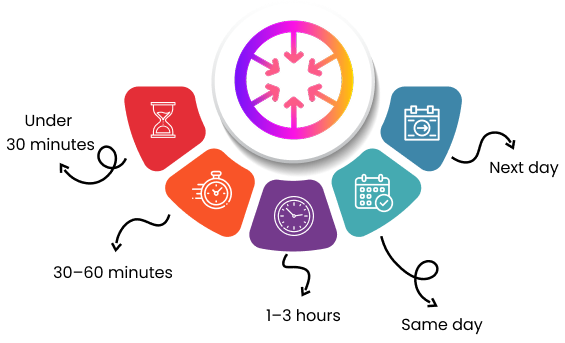





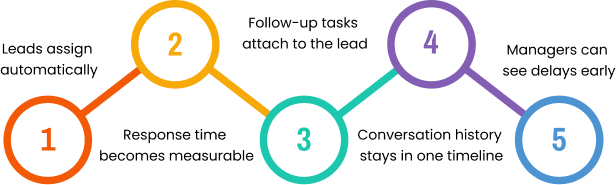
 If you want to test this, track response time inside ConvergeHub for one week and compare meeting rates. Start your