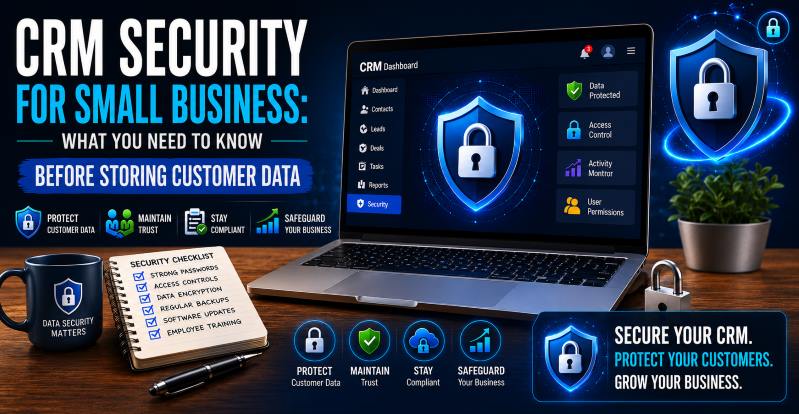
Choosing the right CRM software for a small business is exciting. Until you realize you’re about to store names, emails, phone numbers, financial records, and purchase histories of real people. That’s a serious responsibility. A 2023 IBM report found the average cost of a data breach hit $4.45 million. Small businesses aren’t exempt. Before you store a single customer record, you need to understand what CRM security actually means — and what to look for.
Here’s the uncomfortable truth: 43% of cyberattacks target small businesses, yet only 14% are equipped to defend themselves (Accenture). Hackers don’t only go after the big fish. They target businesses with weaker defenses and a growing database of customer data.
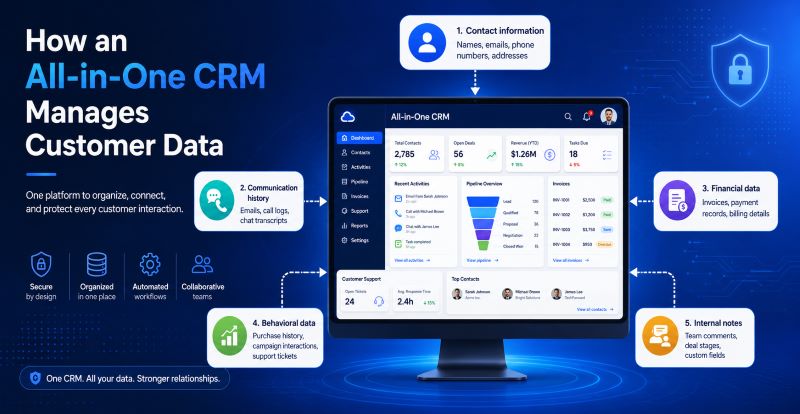
When you’re using CRM software for a small business, you’re centralizing everything in one place — contacts, deals, emails, and billing info. That’s efficient. It’s also a high-value target if your CRM isn’t built with security at its core. Before evaluating security, you need to understand what’s at stake. A typical all-in-one CRM for small business stores:
Each of these data types comes with legal, ethical, and reputational obligations. A breach doesn’t just cost money — it costs trust, and 81% of consumers say they would stop engaging with a brand after a data breach (PwC).
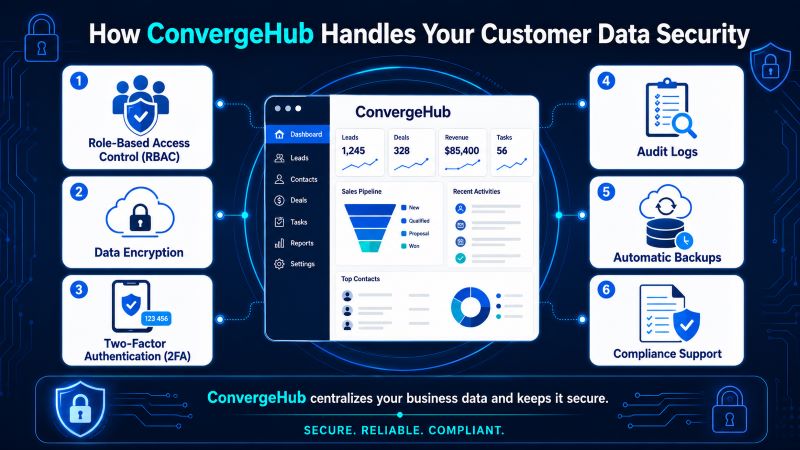
ConvergeHub is built as an all-in-one CRM for small businesses with security baked into every layer. Not all CRMs are built equally when it comes to data protection — here’s what ConvergeHub brings to the table when you’re evaluating a simple CRM for a small business:
With ConvergeHub, you don’t just get a centralized system for sales, marketing, service, and billing — you get a platform designed to protect the data that keeps your business running. Small businesses deserve enterprise-grade security without enterprise-level complexity. That’s exactly the gap ConvergeHub fills.
When evaluating CRM software for a small business, run every vendor through this checklist:
| Security Feature | What to Ask |
| Encryption | Is data encrypted in transit AND at rest? |
| Access Control | Can I set role-based permissions? |
| 2FA | Is two-factor authentication available? |
| Compliance | Is it GDPR/CCPA/HIPAA compliant? |
| Audit Logs | Can I track user activity? |
| Data Backups | How often? Can I restore easily? |
| Data Ownership | Do I own my data if I cancel? |
Don’t assume. Ask. A reputable all-in-one CRM for small businesses will have clear documentation and support to answer every one of these questions.
Security isn’t just about hackers — it’s also about the law. Here are the regulations most small businesses need to be aware of:
Fines for non-compliance aren’t trivial. GDPR violations can result in fines of up to €20 million or 4% of annual global revenue, whichever is higher. A simple CRM for small businesses that helps you manage compliance built in — not bolted on — is worth its weight in gold.
ConvergeHub is built as an all-in-one CRM for small businesses with security baked into every layer. The platform provides role-based access controls, encrypted data storage, and is designed to support GDPR and CCPA compliance requirements. With ConvergeHub, you don’t just get a centralized system for sales, marketing, service, and billing — you get a platform designed to protect the data that keeps your business running. Small businesses deserve enterprise-grade security without enterprise-level complexity. That’s exactly the gap ConvergeHub fills.
Security isn’t a feature you add later — it’s a foundation. The right CRM software for a small business protects your customers’ data while helping you grow with confidence. Before you commit to any platform, verify encryption standards, check compliance certifications, and understand your data ownership rights. ConvergeHub delivers the security infrastructure small businesses need without the enterprise price tag. Start your free 14-day trial and see how secure, simple, and powerful your CRM can be.
Q: Is it safe to store customer data in a CRM?
Yes — if the CRM is built with proper encryption, access controls, and compliance features. The risk lies in using a CRM that lacks these safeguards or in poor internal practices, such as sharing login credentials.
Q: What is the biggest security risk in a CRM?
Human error. Weak passwords, over-permissioned accounts, and phishing attacks are the top causes of CRM-related data breaches. A simple CRM for small businesses with 2FA and RBAC significantly reduces these risks.
Q: Do I need a CRM that’s GDPR compliant?
If you serve customers in the EU or the UK, yes — it’s legally required. Even if you don’t, GDPR-aligned practices signal good data hygiene to all your customers.
Q: Can I control who sees what in a CRM?
Yes, through role-based access control. Any reputable CRM software for small businesses will allow you to set user-level permissions so sensitive data stays with the people who need it.
Q: What happens to my data if I stop using a CRM?
Always ask this before signing up. You should own your data and be able to export it at any time. Verify the vendor’s data retention and deletion policy upfront.