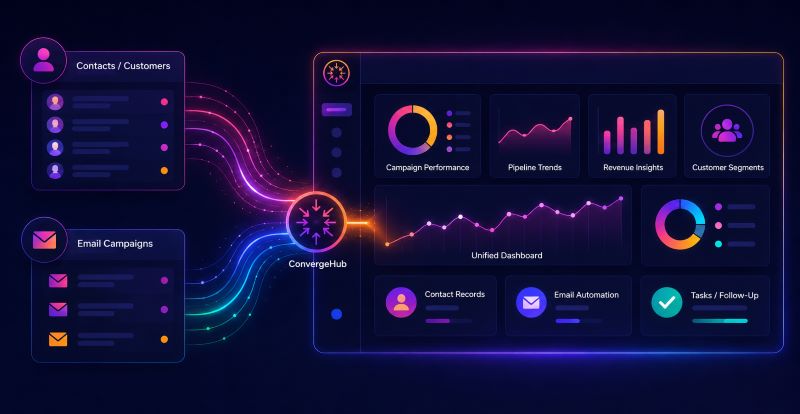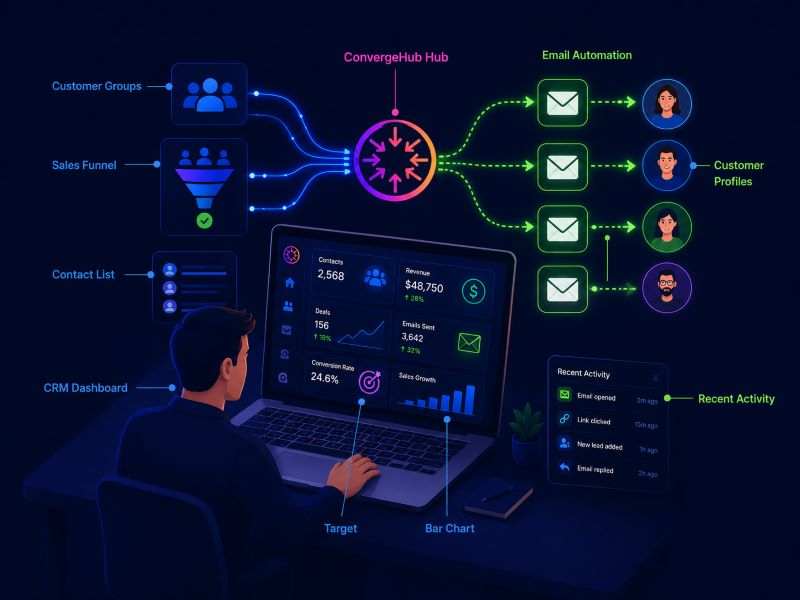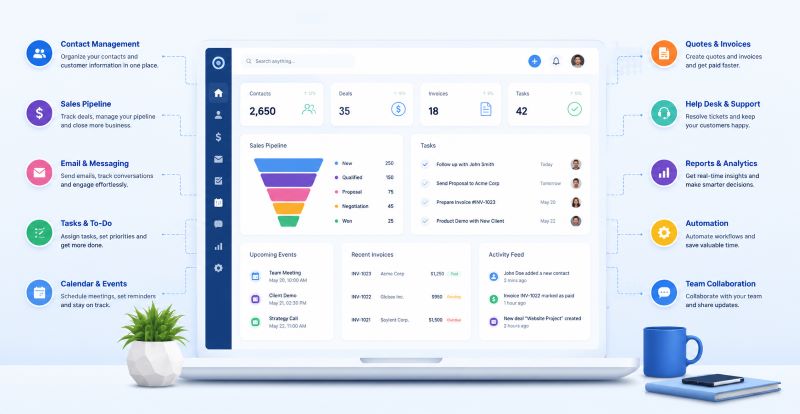
How CRM Software Helps Construction Companies Manage Bids, Clients, and Project Pipelines

In construction, winning the next project is as important as delivering the current one. But managing multiple bids, tracking client conversations, and keeping project pipelines moving — all at once — is where most firms lose ground. The right CRM for real estate and construction companies solves exactly that. It centralizes bid data, organizes client relationships, and gives teams full visibility into every active opportunity — so nothing falls through the cracks, and no revenue is left on the table.

The Construction Industry’s Relationship Problem

Construction is a relationship business. Whether you’re a general contractor, specialty subcontractor, or commercial developer, your pipeline depends on repeat clients, referral networks, and the ability to respond quickly to bid invitations. Yet most construction firms still track all of this through spreadsheets, email threads, and tribal knowledge locked inside individual estimators’ heads.

The cost of that chaos is measurable. According to OpenAsset’s 2024 State of Proposals report, 79% of proposal teams say their firm has lost work due to proposal delays — and over half of marketers report that assembling a single proposal takes more than a week. In a competitive bidding environment, that lag is fatal.

Meanwhile, DocJoist’s 2026 Construction Payment Statistics reveal that 97% of general contractors increased bid prices in 2024 to account for payment delays, inflating bids by an average of 8%. When pricing is distorted by distrust and disorganization, the client relationship suffers before the first shovel hits the ground.

This is the problem CRM software is built to fix.
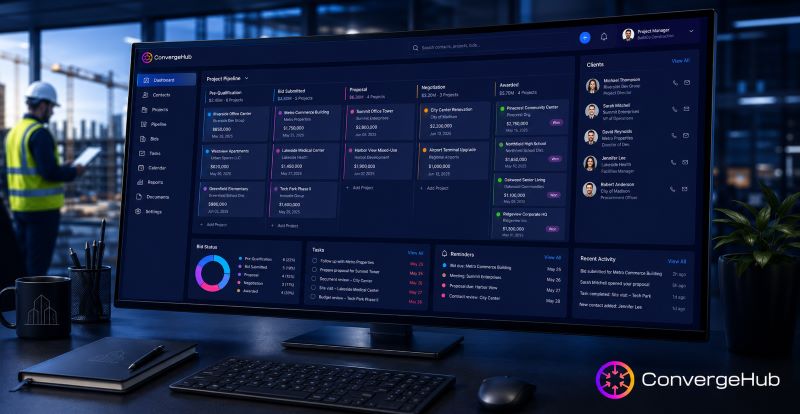
CRM dashboard for construction companies showing bid pipeline and client management data.

What CRM Software Actually Does for Construction Teams

A purpose-built CRM doesn’t just store contact information — it maps every touchpoint across the entire bid-to-build lifecycle. For construction companies, that means:

  • Centralized bid tracking: Every RFP, proposal, and follow-up logged in one place, visible to the entire team
  • Client communication history: A full record of calls, emails, and meetings so any team member can pick up a conversation without starting over
  • Pipeline stage management: Custom stages that reflect construction’s unique workflow — from pre-qualification to bid submission to award and mobilization
  • Subcontractor and vendor relationship tracking: Visibility into who you’ve worked with, their performance history, and their capacity for upcoming bids
  • Automated follow-up and reminders: No more missed check-ins or expired bid windows

According to Market Growth Reports, 73% of construction-related businesses are expected to utilize some form of CRM software by the end of 2025 — up from 60% just three years prior. The firms making this transition aren’t doing it for novelty. They’re doing it because the ROI is documented: the right CRM can deliver returns exceeding 245%, with firms earning an average of $8.71 for every $1 invested.
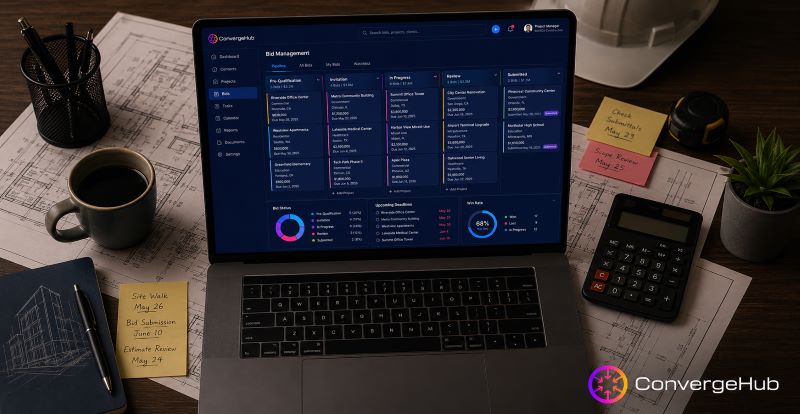
CRM bid management software interface displaying active construction proposals, submission deadlines, win rate analytics, and estimator performance data for construction companies

Bid Management Software: Turning Proposals Into a Competitive Advantage

Effective bid management software does more than track submission deadlines — it transforms the entire pre-construction phase into a structured, repeatable process. The Construction Bid Management Software Market was valued at USD 1.16 billion in 2025 and is projected to reach USD 2.12 billion by 2029, growing at a 16.2% CAGR. That growth signals just how urgently contractors are seeking structured solutions.

When CRM is integrated with bid management, construction firms gain the ability to:

Track win rates by project type, estimator, or client segment — so leadership can redirect resources toward the most profitable bid categories

Leverage historical data — using past project costs and outcomes to sharpen future estimates and avoid underbidding traps

Manage bid windows and RFP deadlines — with automated alerts that ensure proposals never go stale in someone’s drafts folder

Standardize proposal content — with templated sections that reduce the formatting burden and enforce brand consistency across submissions

For firms competing on commercial real estate CRM opportunities — where deal values are higher, stakeholders are more sophisticated, and timelines are compressed — this level of proposal discipline is the difference between making the shortlist and being filtered out.

Construction project pipeline management dashboard showing bid stages from submission to project award, with milestone tracking, deadline alerts, and multi-project visibility for construction teams

Managing the Construction Project Pipeline Without Losing Sight of Clients

A construction project pipeline isn’t static. Projects move from prospect to bid to award to active build to close-out — and each stage involves different people, decisions, and communication needs. Managing that pipeline manually means relying on individual memory and hoping nothing slips between handoffs.

CRM software makes the pipeline visible and manageable in real time. Custom stages can be built to mirror construction’s actual workflow — something generic CRMs rarely accommodate out of the box. HubSpot’s construction CRM analysis highlights that generic sales pipelines don’t match construction’s unique bid-to-build workflow, requiring industry-specific customization to be genuinely useful.

The most impactful pipeline capabilities for construction companies include:

  • Multi-project visibility: See every active bid and project in one dashboard, filtered by stage, client, project type, or team member
  • Change order tracking: Log scope changes as they happen so client records stay accurate, and disputes are easier to resolve
  • Milestone and deadline alerts: Automated reminders keep project managers on schedule without manual follow-up overhead
  • Mobile access for field teams: Updates from the job site feed directly into the CRM, keeping the office and field aligned

This is particularly critical given that construction management software market is currently valued at around $10 billion and expected to grow to $21 billion by 2030. Firms integrating CRM into that digital stack today are building a structural advantage over competitors still running on email and gut instinct.

Contractor Client Management: Building Relationships That Generate Repeat Business

In construction, the highest-value clients aren’t necessarily the ones writing the largest checks — they’re the ones who come back. Repeat business and referrals account for a disproportionate share of revenue for most firms, yet many construction companies have no systematic way to nurture those relationships between projects.

Strong contractor client management through a CRM means:

  • Post-project check-ins: Automated follow-ups 30, 60, or 90 days after project close to maintain the relationship and surface new opportunities
  • Client segmentation: Categorize clients by project type, deal size, geographic region, or relationship stage to prioritize outreach intelligently
  • Interaction logging: Every call, site visit, and email captured so the full relationship history is always available to any team member
  • Opportunity alerts: When a client’s project type or budget aligns with a new bid opportunity, the CRM surfaces it automatically

The construction industry’s 21.4% turnover rate — one of the highest across all industries — makes this even more urgent. When experienced project managers and estimators leave, they take client relationships with them. A CRM-anchored relationship model keeps that institutional knowledge in the business, not in someone’s phone.

Why ConvergeHub Works for Construction Companies

ConvergeHub is an all-in-one CRM platform built for the complexity that smaller and mid-sized construction firms actually face. Rather than forcing teams to stitch together separate tools for bid tracking, client communication, and pipeline management, ConvergeHub centralizes everything into one connected system.

For construction companies, that means:

  • A unified contact and company database that captures every client, subcontractor, and vendor relationship in one place
  • Custom sales pipeline stages that can be configured to match construction’s bid-to-build workflow — not a generic SaaS sales model
  • Built-in task automation that handles follow-up sequences, deadline alerts, and post-project outreach without manual input
  • Full email and communication integration so every touchpoint is captured automatically, no manual logging required
  • Real-time reporting and dashboards that give principals and project managers visibility into bid win rates, pipeline value, and client activity at a glance.
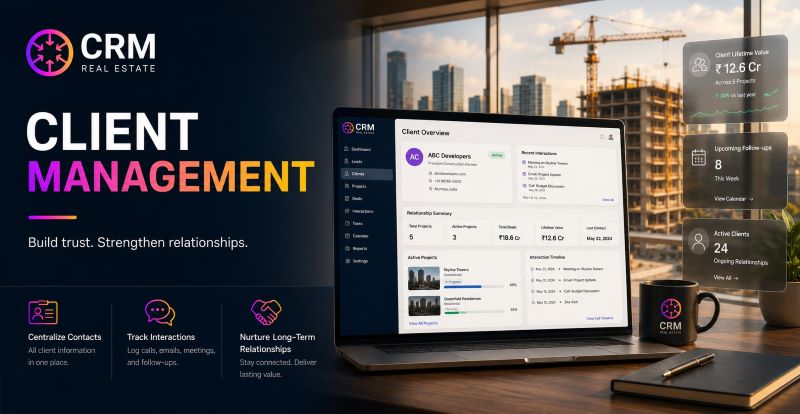
ConvergeHub CRM client profile interface showing contractor client management features including interaction history, open bids, automated follow-up sequences, and pipeline deal stages for construction companies

Final Thoughts

Construction companies that treat CRM for real estate and construction as a back-office tool are missing the point. The firms winning more bids, retaining more clients, and building more predictable pipelines in 2025 and beyond are the ones using CRM as a core operational system — not an afterthought. Now is the time to close it. Whether you’re managing a handful of active bids or juggling a multi-project pipeline across commercial and residential verticals, ConvergeHub gives your team the structure to compete — and the relationship visibility to win repeat business. Explore ConvergeHub’s CRM for construction teams.

Frequently Asked Questions

What is the best CRM for construction companies?

The best CRM for construction companies is one that supports the full bid-to-build workflow — including bid tracking, client communication history, pipeline stage management, and post-project follow-up. ConvergeHub offers all of these in a single platform built for small and mid-sized businesses.

How does CRM software help with bid management?

CRM software centralizes all bid data — RFPs, proposals, follow-up history, and decision timelines — in one system. It also tracks win rates by project type or estimator, surfaces historical data to improve future bids, and automates reminders so no deadline is missed.

Is CRM software useful for commercial real estate construction?

Yes. Commercial real estate CRM functionality is especially valuable in construction because commercial deals involve more stakeholders, longer timelines, and higher proposal standards. CRM software helps teams manage complex multi-stakeholder relationships and maintain proposal consistency across large commercial pursuits.

How does CRM improve contractor client management?

CRM software creates a permanent, searchable record of every client interaction — calls, emails, site visits, proposals, and project outcomes. This means any team member can pick up a client relationship at any point, and automated follow-ups ensure clients are consistently nurtured even between active projects.

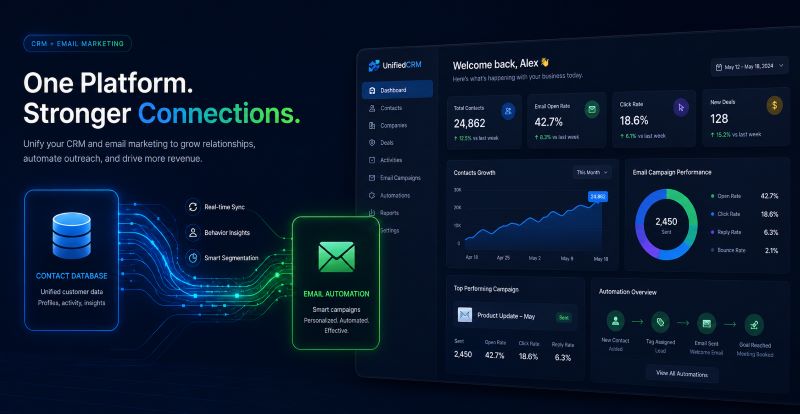
How to Automate ACH Follow-Ups and Holdback Tracking in Your MCA CRM

Automating ACH follow‑ups and holdback tracking using a merchant cash advance CRM improves payment collection efficiency and cash‑flow management for Merchant Cash Advance (MCA) firms. This article outlines practical methods to implement these automations within a CRM, best practices to follow, and the operational benefits of modernising payment processes. You will learn how ACH automation connects with payment gateways, how targeted automation supports business growth, and how CRM solutions such as ConvergeHub can help. The sections that follow cover core concepts, implementation steps, integrations, and measurable benefits.

What Are ACH Payment Automation and Holdback Tracking in MCA CRM?

ACH payment automation digitally manages collections through the Automated Clearing House network to move funds across the banking system, streamlining billing cycles and reducing manual effort. Holdback tracking records and monitors reserves withheld to mitigate default risk. Together, these capabilities raise operational efficiency and strengthen risk management for MCA lenders.

How Does ACH Follow-Up Automation Improve Collection Efficiency?

Automated ACH follow‑ups deliver timely reminders and status updates to clients, reducing missed payments and improving repayment rates. Automation also frees staff from routine outreach so they can focus on higher‑value tasks. CRMs such as ConvergeHub support fast deployment of these workflows.

How to Implement ACH Payment Scheduling and Automated Collections in MCA CRM?

Implementing ACH payment scheduling and automated collections in your CRM follows a simple sequence:

  • Identify Current Workflow: Assess how payment collections are managed today and document pain points.
  • Integrate Automated Solutions: Add software tools that support ACH payment automation and holdback tracking via APIs or builtin connectors.
  • Set Up Scheduling Protocols: Configure timelines for reminders and processing schedules within the CRM to match your repayment cadence.

What Are Best Practices for Automated ACH Follow-Up Workflows?

Effective automated ACH follow‑up workflows include these practices:

  • Mapping Current Processes: Map existing workflows to identify automation opportunities and avoid disrupting key controls.
  • Setting Up Reminders: Use the CRM’s reminder and notification features to send messages before and after due dates.
  • Utilizing Templates: Create standard communication templates for follow-ups to ensure consistent messaging and faster setup.

How to Integrate ACH Automation with Payment Gateways and CRM Systems?

Integrating ACH automation with payment gateways and your CRM ensures consistent data flow, accurate payment tracking, and automated reconciliation. Many payment gateways provide APIs for CRM integration, which reduces reconciliation errors and manual entry. For cost and implementation options, review offerings such as ConvergeHub pricing.

What Are the Key Benefits of Automated Holdback Tracking Software for MCA Lenders?

Automated holdback tracking delivers operational advantages that help MCA lenders manage reserves and exposure:

  • Efficiency Improvements: Automation reduces manual labour for tracking held funds and speeds reconciliations.
  • Accuracy in Tracking: Automated systems lower human error and keep holdback records precise.
  • Impact on Cash Flow Management: Reliable holdback data lets lenders make better decisions about disbursements and reserve levels.

How Does Automated Holdback Reporting Enhance Risk Management?

Automated holdback reporting gives near real‑time visibility into reserve levels, enabling faster detection of discrepancies, clearer exposure assessment, and more informed risk‑mitigation decisions.

What Metrics Track Success in Holdback Automation?

Track these metrics to evaluate holdback automation:

  • Processing Time: Time required to complete holdback reconciliations and payments.
  • Error Rates: Frequency of discrepancies compared with manual processes.
  • Customer Satisfaction: Client feedback on payment handling and communication.

Where Can MCA Lenders See Real-World Success with ACH and Holdback Automation?

Review case studies and vendor references to see automation’s effect on collections and operations.

How Do Automated Systems Reduce Manual Errors and Operational Costs?

Automated systems reduce manual errors and operational costs by minimising human intervention in payment workflows. Automating follow‑ups and payments improves accuracy and lowers labour tied to manual data entry. These efficiency gains and cost reductions explain why many MCA lenders adopt automation. For sector‑specific solutions, see ConvergeHub for Merchant Cash Advance.

Frequently Asked Questions

1. What types of businesses can benefit from ACH payment automation?

ACH payment automation helps businesses that process recurring or high‑volume payments—finance, retail, e‑commerce, and service sectors. Automating collections streamlines billing, lowers overhead, and improves cash‑flow predictability.

2. How can automation tools help in reducing customer disputes in payment collections?

Automation reduces disputes by providing timely, clear payment notifications and accurate transaction histories. Automated reminders and accessible records help resolve queries faster.

3. Are there challenges in implementing ACH automation that businesses should consider?

Yes. Common challenges include integrating with legacy systems, ensuring regulatory compliance, and training staff. Auditing current workflows and planning migrations helps minimise disruption.

4. How often should businesses review their automated payment processes?

Review automated payment processes at least annually or after major operational changes. Regular reviews identify efficiency gains, compliance needs, and optimisation opportunities.

5. What role does data security play in ACH payment automation?

Data security is essential because payment information is sensitive. Solutions should meet standards such as PCI‑DSS and use strong encryption for data in transit and at rest. Regular security audits and staff training protect trust and reduce breach risk.

6. Can ACH automation improve customer retention rates for MCA lenders?

Yes. ACH automation can increase retention by providing consistent, low‑friction payment experiences and clear communication. Reduced payment‑related stress and reliable service boost loyalty and referrals.

7. How can MCA lenders ensure they are maximizing the benefits of automation?

MCA lenders can maximize benefits by training staff on CRM features, using the system’s capabilities fully, and monitoring performance metrics to guide improvements. Collecting feedback from users and clients helps refine workflows as needs evolve.

Conclusion

Automating ACH follow‑ups and holdback tracking improves operational efficiency and reduces manual errors for MCA lenders. These technologies simplify cash‑flow management and support higher repayment rates, freeing teams to focus on strategic growth. Contact ConvergeHub to evaluate solutions that match your requirements, review our CRM offerings.

CRM and Email Marketing: How Small Businesses Can Combine Both to Drive More Revenue

For growing businesses, CRM software for small businesses is no longer a nice-to-have — it’s the operational backbone that connects every customer touchpoint. But CRM alone only tells half the story. When paired with email marketing automation, it becomes a revenue engine that nurtures leads, retains customers, and closes deals on autopilot. Platforms like ConvergeHub are built specifically to bring these two systems together for small businesses in 2026.

Why CRM and Email Marketing Were Never Meant to Be Separate

Most small businesses start with teams. This blog breaks down why integrating them is the smartest move you can make with two disconnected systems: a CRM for small business to manage customer relationship management and track deals, and a separate email tool to send newsletters or promotions. The problem? Sales teams don’t know what marketing is sending, and marketing doesn’t know where a lead sits in the sales pipeline. That disconnect costs real money. 

According to OwlClaw Technologies, CRM-driven email marketing is the highest-ROI retention channel for most businesses, with companies that use CRM effectively retaining customers at 5–25% higher rates and generating 25–95% more revenue per customer through lifecycle marketing (source: owlclaw.com).

This is the core argument for an all-in-one CRM for small businesses: when your contact management database and your email campaigns live in the same system — as they do with ConvergeHub — every email becomes smarter, triggered by real customer behavior instead of guesswork.

 CRM software integration syncing customer contact data with email marketing automation into one unified small business dashboard

The Business Case: What the Numbers Say

If you’re advising a business owner on where to invest a limited tech budget, the data makes the decision easy.

  • CRM platforms have been shown to increase company revenue by as much as 245%, according to SLT Creative’s 2025 research (source: shno.co).
  • The same research found that 91% of businesses report reduced customer acquisition costs after implementing CRM, with nearly half seeing acquisition costs drop by 11% to 20% (source: shno.co).
  • When CRM data is combined with customer segmentation and personalization — exactly what happens with marketing automation — customer lifetime value increases meaningfully. CRM users experience customer lifetime value increases of 25% to 40% when analytics and personalization are integrated (source: shno.co, citing SellersCommerce and BigContacts).
  • On the email side, drip campaigns built from CRM data are especially powerful. A 5-step post-purchase email sequence — thank you, product tips, review request, related products, and a loyalty offer — increases repeat purchase rate by 25 to 40% and lifetime value by 20 to 30% (source: owlclaw.com).
  • For small business owners, these aren’t abstract enterprise numbers. They represent the difference between a one-time sale and a repeat customer who refers others — and it’s exactly the outcome ConvergeHub is designed to deliver.

What Integration Actually Looks Like

A true CRM integration isn’t just “connect two apps and hope.” It means your sales and marketing alignment runs on shared, real-time data. As Salesforce notes, a strong CRM and email marketing integration connects your sales database directly to your sending software, syncing contact data continuously to prevent communication errors (source: salesforce.com).

Here’s what that unlocks for a small business using a platform like ConvergeHub:

  • Automated lead nurturing — when a lead enters your customer database, they’re automatically dropped into a relevant email automation sequence based on their source, industry, or behavior.
  • Behavior-triggered emails — a customer who abandons a quote request, downloads a resource, or hits a pricing page can trigger a follow-up email instantly.
  • Unified customer view — sales reps see every email a contact has opened or clicked before they pick up the phone.
  • Smart customer segmentation — instead of blasting your entire list, you segment by deal stage, industry, or customer engagement level.
  • Closed-loop reporting — you can finally see which email campaigns actually generate revenue, not just opens and clicks.

This is the foundation of what makes a marketing CRM for SMBs different from a generic email tool: it’s built around the customer lifecycle, not just the inbox.

 CRM and email marketing driving revenue growth for small businesses with rising sales chart

Why This Matters More for Small Businesses Than Anyone Else

Enterprise companies can afford separate teams for sales tools and marketing tools. Small businesses can’t. Every tool needs to do double duty, and every hour saved on manual lead scoring and follow-up is an hour spent on revenue-generating work.

This is also why “best of breed” stacking — a separate CRM, a separate email platform, a separate workflow automation tool — often backfires for smaller teams. Research on CRM adoption shows that on average, companies use 3 to 5 tools that integrate with their CRM, and when CRM is integrated with email, sales reps can track engagement automatically rather than manually (source: marketingltb.com). For a lean team, automatic tracking isn’t a convenience — it’s the difference between following up and forgetting entirely.

An all-in-one CRM for small businesses like ConvergeHub removes the integration headache altogether. There’s no syncing delay, no broken third-party connection, no duplicate contact records. Everything — pipeline management, email sequences, reporting — runs from one dashboard.

How to Get Started: A Simple Tool Stack Approach

If you’re a small business owner evaluating your options, here’s the integration-first approach worth considering:

  • Audit your current tools — are your CRM and email platform already connected, or are you manually exporting lists?
  • Map your customer journey — identify the 3-4 key moments where an automated email should trigger (new lead, demo booked, purchase made, follow-up needed).
  • Choose a platform built for both — rather than stitching together point solutions, look for a CRM for small businesses like ConvergeHub that includes native email marketing automation.
  • Start with one automated sequence — a welcome series or post-purchase drip campaign is the easiest place to prove ROI before expanding.
  • Review the data monthly — use your CRM’s reporting to see which emails are converting and adjust accordingly.

ConvergeHub brings customer relationship management and email marketing automation together in a single platform built specifically for small business needs. Visit convergehub.com to explore the full feature set and see how an all-in-one CRM for small businesses can transform your customer relationships.

Small business owner managing CRM software with automated email marketing workflows to streamline customer follow-ups and drive revenue

The Bottom line

Combining CRM and email marketing isn’t a future upgrade — it’s the standard small businesses need to compete today. CRM software for small businesses that includes built-in email capabilities removes friction, increases retention, and turns every customer interaction into a revenue opportunity. The data is clear: integration drives measurable growth, and the businesses that adopt it now, with platforms like ConvergeHub, will be the ones that scale fastest.

Frequently Asked Questions

What is the difference between a CRM and an email marketing tool?

A CRM manages customer relationships, deals, and contact data, while an email marketing tool is built to send and track campaigns. When combined, the CRM provides the data and triggers that make email campaigns more targeted and effective.

Do small businesses really need CRM and email integration, or is it overkill?

For most small businesses, integration pays for itself quickly. Automated, behavior-based emails reduce manual follow-up work and increase conversion rates without adding headcount.

Can I integrate my existing email tool with my CRM, or do I need an all-in-one platform?

Both options work, but an all-in-one platform eliminates syncing issues, duplicate data, and integration costs, making it the simpler long-term choice for growing teams. ConvergeHub is built as an all-in-one solution for exactly this reason.

How quickly can a small business see results from CRM-driven email marketing?

Many businesses see measurable improvements within the first few months, particularly from automated welcome sequences and post-purchase nurture flows, which directly impact repeat purchase rates and customer lifetime value.

Is CRM and email integration only useful for e-commerce businesses?

No. While e-commerce sees strong results from post-purchase flows, service-based businesses benefit equally, using integration for lead nurturing, appointment reminders, and client retention campaigns.

How a Merchant Cash Advance CRM Helps You Close More Deals and Renewals

Efficient sales and renewal processes are essential in the merchant cash advance (MCA) sector. An MCA-focused Customer Relationship Management (CRM) system centralizes leads, client data, documents, and renewal workflows to improve lead handling and boost close and renewal rates. This article outlines key MCA CRM features, benefits, sales impacts, and deployment best practices.

We also note how specialized CRM platforms—such as those from ConvergeHub—can streamline sales operations and improve customer retention.

Features of MCA CRM Software:

MCA CRMs offer core capabilities tailored for cash advance businesses to support faster deal flow and clearer customer management.

  • Centralized Database: Single storage for contacts, transaction history, and documents to reduce silos.
  • Sales Force Automation (SFA): Automates routine tasks so reps can focus on selling.
  • Opportunity Management: Tracks lead stages and required next actions to avoid missed follow-ups.

These features improve team coordination and shorten sales cycles.

Benefits of MCA CRM Software:

Deploying an MCA CRM yields measurable benefits that directly affect sales and retention.

  • Improved Customer Retention: A unified view of interactions supports better service and timely interventions.
  • Enhanced Sales Pipeline: Visibility and prioritization help reps focus on high-value leads.
  • Increased Efficiency: Automation frees time for strategic selling and relationship work.

Collectively, these benefits make operations more predictable and scalable.

Impact on Sales Performance:

MCA CRM platforms optimize workflows and surface actionable insights that improve conversion and revenue.

  • Streamlining Processes: Automated workflows reduce manual errors and speed up deals.
  • Boosting Conversion Rates: Structured data and lead prioritization enable faster, more targeted outreach.
  • Increasing Revenue: Higher close rates and more efficient renewals lift top-line results.

How Does Merchant Cash Advance CRM Improve Lead Tracking and Deal Management?

MCA CRMs centralize lead data and provide tools that make follow-ups systematic and measurable.

  • 360-Degree Customer View: Consolidates interaction history and documents for tailored conversations.
  • Lead Scoring: Prioritizes leads by engagement and eligibility.
  • Automated Alerts and Reminders: Ensures timely tasks and follow-ups are completed.

What Key Lead Management Features Drive Sales Efficiency in MCA CRM?

Core lead-management features reduce friction and focus resources on conversion.

  • Sales Force Automation (SFA): Automates repetitive tasks and data capture.
  • Opportunity Management: Tracks deals across stages and next steps.
  • Data Warehousing: Stores historical interactions to inform reporting and strategy.

How Does Automated Deal Pipeline Tracking Enhance Close Rates?

Automated pipelines keep deals moving and reduce delays.

  • Comprehensive Deal Tracking: Monitors milestones from contact to close.
  • Template-Based Submissions: Speeds document preparation and approvals.
  • Lead Scoring and Prioritization: Directs effort to the most convertible opportunities.

What Role Does Sales Automation Play in Increasing Merchant Cash Advance Renewals?

Automation helps capture renewals proactively and creates revenue opportunities during renewal conversations.

  • Sales Force Automation (SFA): Schedules follow-ups and records interactions automatically.
  • Auto Alerts and Reminders: Notifies teams of upcoming renewals.
  • Intelligent Cross-Selling: Surfaces relevant offers at renewal to increase lifetime value.

These capabilities support better retention and customer satisfaction.

How Do Automated Renewal Workflows Reduce Manual Follow-up Effort?

Automated renewal workflows remove repetitive tasks and increase transparency.

  • Tracking Renewals Automatically: Flags contracts approaching expiration for timely outreach.
  • Task Automation: Sends reminders and schedules renewal activities automatically.
  • Improved Visibility: Central dashboards keep teams aligned on renewal status.

What Are Best Practices for Managing Cash Advance Renewals via CRM?

Adopt straightforward processes that keep customers engaged and valued.

  • Regular Engagement: Maintain consistent touchpoints ahead of renewal dates.
  • Personalized Communication: Use customer history to tailor offers and outreach.
  • Feedback Loops: Collect and act on feedback to improve service and renewals.

Why Is an Integrated Merchant Cash Advance CRM Platform Essential for Small and Medium Businesses?

Integration reduces overhead and makes small teams more effective.

  • Streamlined Sales Process: Central tools reduce context switching.
  • Enhanced Customer Communication: Shared records improve responsiveness.
  • Better Marketing ROI: Targeted campaigns convert more efficiently.

How Does Centralized CRM Access Streamline Sales, Marketing, and Customer Service?

Shared access ensures consistent customer experiences and better coordination across functions.

  • 360-Degree Customer View: One source of truth for all teams.
  • Enhanced Collaboration: Teams share insights and hand-offs smoothly.
  • Integration with Other Tools: Connects accounting, email, and marketing systems for seamless workflows.

What Value Do MCA-Specific CRM Customizations Bring to SMEs?

Tailored fields and workflows accelerate MCA-specific tasks and reporting.

  • Centralized Client Data Management: Capture MCA-specific details to improve decisions.
  • Enhanced Communication Tools: Track outreach and document interactions more precisely.
  • Increased Productivity: Custom workflows reduce manual steps in underwriting and renewals.

Which Metrics and ROI Indicators Demonstrate the Impact of MCA CRM on Deal Closures and Renewals?

Track a focused set of KPIs to measure CRM value.

  • Customer Retention Rate: Percent renewing over a period.
  • Sales Conversion Rate: Leads converted to funded deals.
  • Return on Investment (ROI): Revenue gains versus CRM cost.

How Do Automated MCA CRM Tools Improve Deal Close Rates by Up to 40%?

Automation boosts productive selling time and reduces missed opportunities.

  • Sales Force Automation (SFA): Cuts admin time so reps sell more.
  • Opportunity Management: Ensures no leads are lost in the funnel.
  • Comprehensive Deal Tracking: Keeps decision-makers informed and reduces delays.

What Renewal Efficiency Gains Can Businesses Expect with CRM Automation?

Automation reduces manual workload and improves timeliness.

  • Reduced Manual Effort: Fewer repetitive tasks for staff.
  • Increased Efficiency: Faster response to client needs.
  • Improved Client Satisfaction: Timely, personalized renewals increase loyalty.

Over time these improvements support stronger customer lifetime value.

Frequently Asked Questions

1. Can MCA CRM software be integrated with existing business systems?

Yes. Many solutions integrate with accounting, email, and marketing tools to reduce manual entry and maintain consistent data across systems.

2. What types of businesses benefit the most from MCA CRM software?

Financial services firms offering merchant cash advances, loans, or credit, plus any organization needing structured lead and renewal management, benefit—especially small and medium businesses that need automation and scalability.

3. How does data security work with MCA CRM systems?

Vendors typically provide encryption, role-based access controls, and audits; many platforms support compliance with relevant data-protection standards.

4. What training is necessary for employees to use MCA CRM software effectively?

Provide introductory training on the interface and core workflows, plus ongoing reference materials and role-based coaching to ensure adoption.

5. How quickly can businesses expect to see ROI after implementing MCA CRM software?

Timelines vary, but many organizations report operational improvements within months; measurable revenue and retention benefits often appear across a full sales cycle.

6. Are there specific industry regulations that MCA CRM users need to be aware of?

Yes. MCA businesses should consider consumer protection and financial reporting requirements; CRM features can assist with compliant record-keeping and reporting.

7. What are the common challenges businesses face when transitioning to MCA CRM software?

Common issues include change resistance, data migration, and training needs; structured rollouts, clear training, and stakeholder engagement mitigate these risks.

Conclusion

MCA CRM software centralizes data, automates workflows, and strengthens sales and renewal processes. By reducing manual work and improving visibility, these platforms help teams close more deals and retain customers. Evaluate CRM options carefully—including industry-specific platforms—to find the best fit for your sales and renewal workflows.

To learn more about how MCA CRM software can transform your business, contact ConvergeHub today.

CRM Automation for Small Business: Save 10+ Hours a Week Without Hiring More Staff

ConvergeHub CRM dashboard showing sales pipeline, tasks, invoices, automation, and team collaboration features for small businesses

Running a small business means wearing every hat: sales rep, marketer, customer support, and billing manager, all before lunch. The problem isn’t effort. It’s that manual processes silently drain hours your team can’t afford to lose. The right CRM for a small business doesn’t just organize your contacts — it automates the repetitive work that’s quietly killing your productivity. Here’s how CRM automation helps small businesses reclaim 10+ hours a week, without adding a single headcount.

Why Manual Processes Are Costing You More Than You Think

Before diving into automation, let’s talk about what’s actually happening behind the scenes.

According to McKinsey, employees spend nearly 28% of their workweek managing emails alone. Add manual data entry, follow-up scheduling, and invoice creation, and it’s easy to see how a 5-person team can collectively lose 20–30 hours weekly to tasks that don’t drive revenue.

For small businesses operating on lean teams, that’s not just inefficiency — it’s a growth blocker.

A CRM software for small businesses built with automation at its core solves this at the system level, not the individual level. Instead of asking your team to work harder, it makes the workflow work smarter.

What CRM Automation Actually Does?

CRM automation refers to rule-based workflows that trigger actions automatically — no human input required. Think of it as setting up a series of “if this, then that” instructions inside your CRM.

Common automations include:

  • Lead assignment — new leads routed to the right rep the moment they come in
  • Follow-up reminders — triggered automatically after a call, meeting, or email
  • Email sequences — personalized nurture emails sent based on lead behavior or deal stage
  • Task creation — auto-generated to-dos when a deal moves to a new pipeline stage
  • Invoice generation — triggered when a deal is marked as closed-won
  • Support ticket routing — cases assigned to the right agent based on category or priority

Each of these sounds small in isolation. Together, they compound into serious time savings across the week.

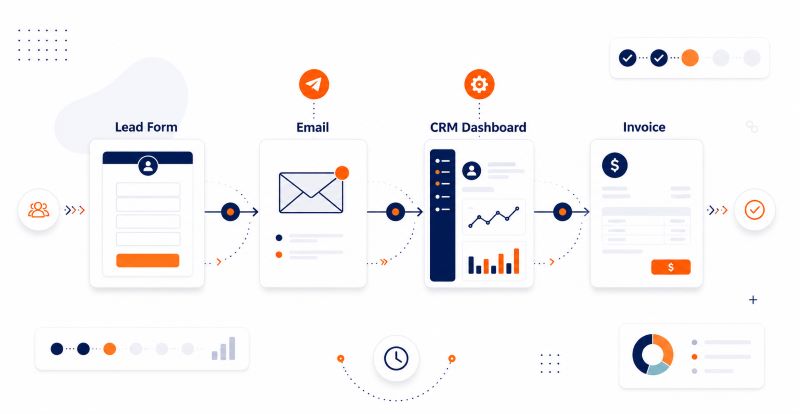
A clean workflow automation graphic showing four connected business steps labeled Lead Form, Email, CRM Dashboard, and Invoice, linked by arrows in a left-to-right flow, using navy and orange accents on a white background.

The 6 Biggest Time Drains Automation Eliminates

1. Manual Lead Follow-Up

The data is clear: 78% of customers buy from the first company that responds to their inquiry (Vendasta). Yet most small businesses still rely on manual reminders to follow up — which means prospects go cold while reps juggle competing priorities.

  • With an all-in-one CRM for small businesses like ConvergeHub, follow-up sequences are triggered automatically the moment a lead enters the pipeline.
  • No reminders needed.
  • No leads slipping through.
  • Time saved: 2–4 hours/week per rep

2. Data Entry and Contact Updates

Manual data entry is one of the highest-waste activities in any small business. Sales reps log calls, update fields, copy information between tools — time that could be spent selling.

CRM automation eliminates this by:

  • Auto-capturing lead data from web forms and landing pages
  • Syncing contact activity from email and calendar integrations
  • Updating deal stages based on rep actions

ConvergeHub’s sales automation handles this natively, keeping records clean without requiring manual input at every step.

Time saved: 3–5 hours/week across the team

3. Email Campaign Management

Manually sending nurture emails — tracking who got what, when, and what to send next — is unsustainable at any scale. Yet many small businesses still do it this way.

A sales CRM for small businesses with built-in marketing automation solves this by:

  • Segmenting contacts automatically based on behavior, industry, or deal stage
  • Triggering personalized email sequences without manual scheduling
  • Tracking open rates, clicks, and responses inside the same platform

ConvergeHub’s marketing features let small teams run campaigns that feel enterprise-grade — without the enterprise overhead.

Time saved: 2–3 hours/week

4. Invoicing and Billing

According to Intuit, small businesses spend an average of 15 days per year chasing late payments. Much of that stems from manual invoicing — delayed sends, missing follow-ups, and no payment tracking.

CRM billing automation changes this by:

  • Auto-generating invoices when a deal closes
  • Sending payment reminders on a set schedule
  • Logging payment status directly against the contact record

With ConvergeHub’s billing module, sales and billing operate from the same platform — no tool-switching, no reconciliation headaches.

Time saved: 2–3 hours/week

5. Customer Support Ticket Routing

When a support request comes in, every minute spent figuring out who handles it is a minute the customer is waiting. Manual triage is slow and inconsistent.

CRM automation routes tickets instantly based on:

  • Issue category
  • Customer tier or account value
  • Agent availability or specialization

ConvergeHub’s service automation ensures cases reach the right agent immediately — improving both response time and customer satisfaction without adding staff.

Time saved: 1–2 hours/week

6. Reporting and Pipeline Visibility

Building weekly reports manually — pulling data from spreadsheets, email threads, and disconnected tools — is a significant time drain for managers and owners.

With a CRM software for small businesses that includes real-time dashboards:

  • Pipeline status is visible at a glance, always up to date
  • Revenue forecasts are generated automatically
  • Team performance data requires no manual compilation

No more Friday afternoon hours lost to report building.

Time saved: 1–2 hours/week

The bottom line

Small businesses don’t lose to larger competitors because of strategy. They lose because manual processes burn time that could be spent growing. A CRM for small businesses built around automation changes that equation — giving lean teams the operational leverage they need to compete at scale. If your team is still manually logging follow-ups, building reports by hand, or chasing invoices one by one, you’re not just losing time. You’re leaving growth on the table. ConvergeHub is the all-in-one CRM for small businesses that automates the work that slows you down — so you can focus on what moves you forward.

Start your free trial today — no credit card required.

Frequently Asked Questions

Q: Is CRM automation only for large businesses? 

No. CRM automation is actually more impactful for small businesses because lean teams feel every hour of manual work more acutely. Purpose-built platforms like ConvergeHub are designed specifically for SMBs — accessible pricing, guided onboarding, and no enterprise complexity.

Q: How long does it take to set up CRM automation? 

Basic automation workflows — lead assignment, follow-up sequences, task triggers — can be live within a day. More complex multi-step workflows typically take one to two weeks to build and test properly.

Q: Do I need technical skills to automate my CRM? 

No. Modern CRM platforms use visual workflow builders that require no coding. If you can describe a process in plain language (“when a lead fills out a form, assign it to the sales rep and send a welcome email”), you can automate it.

Q: What’s the difference between CRM automation and marketing automation? 

Marketing automation focuses on prospect nurturing and campaign management. CRM automation is broader — it covers sales workflows, support routing, billing triggers, and internal task management. An all-in-one CRM for small businesses handles both under one roof.

Q: Will CRM automation replace my team? 

No — it removes the administrative burden so your team can focus on high-value work: building relationships, closing deals, and solving complex customer problems. Automation handles the repetitive tasks; your people handle what matters most

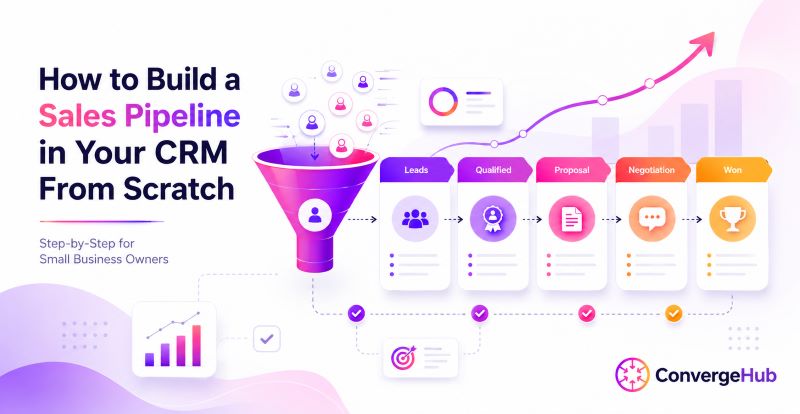
How to Build a Sales Pipeline in Your CRM From Scratch (Step-by-Step for Small Business Owners)

If you run a small business and your leads are living in sticky notes, spreadsheets, or your inbox, you’re already losing deals. A CRM for small businesses gives you the structure to track every lead, follow up on time, and close more deals — without the chaos. This step-by-step guide shows you exactly how to build a sales pipeline inside CRM software from scratch, so you can finally see your revenue clearly and act on it fast.

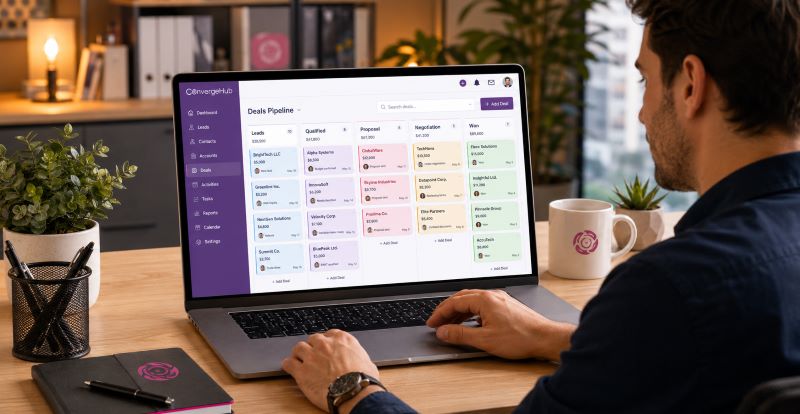
A small business owner sitting at a desk reviewing a color-coded CRM sales pipeline dashboard on a laptop screen, with deal cards organized across multiple pipeline stages

What Is a CRM for Small Business?

A CRM for small businesses (Customer Relationship Management software) is a platform that centralizes all your contacts, deals, communications, and tasks in one place.

Unlike enterprise tools, a CRM software for small businesses is built to be affordable, easy to set up, and useful from day one — even without a dedicated IT team. 71% of small businesses now use a CRM system, and for good reason: a well-implemented CRM delivers an average ROI of $8.71 for every $1 spent. The data is clear — small businesses that adopt CRM early grow faster and close more consistently.

Why Lead Management CRM Matters More Than a Spreadsheet

Most small business owners start with spreadsheets. It works — until it doesn’t. A lead management CRM does what no spreadsheet can:

  • Tracks every touchpoint: Calls, emails, meetings, and notes all log against each contact automatically.
  • Prioritizes follow-ups: Task reminders and automated alerts mean no lead goes cold by accident.
  • Forecasts revenue: See expected revenue at each pipeline stage in real time.
  • Scales with you: As your team grows, your CRM grows with it — no rebuilding from scratch.

40% of salespeople still use spreadsheets and email to manage customer data. That’s 40% operating blind. A lead management CRM replaces guesswork with a system that works.

 How Do Small Businesses Build a Sales Pipeline in a CRM From Scratch?

Step 1: Choose the Right CRM Software for Small Businesses

Not all CRMs are built for small businesses. Many are designed for enterprises with large teams and bigger budgets. When evaluating CRM software for small businesses, look for:

  • All-in-one functionality: sales, marketing, and support in a single platform
  • Easy contact and deal management without a learning curve
  • Built-in automation for follow-ups, tasks, and email sequences
  • Real-time pipeline reporting and dashboards
  • Affordable pricing that scales as you grow

ConvergeHub is built specifically for small businesses that need enterprise-level features without enterprise-level complexity. It combines sales CRM for small businesses, marketing automation, and customer support into one platform — so you’re not paying for five tools when one will do.

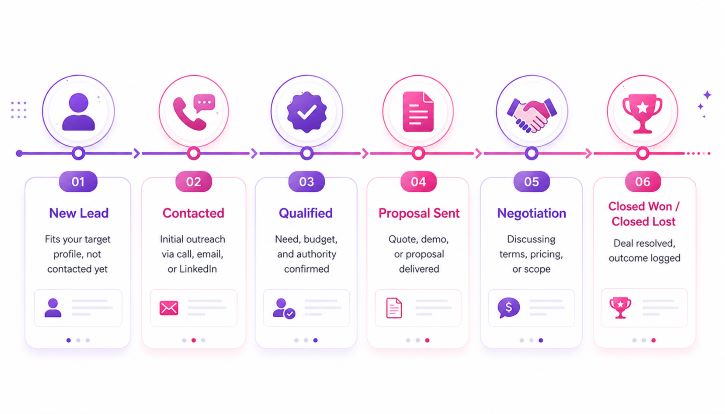
Step 2: Define Your Sales Pipeline Stages

Before you add a single deal, map out your real sales process. Your sales CRM for small business pipeline should reflect how your customers actually buy — not a generic template.

Recommended Pipeline Stages for Small Businesses

  • New Lead: A contact who fits your target profile but hasn’t been reached yet.
  • Contacted: Initial outreach made — call, email, or LinkedIn.
  • Qualified: Confirmed they have a need, budget, and decision-making authority.
  • Proposal Sent: Quote, demo, or proposal delivered.
  • Negotiation: Discussing terms, pricing, or scope.
  • Closed Won / Closed Lost: Deal resolved. Reason logged either way
a six-stage small business sales CRM pipeline in a white, pink, and purple theme, with icons and labeled steps for New Lead, Contacted, Qualified, Proposal Sent, Negotiation, and Closed Won or Closed Lost, connected along a horizontal process flow

Step 3: Add and Organize Your Leads

With your stages set, populate your lead management CRM. Import existing contacts from a CSV or connect your email to pull leads in automatically. Every deal should capture:

  • Contact name and company
  • Deal value (expected revenue)
  • Pipeline stage and expected close date
  • Deal owner — who’s responsible for this opportunity
  • Source — where the lead came from (referral, web, social, etc.)

Accurate deal data is what makes your pipeline trustworthy. CRM systems improve sales forecast accuracy by up to 42% — but only when your data is clean and current.

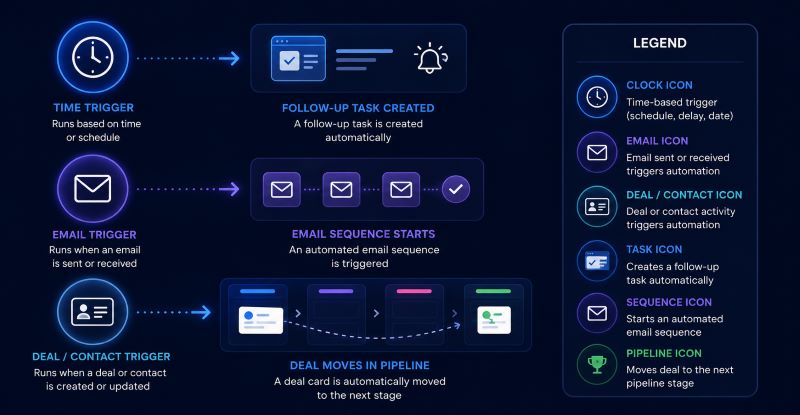
Step 4: Set Up Automation to Keep Deals Moving

Automation is where a CRM for small businesses earns its keep. Without it, follow-ups get dropped. With it, your pipeline runs even when you’re not watching.

  • High-Impact Automations to Set Up First
  • Follow-up reminders: Auto-create a task when a deal hasn’t moved in 5 days.
  • Stage-triggered emails: Send a tailored email sequence when a lead moves to ‘Contacted.’
  • Deal aging alerts: Get notified when a high-value deal goes cold.
  • Closed Won workflows: Trigger onboarding tasks or a welcome email the moment a deal closes.

CRM automation boosts sales productivity by 34% and shortens sales cycles by 8–14%. For a small team, that’s the difference between losing a deal to slow follow-up and closing it on time.

CRM automations: a clock trigger creating a follow-up task, an email trigger starting an email sequence, and a deal or contact trigger moving a deal card through pipeline stages, with a legend explaining each icon.

Step 5: Track the Right Pipeline Metrics

Your sales CRM for a small business should be generating insights, not just storing data. From day one, track:

  • Pipeline value: Total expected revenue across all open deals.
  • Win rate: What percentage of deals are you actually closing?
  • Deal velocity: How long does it take from first contact to close?
  • Lead conversion rate: How many leads make it to Qualified and beyond?
  • Stage conversion rate: Where exactly do deals drop off?

83% of small businesses reported positive ROI after implementing CRM — and the ones that see the biggest gains are those tracking pipeline metrics consistently.

Step 6: Build a Weekly Pipeline Review Habit

Technology gets deals organized. Habits get them closed. Set a recurring 30-minute pipeline review each week — solo or with your team. In each session:

  • Identify deals that haven’t moved in 5+ days
  • Confirm that the next action is set on every open deal
  • Remove dead deals so your pipeline stays accurate
  • Update deal values and close dates based on new information
  • Discuss blockers on high-value opportunities

Businesses using CRM are 86% more likely to exceed their sales goals than those that don’t. A consistent review habit turns your CRM from a record-keeping tool into a revenue engine.

The Bottom Line

CRM for small businesses isn’t just a tool for big companies with large sales teams. It’s the infrastructure that helps small businesses compete — with better lead tracking, faster follow-ups, and a clear view of what’s in the pipeline at any given moment. ConvergeHub brings sales, marketing, and customer management together in one platform built for the way small businesses actually operate. Start your pipeline today — and stop leaving revenue on the table.

Frequently Asked Questions

  1. What is the best CRM for a small business?

The best CRM for small businesses is one that combines contact management, pipeline tracking, automation, and reporting without requiring a large team to maintain it. ConvergeHub is purpose-built for small businesses that need an all-in-one solution — combining sales, marketing, and support in a single, affordable platform.

  • How does a lead management CRM help small businesses?

A lead management CRM captures every lead, tracks all communication history, automates follow-up tasks, and shows you exactly where each prospect stands. It eliminates the manual tracking that leads to falling through the cracks and replaces it with a consistent, repeatable system.

  • How long does it take to set up a CRM sales pipeline?

A basic pipeline can be live in under an hour. Adding deal data, automations, and reporting may take a few additional hours. Most small businesses begin seeing time savings within the first week of use.

  • Is CRM software for small businesses worth the cost?

Yes — consistently. 51% of small businesses report an increase in lead conversion rates after implementing CRM, and the average ROI is $8.71 per $1 spent. The cost of not having a system — lost deals, missed follow-ups, inaccurate forecasts — is almost always higher.

  • What is the difference between a sales pipeline and a sales funnel?

A sales funnel represents the buyer’s journey from awareness to purchase — it’s a marketing concept. A sales pipeline is your internal operational view of every active deal and which stage it’s in. Your CRM manages the pipeline; your marketing strategy feeds the funnel.

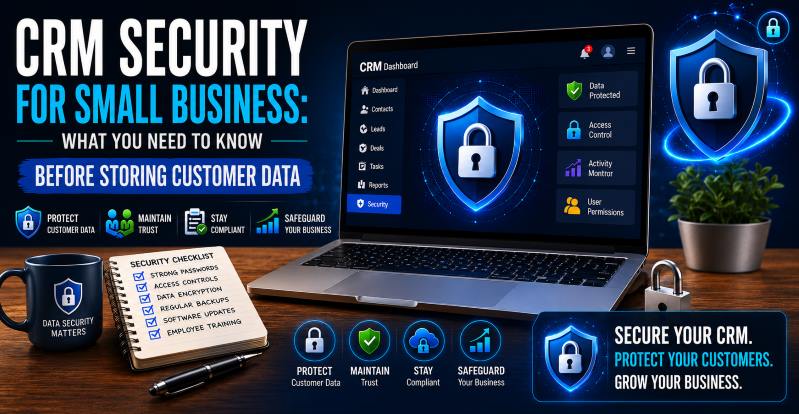
CRM Security for Small Business: What You Need to Know Before Storing Customer Data

Choosing the right CRM software for a small business is exciting. Until you realize you’re about to store names, emails, phone numbers, financial records, and purchase histories of real people. That’s a serious responsibility. A 2023 IBM report found the average cost of a data breach hit $4.45 million. Small businesses aren’t exempt. Before you store a single customer record, you need to understand what CRM security actually means — and what to look for.

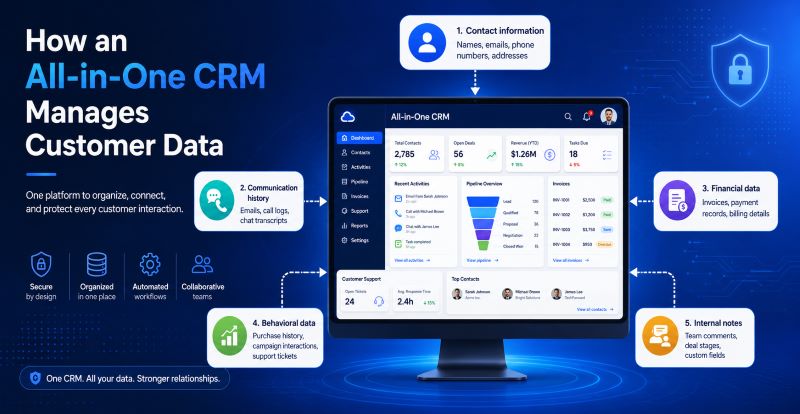
Infographic showing how an all-in-one CRM manages customer data in one secure platform, including contact information, communication history, financial data, behavioral data, and internal notes, all connected to a central CRM dashboard.

Why Small Businesses Are Prime Targets

Here’s the uncomfortable truth: 43% of cyberattacks target small businesses, yet only 14% are equipped to defend themselves (Accenture). Hackers don’t only go after the big fish. They target businesses with weaker defenses and a growing database of customer data.

When you’re using CRM software for a small business, you’re centralizing everything in one place — contacts, deals, emails, and billing info. That’s efficient. It’s also a high-value target if your CRM isn’t built with security at its core. Before evaluating security, you need to understand what’s at stake. A typical all-in-one CRM for small business stores:

  • Contact information — names, emails, phone numbers, addresses
  • Communication history — emails, call logs, chat transcripts
  • Financial data — invoices, payment records, billing details
  • Behavioral data — purchase history, campaign interactions, support tickets
  • Internal notes — team comments, deal stages, custom fields

Each of these data types comes with legal, ethical, and reputational obligations. A breach doesn’t just cost money — it costs trust, and 81% of consumers say they would stop engaging with a brand after a data breach (PwC).

How ConvergeHub Handles Your Customer Data Security

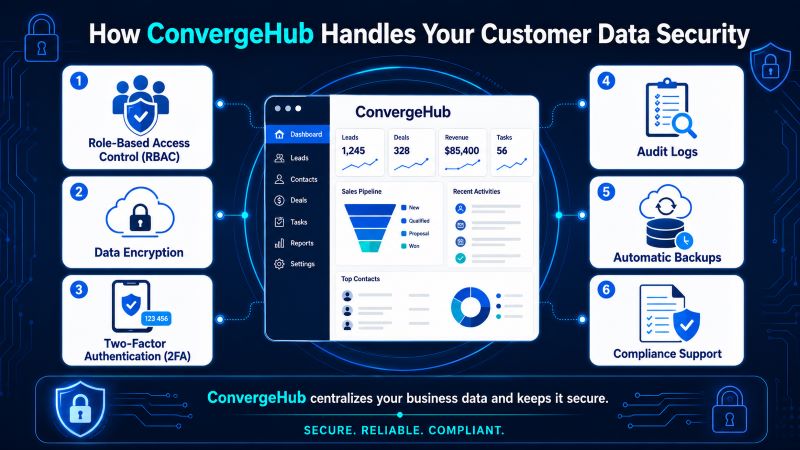
Infographic in a white, pink, and purple color palette showing how ConvergeHub protects customer data with six security features—role-based access control, data encryption, two-factor authentication, audit logs, automatic backups, and compliance support—connected to a central CRM dashboard.

ConvergeHub is built as an all-in-one CRM for small businesses with security baked into every layer. Not all CRMs are built equally when it comes to data protection — here’s what ConvergeHub brings to the table when you’re evaluating a simple CRM for a small business:

  • Role-Based Access Control (RBAC) — Not everyone on your team needs access to everything. ConvergeHub lets you set permissions by role — so your sales rep can see leads, but can’t access billing data. This limits internal exposure significantly.
  • Data Encryption — ConvergeHub encrypts data both in transit and at rest. Look for TLS 1.2+ for transit and AES-256 for storage — non-negotiable industry standards.
  • Two-Factor Authentication (2FA) — Passwords get stolen. 2FA adds a second layer of verification, dramatically reducing unauthorized access. According to Microsoft, enabling 2FA blocks 99.9% of account compromise attacks.
  • Audit Logs — ConvergeHub tracks every action inside your CRM — useful for identifying suspicious activity and for compliance reporting.
  • Automatic Backups — Data loss doesn’t only come from breaches. It can happen from human error or system failure. ConvergeHub backs up data regularly and allows easy recovery.
  • Compliance Support — ConvergeHub is designed to support GDPR and CCPA compliance requirements — so whether you’re in professional services, financial services, or healthcare-adjacent industries, you’re covered.

With ConvergeHub, you don’t just get a centralized system for sales, marketing, service, and billing — you get a platform designed to protect the data that keeps your business running. Small businesses deserve enterprise-grade security without enterprise-level complexity. That’s exactly the gap ConvergeHub fills.

CRM Security Comparison: What to Ask Before You Buy

When evaluating CRM software for a small business, run every vendor through this checklist:

Security FeatureWhat to Ask
EncryptionIs data encrypted in transit AND at rest?
Access ControlCan I set role-based permissions?
2FAIs two-factor authentication available?
ComplianceIs it GDPR/CCPA/HIPAA compliant?
Audit LogsCan I track user activity?
Data BackupsHow often? Can I restore easily?
Data OwnershipDo I own my data if I cancel?

Don’t assume. Ask. A reputable all-in-one CRM for small businesses will have clear documentation and support to answer every one of these questions.

Compliance Laws That Affect How You Store Customer Data

Security isn’t just about hackers — it’s also about the law. Here are the regulations most small businesses need to be aware of:

  • GDPR — Applies if you have customers in the EU. Requires consent for data collection, the right to be forgotten, and breach notification within 72 hours.
  • CCPA — Applies to businesses serving California residents. Customers can request deletion of their data.
  • HIPAA — Mandatory if you handle any health-related data. Requires strict access controls and audit trails.

Fines for non-compliance aren’t trivial. GDPR violations can result in fines of up to €20 million or 4% of annual global revenue, whichever is higher. A simple CRM for small businesses that helps you manage compliance built in — not bolted on — is worth its weight in gold.

How ConvergeHub Handles Your Customer Data Security

ConvergeHub is built as an all-in-one CRM for small businesses with security baked into every layer. The platform provides role-based access controls, encrypted data storage, and is designed to support GDPR and CCPA compliance requirements. With ConvergeHub, you don’t just get a centralized system for sales, marketing, service, and billing — you get a platform designed to protect the data that keeps your business running. Small businesses deserve enterprise-grade security without enterprise-level complexity. That’s exactly the gap ConvergeHub fills.

The Bottom Line

Security isn’t a feature you add later — it’s a foundation. The right CRM software for a small business protects your customers’ data while helping you grow with confidence. Before you commit to any platform, verify encryption standards, check compliance certifications, and understand your data ownership rights. ConvergeHub delivers the security infrastructure small businesses need without the enterprise price tag. Start your free 14-day trial and see how secure, simple, and powerful your CRM can be.

Frequently Asked Questions

Q: Is it safe to store customer data in a CRM?

Yes — if the CRM is built with proper encryption, access controls, and compliance features. The risk lies in using a CRM that lacks these safeguards or in poor internal practices, such as sharing login credentials.

Q: What is the biggest security risk in a CRM?

Human error. Weak passwords, over-permissioned accounts, and phishing attacks are the top causes of CRM-related data breaches. A simple CRM for small businesses with 2FA and RBAC significantly reduces these risks.

Q: Do I need a CRM that’s GDPR compliant?

If you serve customers in the EU or the UK, yes — it’s legally required. Even if you don’t, GDPR-aligned practices signal good data hygiene to all your customers.

Q: Can I control who sees what in a CRM?

Yes, through role-based access control. Any reputable CRM software for small businesses will allow you to set user-level permissions so sensitive data stays with the people who need it.

Q: What happens to my data if I stop using a CRM?

Always ask this before signing up. You should own your data and be able to export it at any time. Verify the vendor’s data retention and deletion policy upfront.

Best CRM for ISO Brokers vs Direct Funders: How to Pick the Right One

Selecting the right merchant cash advance CRM is essential for ISO brokers and direct funders in alternative lending. This guide summarizes the core features, benefits, evaluation criteria, pricing considerations, and distinct needs of each role to help you choose a CRM that supports customer and funding management.

Key Features:

Focus on capabilities that streamline operations and keep communication consistent across lending activities.

  • Automation Streamlining Loan Processes: Automate routine tasks to speed application handling.
  • Document Management Efficiency: Securely organize and retrieve essential documents.
  • Performance Analytics Insights: Provide actionable metrics to guide decisions.

Benefits:

A tailored CRM improves processing speed, capacity, and client relationships for brokers and funders.

  • Improved Speed and Accuracy in Loan Processing: Faster, more accurate workflows increase satisfaction.
  • Higher Capacity for Handling Applications: Scale operations without sacrificing service.
  • Better Customer Relationship Management: Personalised records and communication improve retention.

Decision-Making Criteria:

Match CRM selection to your organization’s size, budget, and daily user needs to ensure practical fit.

  • Business Size Compatibility: Choose a platform that fits your operational scale.
  • Budget Considerations: Balance cost with needed features and support.
  • User Needs Involvement: Gather user input to prioritise usability and essential functions.

What Distinguishes ISO Broker CRM Solutions from Direct Funder CRM Software?

ISO brokers and direct funders have overlapping needs but different priorities; understanding these differences is key, especially for merchant cash advance operations.

Key Roles and Responsibilities of ISO Brokers and Direct Funders in CRM Usage

ISO brokers emphasize lead management and long-term client engagement; direct funders prioritize automated processing, underwriting support, and risk checks to accelerate funding.

Core CRM Features Tailored to ISO Brokers vs Direct Funders

Compare features by role: brokers benefit from lead tracking and relationship tools; funders need automation, decisioning, and loan administration.

Which Merchant Cash Advance CRM Features Drive Efficiency for ISO Brokers and Direct Funders?

Key features that drive efficiency across roles include:

  • Sales Force Automation: Automate lead routing and follow-ups.
  • Data Warehousing Benefits: Centralised data for reliable reporting.
  • Customer View Mechanisms: Unified profiles for faster decisions.

Lead Tracking and Pipeline Management Tools for Alternative Lending Professionals

Effective lead tools prioritise prospects and capture interaction history to improve conversion and service.

  • Lead Scoring Methodologies: Rank leads so teams focus on high-potential opportunities.
  • Interaction Tracking Functionalities: Record touchpoints to guide timely follow-up.

Compliance Workflows and Automation Benefits in Merchant Cash Advance CRM

Compliance requires reliable records and automation; a CRM should enforce workflows, deadlines, and documentation to reduce audit risk.

  • Workflow Automation Details: Automate compliance checkpoints and record updates.
  • Task Management Improvements: Assign and track tasks to meet obligations consistently.

How to Evaluate Pricing and ROI When Choosing the Best CRM for Financial Brokers?

Compare pricing against expected efficiency gains; for provider plans, review the vendor’s pricing page.

  • Understanding Pricing Tiers: Identify tiers that include the features you need.
  • Calculating Potential ROI: Estimate time savings, increased throughput, and reduced errors versus cost.

Comparing CRM Pricing Tiers and Affordability for ISO Brokers and Direct Funders

Match feature sets to budget and growth plans; higher tiers often add automation and support that speed adoption.

  • Affordability Comparisons: Prioritise core features that deliver immediate value.
  • Value Proposition for Each Tier: Weigh advanced support and integrations against price.

What Integration and Adoption Factors Influence CRM Selection for ISO Brokers and Direct Funders?

Integration and adoption determine long-term value; request a demo to confirm fit (requesting a demo).

  • Integration Capabilities Importance: Ensure smooth connections with ERPs, accounting, and payment systems.
  • User Adoption Strategies: Plan training and support to increase user uptake.

Essential Integration Capabilities with Funding and Sales Workflows

Integrations should keep customer and transaction data synchronized and secure across systems.

  • Data Synchronization Necessities: Preserve consistent records across platforms.
  • Security and Compliance Considerations: Confirm the CRM meets relevant security standards.

Industry Adoption Trends and Compliance Automation Growth Through 2026

Automation for compliance and efficiency is rising; choose a CRM that can evolve with industry needs.

CRM solutions deliver different advantages depending on whether you are an ISO broker or a direct funder. Evaluate features, benefits, and integrations to pick a solution that improves operational effectiveness. Explore a robust option at ConvergeHub CRM.

Frequently Asked Questions

1. What should I consider when integrating CRM with existing systems?

Check database and software compatibility, confirm available APIs or connectors, and perform a security assessment to protect customer data.

2. How can CRM improve compliance management in alternative lending?

A CRM can automate documentation, deadline alerts, and compliance checks, simplifying audits and reducing manual errors.

3. How does user feedback influence CRM selection?

User input reveals usability and feature priorities so you choose a system that fits daily workflows and adoption needs.

4. What are the ongoing costs associated with CRM solutions?

Ongoing costs include subscriptions, maintenance, training, and support; evaluate total cost of ownership over time.

5. What role does automation play in enhancing productivity for ISO brokers?

Automation reduces repetitive work—data entry, follow-ups, and lead routing—letting brokers focus on relationships and deals.

6. What training resources are important for ensuring CRM adoption?

Provide role-specific training, clear documentation, video guides, and live support to accelerate effective use.

7. How can CRM systems enhance customer communication for direct funders?

Centralised profiles, interaction histories, and automated reminders enable faster, more personalised responses and stronger relationships.

Conclusion

Choosing the right CRM for ISO brokers or direct funders requires balancing role-specific features, integration, and cost. Prioritise automation, secure data workflows, and user adoption to improve processing, compliance, and customer outcomes.

Ready to enhance your alternative lending processes? Contact ConvergeHub to discover how our tailored CRM solutions can help your business grow.

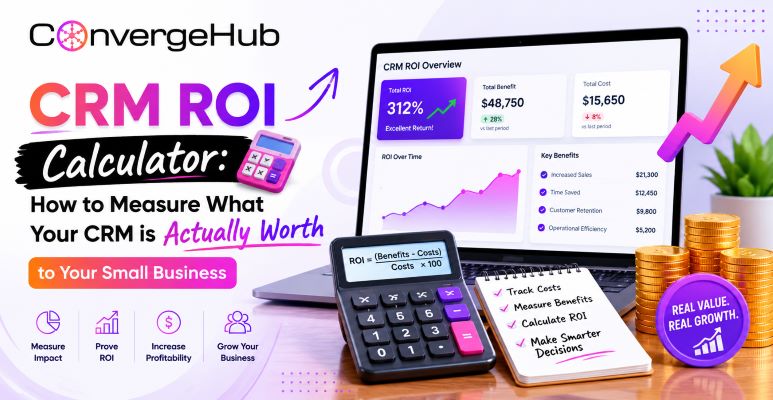
CRM ROI Calculator: How to Measure What Your CRM is Actually Worth to Your Small Business

CRM for small businesses dashboard showing ROI analytics, customer data, sales growth metrics, performance tracking charts, and business revenue insights.

Most small business owners invest in CRM software for small businesses with good intentions — and then struggle six months later to explain what it’s actually doing for their bottom line. That’s not a CRM problem. It’s a measurement problem. According to Nucleus Research, CRM systems deliver an average return of $8.71 for every $1 spent — one of the highest ROI figures of any business software category. But that number means nothing if you don’t know how to calculate it for your own business. ConvergeHub is specifically built for that. Let’s explore more in the following article.

Why ROI Is the Right Question to Ask

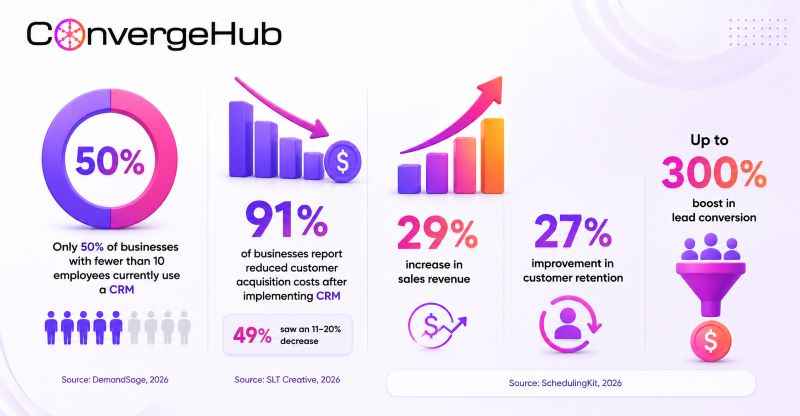
CRM for small businesses statistics infographic showing only 50% CRM adoption among businesses with fewer than 10 employees, 91% reduction in customer acquisition costs after CRM implementation, 29% increase in sales revenue, 27% improvement in customer retention, and up to 300% boost in lead conversion rates.

Many businesses evaluate CRM on features — pipeline views, contact logs, and integrations. But features don’t pay for themselves. ROI does. The right question isn’t “does this CRM do X?” — it’s “what is this CRM earning me?”

Here’s why this is necessary for small businesses specifically:

The CRM ROI Formula-And How to Apply It

The core formula is straightforward:

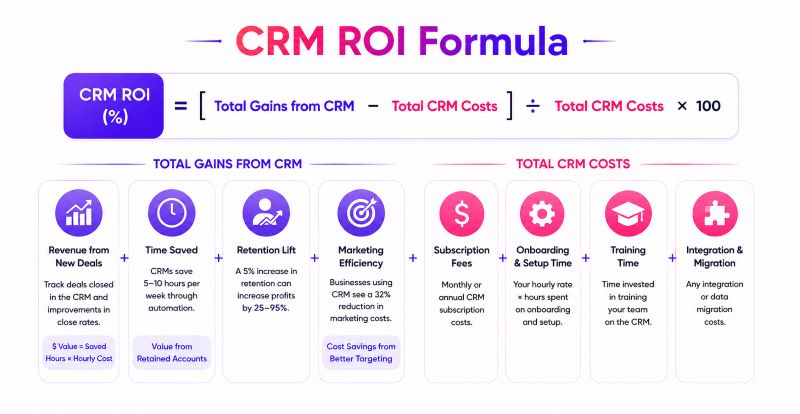
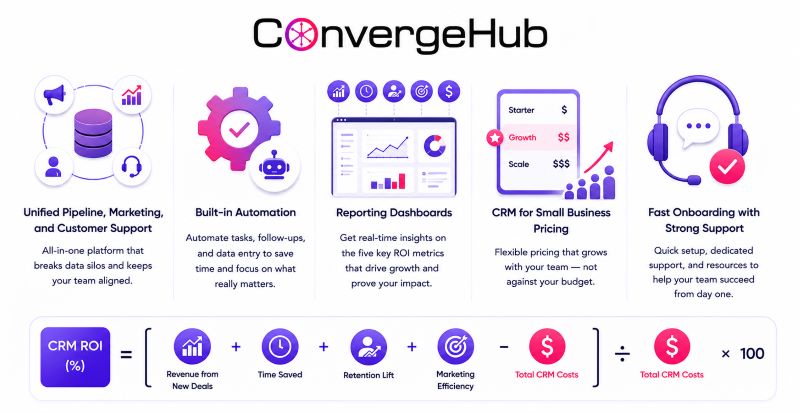
CRM ROI (%) = [(Total Gains from CRM − Total CRM Costs) ÷ Total CRM Costs] × 100

To use this formula, you need two things: what your CRM costs you, and what it’s generating. Let’s break both down.

1. Step 1: Calculate Your Total CRM Cost

The total cost includes more than just your monthly subscription. Add up:

  • Subscription fees (monthly or annual)
  • Onboarding and setup time (your hourly rate × hours spent)
  • Training time for your team
  • Any integration or migration costs

For context: the average cost of CRM software for small businesses is around $75 per user per month — but 38% of small businesses use free or freemium tools (SchedulingKit, 2026). An affordable CRM for a small business doesn’t mean cutting corners. It means getting full-stack functionality — sales, marketing, and support — without enterprise pricing.

2. Step 2: Measure Your CRM Gains

This is where most small businesses drop the ball. CRM gains aren’t just closed deals — they span the entire customer lifecycle:

  • Revenue from new deals closed: Track deals closed in the CRM over a defined period (e.g., one quarter). Compare your close rate before and after CRM adoption.
  • Time saved: CRM systems save employees an average of 5–10 hours per week through automation (Freshworks). Multiply saved hours by your average hourly cost to get the dollar value.
  • Retention lift: A 5% increase in customer retention can increase profits by 25–95% (Harvard Business Review). If your CRM improved follow-up consistency, assign a dollar value to retained accounts.
  • Marketing efficiency: Businesses using CRM report a 32% reduction in marketing costs through better lead targeting and campaign tracking (Zippia).

5 Metrics Every Small Business Should Track

If you want a clear picture of CRM value, track these five metrics consistently — before and after CRM adoption:

  • Lead-to-customer conversion rate: CRM boosts conversion by up to 300%. Even a modest improvement — say 5% to 8% — dramatically changes your pipeline math.
  • Sales cycle length: CRM automation reduces sales cycles by 8–14% (Salesmate, 2026). Shorter cycles mean faster cash flow.
  • Customer acquisition cost (CAC): Track how much you spend to acquire each new customer. A CRM that automates follow-up and nurturing directly reduces this number.
  • Customer lifetime value (CLV): With better retention — up 27% on average — the total value of each customer relationship increases over time.
  • Team productivity: Businesses report nearly 50% productivity gains with CRM adoption (LinkedIn). For a small team, that’s the equivalent of adding headcount without the overhead.

Common Reasons CRM ROI Falls Short

Not every CRM investment pays off. 43% of CRM implementations fail due to poor team adoption — and ease of use matters more than feature count (SchedulingKit, 2026). Here’s where small businesses most often go wrong:

  • Choosing complexity over fit: Enterprise-grade CRMs often overwhelm small teams. If your people aren’t using it, there’s no ROI.
  • No baseline data: You can’t measure improvement without knowing where you started. Track your key metrics before going live.
  • Treating CRM as a contact list: The real value is in automation, pipeline management, and reporting — not just storing names and emails.
  • Siloed data: A CRM disconnected from your marketing and support operations limits its own ROI. All-in-one platforms eliminate this gap.

Choosing the Right CRM for Small Business ROI

The best CRM software for small businesses isn’t the one with the most features — it’s the one your team will actually use, that connects your sales, marketing, and support workflows, and that gives you clear data to measure performance against.

When evaluating options, look for:

  • Unified pipeline, marketing, and customer support in one platform (no data silos)
  • Built-in automation to reduce manual follow-up and data entry
  • Reporting dashboards that surface the five ROI metrics outlined above
  • CRM for small business pricing that scales with your team — not against it
  • Fast onboarding with strong customer support

Platforms like ConvergeHub are designed around these principles. Known for giving small businesses an all-in-one system that eliminates the need to stitch together separate tools for sales, marketing, billing, and support.

ConvergeHub CRM infographic highlighting unified sales, marketing, and customer support, workflow automation, reporting dashboards, scalable pricing, and customer onboarding, alongside a visual CRM ROI formula showing how business gains exceed CRM costs

Conclusion

A CRM for small businesses is not an expense line — it’s a revenue tool. But only if you measure it like one. Start by establishing your baseline metrics, calculating the total cost of ownership, and then consistently track the five ROI indicators laid out in this guide. With the right system in place, the numbers speak for themselves: $8.71 returned for every $1 invested, 29% more revenue, 27% better retention, and 5–10 hours saved per employee every week. ConvergeHub gives small businesses the unified platform to make those numbers a reality — from first contact to closed deal to long-term retention.

Frequently Asked Questions

  1. How do I know if my small business actually needs a CRM right now? 

If you’re losing track of follow-ups, struggling to see where leads are in your pipeline, or relying on memory to manage customer relationships, you need a CRM. Businesses with even 2–3 active salespeople see measurable gains in conversion and retention within the first 90 days of adoption.

  • Can a CRM replace my current spreadsheet and email setup? 

Yes — and it should. Spreadsheets don’t alert you to stale leads, automate follow-ups, or show you pipeline health at a glance. Businesses that switch from manual tracking to CRM report up to 50% productivity gains and a 32% reduction in marketing costs almost immediately.

  • How much time does it take to get a CRM up and running? 

Most small business CRMs are operational within a day or two. The bigger time investment is data migration and team training — typically one to two weeks for a small team. The payoff starts quickly: most businesses report saving 5–10 hours per employee per week once the system is live.

  • Will my team actually use a CRM, or will it just sit unused? 

That depends entirely on the platform you choose. 43% of CRM implementations fail because the tool is too complex for the team using it. The fix is choosing a CRM built for small business workflows — one where updating a contact or logging a call takes seconds, not a training manual.

  • What happens to my customer data if I switch CRM platforms later? 

Most reputable CRM platforms allow full data export in standard formats like CSV. Before committing to any platform, confirm its data portability policy. Choosing an all-in-one CRM from the start — covering sales, marketing, and support — also reduces the likelihood you’ll ever need to switch.

ConvergeHub vs Salesforce for Merchant Cash Advance: Which CRM Fits MCA Brokers?

Choosing the right merchant cash advance CRM is critical for brokers because it shapes lead management, deal tracking and compliance. This article compares ConvergeHub and Salesforce across features, user experience and integrations so brokers can match platform capabilities to business needs.

Comparison of ConvergeHub and Salesforce for Merchant Cash Advance Brokers

ConvergeHub and Salesforce take different approaches to CRM. Below we compare core features, usability and integration so brokers can decide which aligns with their scale and technical resources.

Features:

ConvergeHub offers an integrated CRM for small and mid-sized firms, combining sales, marketing, customer service and billing to support lead generation, deal lifecycle management and compliance. Salesforce provides broader pipeline and customization capabilities but can be more complex to configure for smaller operations.

CRM Platform Key Features Specialty for MCA Brokers
ConvergeHub Integrated sales, marketing, customer service, and billing Tailored functionalities for lead management and compliance
Salesforce Comprehensive sales pipeline management and customization options Offers extensive features but requires more setup and expertise

Use the table to gauge which platform fits your operational scale and required level of customisation.

User Experience:

Ease of use influences onboarding speed. ConvergeHub generally requires less training and offers faster onboarding, while Salesforce can deliver powerful workflows at the cost of a steeper learning curve.

Integration Capabilities:

Integrations affect automation and data flow. ConvergeHub supports a range of third-party connections suitable for streamlined workflows; Salesforce supports extensive integrations but often needs additional configuration or middleware to unlock advanced integrations.

What Are the Key Features of CRMs for Merchant Cash Advance Brokers?

A CRM for MCA brokers should provide core functions that support efficient operations and compliance. Essential features include:

  • Lead Management: Track and prioritise prospective clients to capture opportunities in a competitive market.
  • Deal Tracking: Monitor each transaction’s lifecycle to provide timely updates and prevent leakage.
  • Compliance Monitoring: Built-in compliance tools reduce legal and regulatory risk in funding operations.

These capabilities improve efficiency, reduce manual tasks and support consistent client service.

Which Salesforce Features Align with Alternative Lending Needs?

Salesforce provides customizable dashboards and advanced reporting for pipeline visibility and trend analysis. These tools are powerful for strategic decisions but usually require time and technical resources to configure effectively.

How Do ConvergeHub and Salesforce Compare on Automation and Workflow Efficiency?

Both platforms offer automation. ConvergeHub’s marketing automation features support campaigns and follow-up sequences to boost conversion with minimal setup. Salesforce can automate more complex processes but typically needs specialised configuration.

How Does Integrated Communication Impact Broker Operations?

Integrated communication tools speed client responses and improve team collaboration. ConvergeHub provides straightforward communication features out of the box; Salesforce’s communication suite is extensive but may require add-ons or more configuration to achieve the same immediacy.

What Are the Pricing and ROI Differences Between ConvergeHub and Salesforce for MCA Brokers?

ConvergeHub’s lower monthly cost can deliver quicker ROI for small brokerages, while Salesforce’s broader feature set supports scalability and long-term returns for larger organisations. Consider implementation, customisation and ongoing support when calculating total cost of ownership.

What ROI Can Brokers Expect from Salesforce CRM Investments?

Salesforce can provide substantial long-term ROI through advanced analytics and scalability, but expect longer implementation and higher initial costs; smaller teams should weigh these trade-offs against immediate productivity needs.

Why Do MCA Brokers Choose ConvergeHub Over Salesforce?

Brokers often choose ConvergeHub for affordability and focused features that address lead management and compliance without overcomplicating workflows. Additionally, brokers report higher satisfaction ratings tied to ConvergeHub’s straightforward interface.

How Do Broker-Specific Features Influence CRM Adoption Rates?

Adoption is shaped by feature relevance and cost. ConvergeHub’s core, cost-effective functionality appeals to smaller brokers; Salesforce attracts larger organisations needing deep customisation and enterprise features.

Match platform capabilities to operational needs and technical capacity to ensure a smooth rollout and sustained use.

Frequently Asked Questions

1. What are the primary advantages of using ConvergeHub for MCA brokers?

ConvergeHub’s advantages are an intuitive interface and lower cost, enabling small to mid-sized brokers to manage leads, deals and compliance affordably.

2. How long does it typically take to implement ConvergeHub?

Implementation varies, but many users report being operational within days due to a straightforward setup and minimal training needs.

3. Can ConvergeHub and Salesforce be integrated with other tools?

Yes. Both support integrations with third-party applications; Salesforce often needs extra configuration or middleware for complex setups.

4. What type of training is available for new users of Salesforce?

Salesforce offers tutorials, forums, documentation and Trailhead learning. Given its complexity, some teams require dedicated training or consultants.

5. How does customer support compare between ConvergeHub and Salesforce?

ConvergeHub is known for responsive, focused support for smaller businesses. Salesforce provides extensive resources but support experiences can vary due to scale.

6. Are there any hidden costs associated with using Salesforce?

Beyond the base price, additional costs may include premium features, storage, third-party integrations and consulting for customisation.

7. What future enhancements can users expect from ConvergeHub and Salesforce?

Both vendors regularly update their platforms: ConvergeHub focuses on automation and usability improvements, while Salesforce expands analytics, AI features and enterprise customisation.

Conclusion

Selecting the right CRM improves efficiency and client relations for MCA brokers. ConvergeHub suits smaller brokerages seeking affordability and speed to value; Salesforce suits larger organisations needing deep customisation and scale. Evaluate features, costs and implementation needs to choose the best fit for your brokerage. Contact ConvergeHub to request a free demo.

CRM for Insurance Agents — From First Quote to Policy Renewal: Automate the Entire Journey

An illustration of a connected insurance ecosystem showing a family at the center linked to auto, home, health, and life insurance services through automated digital workflows.

Running an insurance agency means juggling leads, quotes, active policies, renewal deadlines, and client service — all at once. Most small agencies try to manage this across spreadsheets, email inboxes, and sticky notes. That’s where things fall apart. The right CRM for small businesses in the insurance space doesn’t just organize contacts — it automates the entire client journey from first inquiry to renewal. This blog breaks down exactly how that works and why it matters.

The Real Problem Insurance Agencies Face

Insurance is a relationship business. But relationships are hard to maintain when your team is buried in manual follow-ups, chasing renewal dates, and toggling between disconnected tools.

The numbers reflect this: according to Salesforce’s State of Sales report, sales reps spend only 28% of their week actually selling. The rest goes to administrative tasks — exactly the kind of work a well-configured insurance CRM software can handle automatically.

For small agencies, this isn’t just an efficiency problem. Missed renewals, slow lead response, and inconsistent follow-ups directly cost revenue. A client who doesn’t hear from you 60 days before renewal will find someone who does reach out.

What the Full Insurance Client Journey Actually Looks Like

Before you can automate anything, you need to understand what you’re automating. A typical insurance client journey covers:

  • Lead capture — inquiry comes in via web form, referral, or campaign
  • Quote stage — agent qualifies the lead and prepares a quote
  • Underwriting & follow-up — back and forth with the carrier, client questions
  • Policy binding — deal closes, policy is issued
  • Onboarding — welcome communication, document sharing
  • Mid-term service — endorsements, changes, certificates of insurance
  • Renewal outreach — 120/90/60-day contact cadence before expiry
  • Retention or cross-sell — review meetings, additional coverage conversations

Each of these stages has tasks, deadlines, and communication touchpoints. Without a structured system, things slip. With the right insurance CRM systems, the entire sequence runs on automation.

How a CRM Handles Each Stage — Practically

Here is a practical roadmap of how ConvergeHub deals with each stage of client dealing and handling

1. Lead & Quote Management

When a new inquiry comes in, your CRM for insurance agents should automatically assign it to the right agent, trigger a response email, and create a follow-up task — all without anyone manually touching it. Leads are scored, prioritized, and moved through a structured pipeline so nothing gets buried.

According to InsureTech Connect research, agencies that respond to leads within the first five minutes are 9x more likely to convert them. Automation makes that response time consistent — not dependent on who’s in the office.

2. Policy & Renewal Tracking

This is where most agencies bleed revenue without realizing it. A lapsed policy is a lost client — and often a lost referral source too.

A proper insurance CRM software tracks every active policy, flags upcoming renewal dates, and triggers a structured outreach sequence automatically:

  • 120 days out — relationship check-in
  • 90 days out — renewal review scheduled
  • 60 days out — quote sent, alternatives presented
  • 30 days out — decision follow-up

ConvergeHub’s insurance CRM does exactly this — automating renewal reminders and outreach sequences so agents focus on conversations, not calendar management.

3. Service Requests & Mid-Term Changes

Clients don’t just interact with their agent at renewal. They need certificates of insurance, policy endorsements, coverage changes, and claims assistance throughout the year.

Without a case management system, these requests get lost in email threads. With insurance CRM systems, every service request is logged, assigned, prioritized, and tracked to resolution — with full client history visible to whoever picks it up.

4. Cross-Sell & Upsell Opportunities

The most overlooked revenue source in insurance is right inside your existing book of business. A client with auto coverage is a candidate for home. A business owner with general liability needs workers’ comp. A family with life insurance needs an annual review.

A CRM for insurance agents surfaces these opportunities by tracking client profiles, policy history, and engagement signals. Automated triggers can prompt agents to reach out at the right time — not just when renewal season arrives.

An all-in-one insurance CRM platform at the center connected to key capabilities including lead and pipeline management, marketing automation, service and case management, billing and invoicing, reporting dashboards, renewal automation, pipeline customization, client communication history, role-based access, and scalability

Why ConvergeHub Works for Insurance Agencies

ConvergeHub is built as a CRM for small businesses that handles the full operational picture — not just contact storage. For insurance agencies and brokers specifically, it brings together:

  • Lead and pipeline management — structured stages from inquiry to bind
  • Marketing automation — renewal campaigns, drip sequences, and targeted outreach
  • Service and case management — endorsement requests, claims support, mid-term changes
  • Billing and invoicing — quotes, payments, and financial tracking in one place
  • Reporting and dashboards — conversion rates, renewal performance, agent productivity
  • Renewal automation — does it track expiry dates and trigger outreach automatically?
  • Pipeline customization — can you build stages that match how you actually sell?
  • Service/case management — is there a structured way to handle mid-term requests?
  • Client communication history — can any agent pick up a file and see the full context?
  • Role-based access — can you control what each team member sees?
  • Scalability — will it support your agency as your book of business grows?

ConvergeHub checks every one of these boxes — and it’s designed to be operational from day one, not after months of setup. It’s purpose-built for agencies that need clarity across the entire client lifecycle — without paying enterprise-level prices or managing five separate tools.

The key Takeaway

Insurance agencies don’t lose clients because they don’t care — they lose them because follow-up falls through the cracks. The right CRM for small businesses fixes that by automating every stage of the journey: lead capture, quoting, policy management, renewals, and cross-sell. ConvergeHub gives insurance agencies and brokers one platform to run it all — without complexity, without high costs, and without missed opportunities. Start your free trial today and see the difference a structured system makes.

Frequently Asked Questions

Q: What is insurance CRM software? 

Insurance CRM software is a platform built to help agencies and brokers manage leads, policies, renewals, and client communication from one place. It replaces spreadsheets and disconnected tools with automation, structured pipelines, and a complete view of every client relationship.

Q: How does a CRM help with policy renewals? 

It tracks every policy expiry date and automatically triggers a renewal outreach sequence — emails, tasks, and reminders — at 120, 90, 60, and 30 days before the policy lapses. This keeps agents proactive instead of reactive.

Q: Can small insurance agencies afford a CRM? 

Yes. Platforms like ConvergeHub are specifically built as a CRM for small businesses — enterprise-grade functionality without enterprise pricing. ConvergeHub offers a free 14-day trial with no credit card required.

Q: Is ConvergeHub suitable for both agents and brokers? 

Yes. Whether you’re a solo agent or managing a multi-carrier brokerage, insurance CRM systems like ConvergeHub scale with your book of business and team size.

Q: What’s the difference between a generic CRM and an insurance-specific one? 

A generic CRM stores contacts. An insurance CRM software tracks policies, automates renewal sequences, manages service requests, and gives you visibility into your entire book of business — structured around how insurance actually works.

CRM for Financial Services: How Small Firms Build Client Trust & Grow AUM with Better Relationship Management

In financial services, trust is the product, and losing it costs AUM. Yet most small advisory firms still manage multimillion-dollar client relationships through spreadsheets and fragmented notes. A purpose-built CRM for small businesses closes that gap. According to a 2025 Investor Engagement Survey by Logica Research and CapIntel, 61% of clients say a lack of trust would cause them to leave their advisor. Let’s explore more in the following blog.

Why Financial Services Firms Can’t Afford to Run Blind

Small financial advisory firms face a specific operational paradox: their business is built entirely on relationships, but they rarely have the systems to manage those relationships at scale.

1. The Operational Gaps That Cost You, Clients

When a client calls to ask about their last portfolio review, the advisor scrambles. When a compliance audit arrives, the documentation is incomplete. When a key advisor leaves, institutional knowledge walks out the door.

2. What Purpose-Built Financial CRM Software Actually Solves

This is exactly the problem CRM for the financial services industry is designed to solve. Unlike generic CRM tools, financial CRM software built for this sector comes equipped with features that address both the relational and regulatory dimensions of the business — client lifecycle management, audit-ready interaction logs, review meeting automation, and KYC status tracking.

3. The Data Makes the Case

The data reinforces the urgency. Firms that implement unified client views report 3–5x faster client onboarding and a 40–60% reduction in advisor time spent searching for client information, according to Vantage Point’s 2026 CRM benchmarking report. That time goes back into client-facing work — which is where AUM growth actually happens.

Interaction History: The Foundation of Compliance and Trust

In a regulated industry, every client conversation carries weight — legally and relationally. Interaction history tracking is not just a convenience feature; it is a compliance imperative.

1. Why FINRA Compliance Starts with Your CRM

FINRA requires firms to maintain meticulous records of all client communications under SEC Rule 17a-4, mandating that electronic records be stored in a Write Once, Read Many (WORM) format, preventing alteration during required retention periods. A robust financial CRM software solution automates this documentation, creating timestamped, tamper-evident logs of every call, email, meeting note, and advisory recommendation.

2. Implication for Small Firms in Practice

For small firms, the practical impact is significant:

  • Complete audit trails mean compliance officers can run regulatory reports without IT involvement.
  • Role-based access controls ensure sensitive client data is visible only to authorized personnel.
  • Immutable communication archives satisfy FINRA and SEC requirements natively — or via integrated third-party archiving tools.

3. All-in-one CRM- Compliance Record to Relationship Asset

Beyond compliance, interaction history directly shapes client experience. When an advisor can pull up a full relationship timeline before a call — including a client’s financial goals, risk tolerance, last discussed concerns, and personal milestones — the conversation feels informed and intentional. Clients notice. That consistency is what builds the kind of advisor-client trust that drives referrals and long-term AUM retention.

Financial CRM illustration showing a shield with a checkmark, connected client profile cards, and an upward AUM growth chart representing stronger client trust, retention, and asset growth.

Triggering Review Meetings: Automation as a Relationship Strategy

One of the highest-value and most overlooked capabilities of CRM for financial services is automated meeting triggers. Here is what you need to know

1. The Hidden Reason Firms Lose Clients

Many small firms lose clients not through bad advice, but through simple neglect — a quarterly review that slipped, a policy renewal that wasn’t flagged, a life event that went unacknowledged.

2. How Workflow Automation Keeps Advisors Ahead

Workflow automation in a financial CRM can trigger review meetings based on predefined criteria: time elapsed since last contact, changes in a client’s AUM threshold, an approaching policy renewal date, or a significant life event logged in the CRM. The result is a proactive engagement model that removes the burden of manual follow-up from advisors’ plates.

3. The Business Case in Numbers

The business case is compelling. A wealth management firm that implemented CRM-driven workflow automation saw an 18% improvement in client retention and a 25% increase in advisor productivity. Yes, with key processes like scheduling portfolio review meetings, sending follow-up reminders, and generating compliance reports fully automated.

4. From Reactive to Proactive — at Any Scale

For small firms managing 50 to 200+ client relationships, this kind of systematic outreach is the difference between reactive service and proactive relationship management. It also supports cross-sell and upsell opportunities — the CRM flags when a client’s asset threshold crosses a new tier, prompting a conversation about expanded services before the client starts looking elsewhere.

Key CRM Features Every Small Financial Firm Should Prioritize

When evaluating financial CRM software, small firms should focus on features that directly map to their compliance requirements and relationship management goals. ConvergeHub, for instance, is built to give small businesses exactly this kind of all-in-one capability — without the enterprise-level complexity:

  • Centralized client profiles with fields for AUM, risk profile, KYC status, and investment goals
  • Timestamped interaction logs that create a complete, chronological relationship history
  • Automated review triggers based on time, life events, or AUM thresholds
  • Compliance calendar management for tracking regulatory filing deadlines and disclosure requirements
  • Document storage with encryption and role-based access controls
  • Pipeline management for tracking cross-sell and new client acquisition workflows
  • Integration with custodians and financial planning tools (e.g., Schwab, Fidelity, MoneyGuidePro, eMoney)

The right client relationship management system doesn’t just organize data — it makes that data actionable, surfacing the right insights at the right moment across the entire client lifecycle.

An illustration of financial CRM showing key features for small financial firms, including client profiles, interaction logs, automated review triggers, KYC status, compliance calendar, secure document storage, pipeline management, and integrations, with visuals for security, compliance, and AUM growth.

The Bottom Line

Small firms that build their practice on a structured CRM foundation are not just managing relationships better — they are building a scalable, compliant, and auditable business that grows AUM methodically, not accidentally. The firms winning on retention, referrals, and regulatory readiness all share one common thread: they stopped relying on memory and started relying on systems. If your firm is ready to make that shift, ConvergeHub gives small financial services businesses the all-in-one CRM for small businesses they need to compete, comply, and grow — without the enterprise complexity.

Ready to turn every client interaction into a competitive advantage? Start with ConvergeHub — the CRM built for small businesses that mean business.

Frequently Asked Questions

What is CRM for financial services, and how is it different from a generic CRM?

CRM for financial services is purpose-built to address the unique requirements of advisory firms, wealth managers, and financial services providers. Unlike generic CRM tools, financial CRM software includes compliance features such as FINRA-compliant communication archiving, KYC status tracking, AUM management fields, and audit-ready interaction logs — all critical for regulated financial environments.

How does a CRM help with compliance in financial services?

A financial CRM software solution automates the documentation of all client interactions, creates immutable audit trails, and manages compliance calendars for regulatory filing deadlines. This directly supports adherence to SEC Rule 17a-4 and FINRA requirements — reducing the manual burden on advisors and compliance officers while minimizing regulatory risk.

Can a small financial advisory firm afford CRM software?

Yes. Purpose-built CRM platforms for small financial practices are available at $35 to $60 per user per month. The ROI — in client retention, advisor productivity, and reduced compliance risk — typically far exceeds the cost, especially when a single retained client relationship can represent hundreds of thousands of dollars in AUM.

How does CRM software help grow AUM?

By enabling proactive engagement through automated review triggers, client segmentation, and personalized outreach, CRM reduces client attrition and surfaces cross-sell opportunities. Firms using CRM-driven workflow automation have reported up to an 18% improvement in client retention — directly translating to preserved and grown AUM without proportional increases in headcount.

Is CRM adoption mandatory for regulated financial firms?

While no regulation mandates a specific CRM tool, SEC and FINRA requirements for record-keeping, communication archiving, and audit readiness make a structured client relationship management system effectively necessary for compliant operations. Firms relying on email and spreadsheets face significant exposure during regulatory examinations.