10 Key Sales Force Automation Features Every CRM Must Have in 2026

Sales Force Automation (SFA) is changing how small and medium businesses (SMBs) run their sales operations. As we head into 2026, knowing which SFA capabilities sit inside Customer Relationship Management (CRM) systems matters for improving productivity and keeping customers engaged. This guide lays out ten SFA features every CRM should offer so SMBs can stay competitive. You’ll learn how these tools simplify workflows, sharpen lead management, and strengthen customer relationships. Many SMBs still rely on manual sales methods that slow response times and cost deals. The right SFA features automate repetitive work, surface useful insights, and help teams focus on selling. We cover lead capture and scoring, pipeline visibility, AI-driven insights, communication automation, and more — practical areas that transform how sales actually gets done.

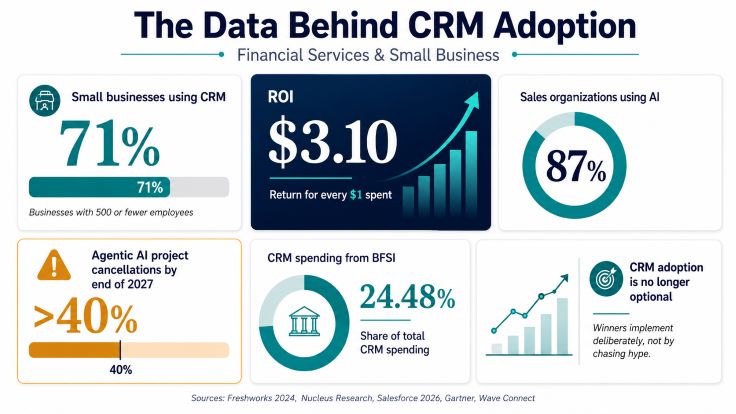
That said, small businesses often face real hurdles when adopting these systems — research explains why.

CRM adoption challenges for small & medium enterprises

Smaller companies typically operate in highly competitive markets, with limited budgets and fewer staff experienced in implementing complex IT systems. Those constraints — from cash flow pressure to staffing gaps — make CRM adoption more difficult for many SMEs.

Understanding customer relationship management technology adoption in small and medium-sized enterprises: An empirical study in the USA, 2014

What is Sales Force Automation — and why it matters for SMBs in 2026?

Sales Force Automation (SFA) uses software to automate routine sales work so teams can spend more time selling. In 2026, SFA matters for SMBs because it speeds processes, improves data quality, and shortens response times. Automating repetitive tasks—like data entry, follow-up reminders, and lead routing—lets teams move faster and deliver more consistent customer experiences. That reliability reduces errors and supports better decision-making.

Adding SFA into CRM systems delivers tangible benefits for SMBs: for example, it can significantly boost  sales productivity  by freeing reps to focus on high-value activities, such as relationship building. SFA also uncovers patterns in customer behavior so you can tailor outreach and prioritize the right opportunities.

Research consistently shows CRM-driven automation improves sales efficiency and outcomes.

Salesforce CRM: sales automation, efficiency & revenue growth

This study analyzes how Salesforce CRM automates routine tasks and provides real-time visibility, leading to efficiency gains and revenue improvement. It quantifies how automation helps sales teams prioritize work, reduce manual effort, and make better strategic decisions.

Exploring the impact of Salesforce CRM on sales automation and performance metrics through a quantitative analysis of efficiency gains and revenue growth, J Pookandy, 2023

How does Sales Force Automation simplify sales workflows?

SFA removes manual overhead by automating tasks like data entry, lead tracking, and follow-up reminders. That means reps spend less time on admin and more time building relationships and closing deals. For example, automatic lead capture pulls prospects from forms, emails, and ads into a single system so nothing slips through the cracks.

SFA also improves data accuracy by cutting down on human errors. With real-time updates, teams see the latest information and can react faster to customer inquiries. The result: smoother sales cycles, better customer experience, and higher retention.

What are the benefits of adding SFA to CRM for SMBs?

Integrating SFA into a CRM brings multiple advantages for SMBs. First, it raises sales productivity by automating routine work so reps can focus on strategy and relationships. Second, it enables more personalized selling by surfacing customer preferences and interaction history.

Centralizing interactions and sales activity in one system improves data management and reporting. That consolidated view helps you make smarter decisions and run targeted campaigns. Analytics then reveal performance gaps and growth opportunities that drive better results.

Which lead management and scoring automation features actually drive growth?

Strong lead management and automated scoring are core to converting more prospects. These features help teams prioritize leads that are most likely to convert so effort goes where it counts.

How do automated lead capture and scoring lift conversion rates?

Automated lead capture speeds prospect intake from websites, social channels, forms, and ads into your CRM — ensuring every inquiry is recorded and routed. Automated lead scoring then ranks those contacts using engagement signals and firmographic data so reps target the best-fit opportunities first.

When outreach focuses on higher-value leads, conversion rates improve because sales teams spend their time on prospects that are most sales-ready.

How does ConvergeHub use AI for lead scoring?

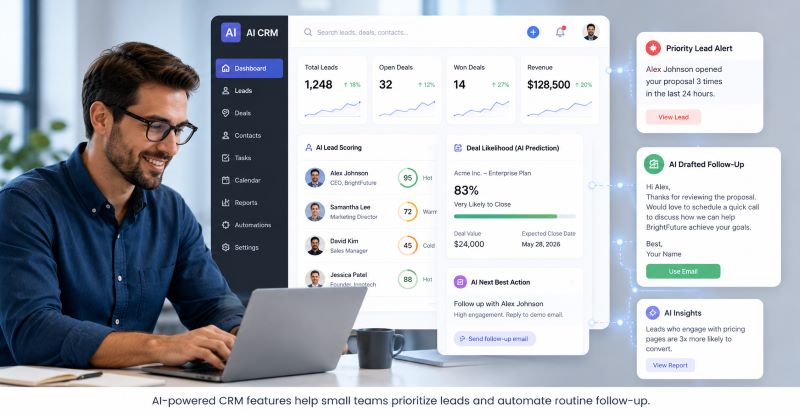
ConvergeHub  applies AI-driven lead scoring to predict which leads are most likely to convert. By analyzing past interactions and behavior patterns, the system highlights high-potential prospects and helps sales teams prioritize work that produces results.

These models adapt as new data arrives, improving accuracy over time so lead prioritization stays aligned with changing buyer behavior.

The shift to AI-powered scoring represents a meaningful step forward in targeting the right leads.

AI lead scoring in Salesforce: optimize conversions

In today’s fast-moving sales landscape, time equals money. Traditional rule-based lead scoring can miss changing buyer behavior and over-prioritize based on fixed criteria like title or company size. AI-driven models address those limits by learning from patterns and re-prioritizing leads that show the most promise, reducing wasted effort and improving conversion focus.

AI-Driven Lead Scoring in Salesforce: Using Machine Learning Models to Prioritize High-Value Leads and Optimize Conversion Rates, VK Tarra, 2024

How does pipeline and opportunity management improve deal tracking?

Pipeline and opportunity management give sales teams clear visibility into where deals stand and what to do next. These features help prevent opportunities from falling through the cracks and make it easier to forecast revenue.

What tools help visualize and manage sales stages well?

Most CRMs include pipeline boards, stage-based tracking, and milestone alerts to map a deal’s lifecycle from first contact to close. Visual tools highlight bottlenecks and where deals stall, so teams can prioritize tasks that move deals forward.

A clear pipeline view helps managers allocate resources, coach reps effectively, and improve conversion at each stage.

How does ConvergeHub support opportunity management for SMBs?

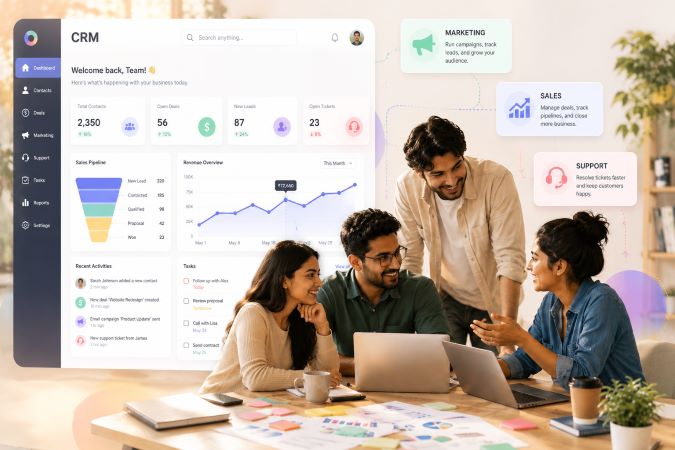
ConvergeHub’s CRM provides opportunity tracking tailored for SMBs, letting users monitor each deal’s stage, estimated value, and expected close dates. Customizable dashboards and reports surface the metrics teams need to act fast.

With that visibility, businesses can spot trends, reassign focus where needed, and make data-driven adjustments to their sales playbook.

What role do AI sales insights play in modern automation?

AI-powered sales insights translate data into practical actions—predicting trends, flagging at-risk deals, and recommending next steps. Those insights help teams sell smarter rather than harder.

How do predictive analytics and AI support sales forecasting?

Predictive analytics mines historical data to identify trends and produce more accurate forecasts. That helps teams set realistic targets, prioritize resources, and plan outreach with better timing.

Using AI-driven forecasts, sales leaders can anticipate demand, adjust quotas, and coach reps to focus on the right accounts at the right time—improving performance and customer outcomes.

What AI features does ConvergeHub offer to boost productivity?

ConvergeHub includes AI features such as automated lead scoring, predictive analytics, and personalized communication tools. These capabilities reduce manual work and surface actionable insights that help reps close deals faster.

By combining automation with intelligence, ConvergeHub helps SMBs streamline workflows, cut administrative load, and compete more effectively.
To evaluate the investment for these capabilities, explore ConvergeHub’s pricing plans designed to scale with different business needs.

How do email and communication automation features boost engagement?

Email and communication automation keep customer touchpoints timely and relevant. They let teams nurture prospects at scale while preserving personalization that builds trust.

What are the sales benefits of automated email campaigns?

Automated email campaigns expand reach without extra manual work and can be personalized using CRM data so messages land with the right audience. Scheduled sends and triggered follow-ups increase engagement and move prospects through the funnel more predictably.

Well-designed automated campaigns nurture leads, keep customers informed, and drive higher conversion over time.

How does ConvergeHub integrate email automation in its CRM?

ConvergeHub embeds email automation directly in the CRM so you can build campaigns, send personalized sequences, and track responses from one place. Every interaction is logged, giving sales and marketing a unified view of engagement.

With templates and automated follow-ups, teams maintain consistent outreach without adding manual steps, improving both efficiency and customer experience.

Why are task and workflow automation important for efficient sales teams?

Task and workflow automation remove repetitive steps and enforce consistent processes so reps can focus on revenue-generating work. Automations keep deals moving and reduce the risk of missed tasks.

How does automating routine sales work save time and cut errors?

Automating routine tasks like data entry, meeting scheduling, and report generation frees up hours each week and reduces human error. That leads to cleaner data, faster follow-ups, and more reliable forecasts.

Automation ensures repeatable best practices are applied consistently, which improves team performance and customer trust.

What workflow automation templates does ConvergeHub provide for SMBs?

ConvergeHub ships with workflow templates for common sales processes—lead nurturing, automated follow-ups, task reminders, and reporting. These templates let SMBs adopt proven processes quickly without heavy customization.

Using templates helps teams roll out consistent workflows fast so they can focus on iterating strategy rather than building basic automations from scratch.

Feature What it does Business benefit
Automated Lead Capture Gathers leads from forms, ads, and channels into the CRM automatically Prevents lost leads and speeds response
AI-Powered Lead Scoring Ranks leads by conversion likelihood using behavior and data Directs sales focus to the best opportunities
Sales Pipeline Management Visual board and stage tracking for deals Improves deal tracking and reveals bottlenecks

This table summarizes core sales force automation features that boost SMB sales efficiency and effectiveness.

AI Feature Functionality Impact
Predictive Analytics Uses past data to forecast sales and trends Raises forecast accuracy and planning quality
Automated Email Campaigns Sends personalized messages triggered by behavior Increases engagement and conversion
Workflow Automation Templates Pre-built automations for common sales tasks Speeds implementation and improves consistency

This table highlights AI-driven capabilities in ConvergeHub that help increase sales productivity and customer engagement.

For specific questions or to discuss your setup, please contact the ConvergeHub team. Our specialists can offer personalized advice and next steps.

Sales force automation is central to modern CRM systems, especially for SMBs. By adopting the features covered here, businesses can streamline sales workflows, strengthen customer relationships, and accelerate growth. As 2026 approaches, these tools will only become more essential—consider integrating them into your operations to stay competitive.

Frequently asked questions

What challenges do SMBs face when adopting Sales Force Automation?

SMBs often face constraints like limited budgets, busy teams, and a lack of in-house IT experience. Those issues can slow implementation and lead to resistance from staff used to older processes. Careful planning, phased rollouts, and targeted training can reduce friction and improve adoption.

How can SMBs measure the success of their SFA implementation?

Track clear KPIs that tie to business goals: sales growth, lead-to-opportunity conversion, average deal close time, user adoption, and customer satisfaction. Regularly review these metrics to validate ROI and refine automations.

What role does training play in the successful adoption of SFA?

Training is critical. Practical, role-based training helps users adopt new tools quickly and use them correctly. Ongoing coaching and easily accessible help resources increase confidence and long-term adoption.

Are there specific industries that benefit more from SFA?

SFA delivers value across industries, but sectors with high customer interaction—retail, real estate, technology, professional services—often see rapid gains. In short, any business that relies on repeatable sales processes benefits from automation.

How does SFA impact customer relationship management?

SFA strengthens CRM by ensuring timely follow-ups, capturing every interaction, and surfacing customer insights that enable personalized outreach. That leads to deeper relationships, higher satisfaction, and better retention.

What are the costs associated with implementing SFA in an SMB?

Costs vary depending on the CRM, feature set, and customization required. Consider initial setup, subscription fees, training, and maintenance. Evaluate expected efficiency gains and revenue impact to estimate ROI before choosing a plan.

Conclusion

Adding Sales Force Automation features to your CRM helps SMBs simplify sales operations and build stronger customer relationships. Automations reduce manual work and surface insights that let teams focus on growth. If you want to modernize your sales stack for 2026, explore how our tailored CRM capabilities can elevate your strategy and deliver measurable results.

What Is Sales Force Automation in CRM and Why It’s a Game Changer in 2026?

Sales Force Automation (SFA) inside Customer Relationship Management (CRM) is changing how companies run sales. Heading into 2026, SFA matters for small and medium businesses (SMBs) that want to be more efficient and grow faster. This article defines SFA, highlights its core features, and explains how it lifts sales productivity. You’ll see how SFA automates the sales lifecycle, where artificial intelligence (AI) fits in, and the measurable gains SFA software can deliver. We’ll also cover how ConvergeHub’s all-in-one CRM strengthens SFA with tools built for SMBs.

What Is Sales Force Automation in CRM?

Sales Force Automation (SFA) is software that automates routine sales tasks inside a CRM. It streamlines steps from capturing leads to closing deals, cutting manual work and improving data accuracy. With repetitive tasks handled automatically, sales teams can spend more time on relationships and selling — the activities that actually drive growth.

In short: combining AI and automation inside CRM systems is one of the fastest ways to improve operational efficiency and make better decisions.

AI & Automation in Salesforce: Improving CRM Efficiency

Research into AI and automation within Salesforce shows how technologies like machine learning, natural language processing (NLP), and predictive analytics sharpen CRM capabilities. Features such as predictive forecasting, automated lead scoring, and smarter service interactions reduce manual work, speed responses, and raise customer satisfaction. Automation keeps processes consistent and frees teams to focus on higher-value work.

Transforming Salesforce Through AI and Automation

How Does SFA Automate the Sales Lifecycle?

SFA automates the sales lifecycle by applying a few practical capabilities:

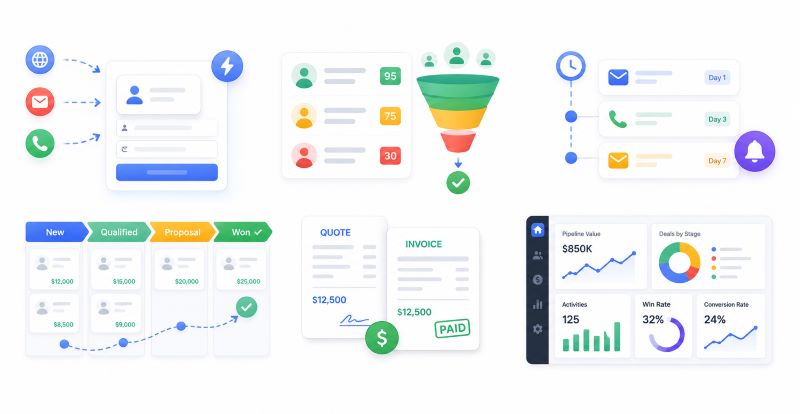
  1. Lead Capture Automation  : Automatically gathers and organizes leads from email, web forms, events, and other sources so nothing falls through the cracks.
  2. Opportunity Tracking  : Keeps tabs on deals as they move through the pipeline, giving visibility into next steps and where to focus effort.
  3. Reporting Features  : Produces clear, actionable reports on performance so teams can make decisions based on real data.

These automations save time and improve the reliability of sales data — which leads to better forecasting and smarter strategy.

What Are the Key Features of CRM Sales Automation?

Key features of CRM sales automation include:

  • Lead Management  : Tracks prospects through every stage of the funnel so nothing is lost and follow-ups happen on time.
  • Sales Forecasting  : Uses historical and real-time data to create projections you can act on.
  • Integration Capabilities  : Connects with other tools and platforms so your sales data flows where it needs to — no double entry.

Together, these features give sales teams the structure and insight they need to close more deals.

Why Is Sales Force Automation a Game Changer for SMBs in 2026?

Looking ahead to 2026, SFA will be essential for SMBs facing more complex buyer journeys and tighter resources. The right automation simplifies operations, speeds responses, and helps small teams punch above their weight.

How Does SFA Boost Sales Productivity and Efficiency?

SFA boosts productivity by removing repetitive tasks from a rep’s day. Automating lead capture and follow-up cuts data entry and frees reps to build relationships. Studies suggest businesses using SFA can cut manual work by up to 30%, which usually means faster responses and higher conversion rates.

Adding machine learning to these workflows further streamlines operations and reduces manual effort.

Machine Learning for Salesforce Workflow Automation

Studies of machine learning applied to Salesforce workflows show measurable gains: shorter task times, fewer errors, and higher user satisfaction. By automating routine steps and surfacing predictive insights, ML helps teams work faster and with more confidence.

Enhancing Salesforce with Machine Learning: Predictive Analytics for Optimized Workflow Automation, 2022

What Role Does AI Play in Modern Sales Force Automation?

AI powers predictive analytics and delivers automated insights that help reps prioritize the right leads. By analyzing behavior patterns, AI highlights high-potential prospects and suggests personalized outreach — so teams spend time on the opportunities most likely to close.

Recent research shows AI-driven CRM tools transform how sales teams score leads, forecast results, and tailor outreach.

AI-Driven CRM: Boosting Salesforce Efficiency with Predictive Analytics

AI integrated with CRM changes how organizations manage pipelines, predict customer behavior, and measure team effectiveness. Machine learning, NLP, and live data automate lead scoring, improve forecasts, and enable more targeted engagement — all of which raise overall sales efficiency.

AI-Driven Customer Relationship Management: Enhancing Salesforce Efficiency Through Predictive Analytics, N Al Kalach, 2025

How Does ConvergeHub’s All-in-One CRM Enhance Sales Force Automation?

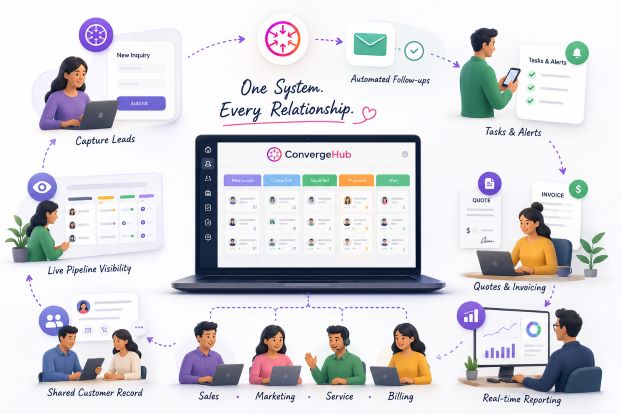
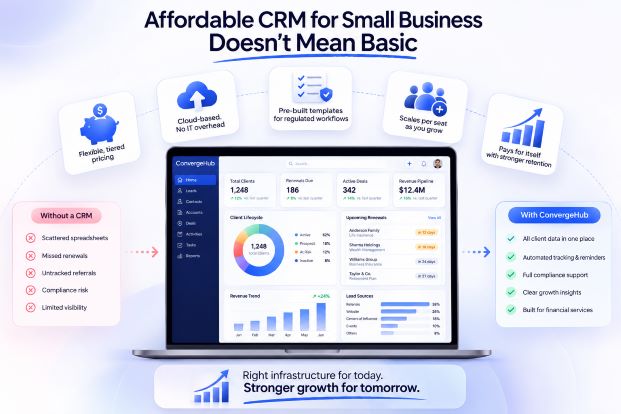
ConvergeHub delivers an all-in-one CRM tailored for SMBs, bundling the tools you need so SFA works across sales, marketing, and service without handoffs or hidden integrations.

What Are the Unified Platform Benefits of ConvergeHub’s SFA?

The unified ConvergeHub platform provides clear benefits:

  • Data Consistency  : Centralized sales data reduces discrepancies and makes reporting reliable.
  • Improved Collaboration  : Teams share a single view of customers, which keeps everyone aligned and speeds decisions.

Those benefits mean smoother workflows and fewer mistakes — helping SMBs operate more efficiently.

How Does ConvergeHub Customize and Scale SFA for SMB Needs?

ConvergeHub’s SFA is built to adapt. SMBs can conp the system to match how they sell and expand capacity as business grows. Key options include:

  • Flexible Workflows: Design processes that reflect your sales motions, not the other way around.
  • Scalability for Growth: The platform scales with increasing deal volume and more complex pipelines.

That flexibility helps SMBs keep using SFA effectively as their business evolves.

How Can SMBs Implement Sales Force Automation Successfully?

Rolling out SFA requires planning and the right partners. SMBs should follow a few practical steps to ensure a smooth transition and measurable results.

What Are the Steps for Effective SFA Setup and Integration?

  1. Define Objectives  : Set clear goals for what you want SFA to achieve — faster responses, higher conversions, cleaner data, or all three.
  2. Choose the Right Software  : Pick an SFA solution that fits your workflows and budget — options like ConvergeHub are built with SMB constraints in mind.
  3. Train the Team  : Invest in training so everyone knows how to use the system and follows agreed processes.

To confirm a solution fits both budget and feature needs, review ConvergeHub’s pricing as part of your evaluation.

Following these steps helps you capture the full value of SFA and avoid common pitfalls.

How Does Dedicated Support Facilitate SFA Adoption?

Dedicated support makes adoption smoother by guiding teams through setup and ongoing use. Typical support areas include:

  • Onboarding Processes: Hands-on help to get teams comfortable with the platform and their starter workflows.
  • Ongoing Support: Troubleshooting, best-practice coaching, and resources to keep performance high.

With the right support, SMBs are more likely to realize faster ROI from SFA.

What Are the Measurable Benefits of Using Sales Force Automation Software?

SFA delivers measurable improvements you can track through standard sales metrics.

How Does SFA Improve Lead Conversion and Sales Forecasting?

By automating follow-ups and personalizing nurture sequences, SFA helps lift conversion rates — businesses often see improvements up to 20%. Better, more consistent data also sharpens forecasting so you can allocate resources more effectively.

What Case Studies Demonstrate SFA Success for SMBs?

Case studies show SFA’s impact. For example, a small tech company that implemented SFA reported a 25% sales increase in six months, crediting faster lead response and improved lead handling. Stories like this highlight how automation translates into real growth.

Which Sales Force Automation Software Solutions Are Best for SMBs in 2026?

As SFA options evolve, SMBs should prioritize solutions that match their team size, budget, and integrations — not just feature lists.

What Features Differentiate Top SFA Software for Small and Medium Businesses?

Leading SFA tools for SMBs generally include:

  • User-Friendly Interfaces: Simple designs make adoption faster and reduce training time.
  • Comprehensive Reporting Tools: Clear reports and dashboards turn data into action.
  • Integration with Other Tools: Seamless connections with your existing systems reduce friction and duplicate work.

Those capabilities help SMBs use SFA effectively without overcomplicating operations.

How Does ConvergeHub Compare to Other Leading SFA Providers?

ConvergeHub stands out for its all-in-one design: sales, marketing, service, and billing work together in a single platform. That reduces handoffs, improves collaboration, and keeps customer data consistent — benefits many SMBs find essential when scaling operations.

FeatureConvergeHubCompetitor ACompetitor B
Unified PlatformYesNoYes
CustomizationHighMediumLow
Integration CapabilitiesExtensiveLimitedModerate

Frequently Asked Questions

What types of businesses can benefit from Sales Force Automation?

Sales Force Automation (SFA) is especially useful for small and medium businesses (SMBs) that need to do more with limited resources. By automating routine tasks, SFA helps companies streamline sales processes, manage leads better, and improve customer interactions. Retailers, tech firms, and service providers are common examples, but any business looking to scale sales without adding headcount can benefit.

How can SMBs measure the success of their SFA implementation?

SMBs should track KPIs like lead conversion rate, length of the sales cycle, and overall revenue growth to measure SFA success. Other useful metrics include response time to leads and customer engagement scores. Comparing these measures before and after implementation gives a clear picture of impact and areas for improvement.

What challenges might SMBs face when adopting SFA?

Common challenges include staff resistance to change, integration hurdles with legacy systems, and the need for effective training. Choosing the right tool for your workflows and investing in onboarding and support will reduce these risks and make adoption smoother.

How does SFA impact customer relationship management?

SFA strengthens CRM by collecting consistent customer data and enabling timely, personalized follow-ups. That leads to better engagement, higher satisfaction, and stronger loyalty. When AI is added, SFA can predict customer needs and surface the best next actions for reps.

What role does training play in the successful implementation of SFA?

Training is essential — it ensures users understand features, follow processes, and use the system consistently. Ongoing training and refreshers keep teams confident and help maintain ROI as workflows evolve.

Can SFA be integrated with other business tools?

Yes. Most SFA platforms offer integrations with marketing automation, customer service tools, accounting systems, and more. These integrations reduce manual work, keep data synchronized, and make cross-team collaboration easier. Look for solutions with robust integration options to maximize value.

Conclusion

Sales Force Automation is changing how SMBs sell — streamlining processes, improving data quality, and freeing teams to focus on customers. With AI and automation embedded in CRM, businesses can convert more leads, forecast more accurately, and scale without losing efficiency. If you’re looking to sharpen your sales motion in 2026, ConvergeHub’s all-in-one CRM can help you put SFA to work where it matters most.

From Data to Decisions: How CRM Analytics Drive Smarter CX

Customer experience (CX) has become the defining battleground for modern businesses. Price and product alone no longer guarantee loyalty; customers expect brands to understand them, anticipate their needs, and deliver seamless interactions across every touchpoint. Meeting these expectations requires more than intuition—it demands insight powered by CRM Analytics.

This is where CRM analytics come in. By turning raw customer data into actionable intelligence, CRM platforms empower organizations to make smarter decisions that directly enhance CX. Instead of guessing what customers want, businesses can rely on evidence, patterns, and predictive models to guide every interaction. In this blog, we’ll explore how CRM analytics transform data into decisions, why they matter, and how they shape the future of customer experience.

Why CRM Analytics Matter

Traditional CRMs were often seen as digital filing cabinets—repositories for contact details, deal stages, and support tickets. While useful, they offered limited strategic value. Modern CRM platforms, however, integrate data from sales, marketing, and support into a unified system. Analytics layered on top of this data reveal patterns, predict behaviors, and highlight opportunities that would otherwise remain invisible.

  • Visibility Across Touchpoints: A customer’s journey is rarely linear. They might read a blog post, attend a webinar, speak to a sales rep, and later contact support. Analytics unify these interactions into one narrative, helping teams understand the full context.
  • Predictive Power: CRM analytics don’t just describe what happened—they forecast what’s likely to happen next. For example, they can identify customers at risk of churn or highlight leads most likely to convert.
  • Decision Confidence: Leaders can move from gutfeel choices to datadriven strategies. Instead of debating opinions, teams can rely on measurable insights to guide investments, campaigns, and resource allocation.

In short, CRM analytics transform the CRM from a passive record keeping tool into an active decision making engine.

Turning Data Into Smarter Decisions

1. Personalization at Scale

Customers expect brands to treat them as individuals, not numbers. CRM analytics make this possible by identifying preferences, buying habits, and engagement triggers. For instance, analytics might reveal that a segment of customers consistently responds to educational content before making a purchase. Marketing teams can then design campaigns that nurture these customers with tailored resources.

Sales reps benefit too. Instead of cold outreach, they can approach prospects armed with insights into past interactions, preferred communication channels, and likely objections. Support teams, meanwhile, can personalize resolutions by referencing purchase history or prior issues. This level of personalization builds trust and accelerates loyalty.

2. Proactive Service

Reactive service—waiting for customers to complain—is no longer enough. CRM analytics enable proactive support by tracking resolution times, sentiment analysis, and churn signals. For example, if analytics show that a customer has logged multiple complaints in a short period, the system can flag them as “at risk.” Support teams can then reach out proactively, offering solutions before frustration escalates.

This approach not only prevents churn but also demonstrates empathy. Customers feel valued when brands anticipate their needs rather than simply reacting to problems.

3. Marketing Optimization

Marketing budgets are often under scrutiny, and leaders demand proof of ROI. CRM analytics provide clarity by showing which segments respond best to specific messages. For example, analytics might reveal that younger customers engage more with social campaigns, while older segments prefer email.

Marketers can use these insights to refine targeting, allocate budgets more effectively, and design journeys that resonate with each audience. Over time, this optimization reduces wasted spend and increases conversion rates.

4. Sales Enablement

Sales teams thrive when they know where to focus. Pipeline analytics reveal which deals are most likely to close and which require extra attention. For example, analytics might show that deals with multiple stakeholders progress slower, prompting reps to adjust their approach.

Managers gain visibility into performance trends, enabling them to coach reps more effectively. Instead of generic advice, they can provide targeted guidance based on data. This not only improves win rates but also boosts morale by giving reps clear, actionable insights.

The Role of Advanced Analytics and AI

While traditional analytics provide valuable insights, the future lies in combining them with AIdriven intelligence. Machine learning models can detect subtle patterns, recommend next best actions, and even automate decisionmaking for routine tasks.

  • Predictive Insights: AI can forecast churn, upsell opportunities, or customer lifetime value with remarkable accuracy. For example, if a customer’s engagement drops suddenly, predictive models can flag them as high churn risk.
  • Recommendation Engines: Similar to how streaming platforms suggest shows, CRM systems can recommend products, content, or services based on realtime behavior. This creates hyperpersonalized experiences that feel intuitive.
  • Automation at Scale: AI handles the complexity of delivering personalization across thousands of interactions. It processes massive datasets, identifies trends, and triggers actions automatically, freeing employees to focus on empathy and creativity.

By layering AI on top of a strong CRM foundation, organizations move from reactive personalization to proactive engagement. Customers experience interactions that feel timely, relevant, and deeply human—even when powered by technology.

Measuring the Impact

Analytics are only valuable if they translate into measurable outcomes. Organizations must track KPIs that demonstrate how datadriven decisions improve both customer perception and business performance.

  • Customer Satisfaction (CSAT) and Net Promoter Score (NPS): These metrics reveal how customers feel about their experiences. Rising scores indicate that personalization and proactive service are paying off.
  • Repeat Purchase Rates and Customer Lifetime Value (CLV): Analytics should show whether personalization leads to loyalty and higher spending.
  • Campaign Engagement Metrics (CTR, Conversion Rates): Marketing teams can prove ROI by tracking how tailored campaigns outperform generic ones.
  • Support Resolution Times and SLA Compliance: Faster resolutions demonstrate that analytics are helping support teams anticipate and address issues more effectively.

Sharing these results across departments reinforces the importance of CRM analytics. Employees see how their efforts contribute to measurable success, motivating them to maintain high standards.

Continuous Improvement Through Feedback and Iteration

CRM analytics are not static. Customer expectations shift, new channels emerge, and behaviors evolve. To keep personalization relevant, organizations must build feedback loops into their CRM strategy.

  • Customer Feedback: Surveys, NPS scores, and postinteraction reviews provide direct insight into how customers perceive personalization.
  • Employee Input: Frontline teams often spot gaps or opportunities that analytics alone might miss. Encouraging them to share feedback ensures strategies remain practical.
  • Iterative Updates: Use feedback to adjust workflows, dashboards, and automation rules regularly. This keeps the CRM aligned with customer needs and market trends.

By treating personalization as a living system, businesses can adapt quickly and maintain experiences that feel fresh and authentic.

Leadership and Organizational Alignment

Personalization is not just a technology upgrade—it’s a cultural shift. For CRM analytics to succeed, leadership must champion them as the heartbeat of CX.

  • CX Council: A crossfunctional team should oversee personalization initiatives, ensuring alignment across sales, marketing, support, and IT.
  • Clear Messaging: Leaders must position CRM analytics as tools that empower employees and delight customers, not as compliance requirements.
  • Measure Impact: Tracking KPIs like repeat purchases, NPS, and campaign engagement proves the value of analytics and motivates adoption.

When leaders visibly support CRM analytics, they set the tone for the entire organization. Employees see that datadriven decisions are not optional but central to how the business operates.

Future Proofing Personalization with AI and Predictive Insights

The next frontier of CX lies in combining CRM data with AI driven intelligence. While today’s personalization focuses on past behavior, tomorrow’s will anticipate future needs.

Predictive analytics can forecast customer intent—such as churn risk or likely next purchase—allowing teams to act before the customer even asks. AI driven recommendations deliver hyperpersonalized product suggestions, content, or service options based on real time patterns. Scalable automation ensures personalization grows with the customer base, handling complexity without sacrificing relevance.

By layering AI on top of a strong CRM foundation, organizations move from reactive personalization to proactive engagement. The result is customer experiences that feel intuitive, timely, and deeply human.

Conclusion

From data to decisions, CRM analytics are the bridge between information and impact. They empower organizations to move beyond reactive customer management and toward proactive, predictive, and personalized engagement. By investing in analytics, businesses not only gain clarity but also unlock the ability to deliver smarter CX—one that builds loyalty, drives growth, and positions them for the future

The False Sense of Control

If you’re leading growth today, you’re likely surrounded by information. Reports update regularly. Dashboards stay active. Reviews stay full.

  January 14th, 2026
The False Sense of Control

If you’re leading growth today, you’re likely surrounded by information.

Reports update regularly.
Dashboards stay active.
Reviews stay full.

And yet, even with all of that, decision-making can still feel slower than expected.

That usually happens when information is spread across too many places. When updates live in different tools, inboxes, and spreadsheets, getting a complete picture takes time.

By the time everything lines up, opportunities to act have already narrowed.
This is how teams end up reacting late rather than adjusting early.
down-arrow

How a False Sense of Control Shows Up
There is no dramatic failure.
Work keeps moving.
Meetings continue.
Targets stay in sight.
But day to day:

  • follow-ups rely on individual memory
  • deal progress varies without a clear reason
  • handoffs lose context
  • issues surface after results are affected
Leaders stay busy reviewing updates while still feeling unsure about where to step in.
down-arrow


The Spotlight: How Netflix Regained Operational Clarity
As Netflix expanded, leadership found themselves reviewing a growing number of internal reports. Different teams focused on different metrics, and meetings stretched longer without producing clearer decisions.
They simplified what leadership paid attention to and tied it closely to customer experience and system performance.
Playback reliability, recovery time during outages, and subscriber behavior during disruptions became shared reference points.
This allowed teams to recognize issues earlier and respond while the impact was still limited.
Decisions became easier because everyone was looking at the same information, at the same time, for the same reason.
down-arrow

What Control Looks Like in Practice
For growing teams, control shows up in everyday work:
  • progress can be seen without digging
  • next steps are visible
  • ownership is clear
  • delays become noticeable early
Teams spend less time explaining what happened and more time deciding what to do next.
down-arrow


How ConvergeHub Helps Teams Stay Oriented

A connected system makes this easier.

ConvergeHub brings customer information, follow-ups, workflows, and progress into one place.

That makes it easier to:

  • see where deals slow down
  • notice missed follow-ups
  • track movement across stages
  • keep context intact during handoffs
  • respond before small issues grow

Teams work from the same view of what’s happening instead of assembling updates from multiple sources.
down-arrow

inbox  If you want to talk through how this could apply to your business, let’s connect.

inbox  Or start your
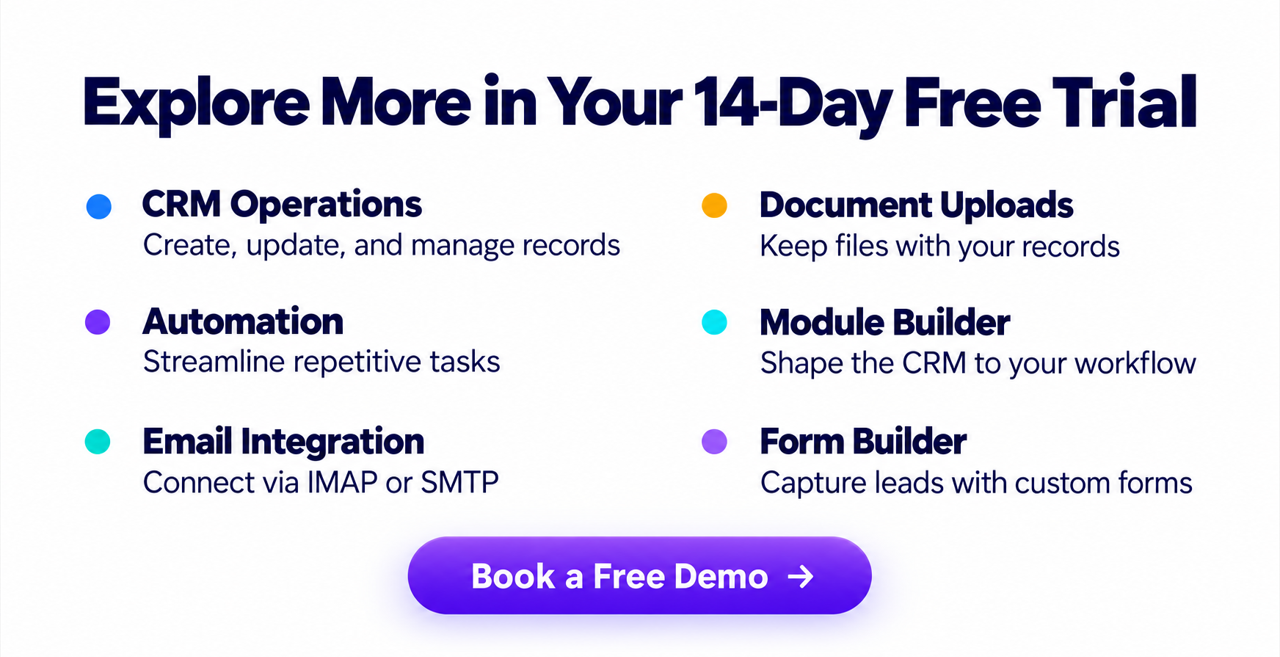
14-day FREE Trial and see how it feels to work from one system.

When leaders can see progress clearly, decisions come sooner and execution stays steady.

The Future of CX: Why Personalization Starts With Your CRM

Customer expectations aren’t standing still, they’re racing ahead. What felt like a personalized experience yesterday now feels impersonal today. Brands are rolling out sleek apps, loyalty perks, and AI-driven campaigns, yet many customers still walk away feeling like just another number. The disconnect isn’t usually in the ambition, it’s in the foundation. The only way to keep pace is to anchor personalization in the one system that sees the entire customer journey: your CRM. Without a CRM that unifies data and powers personalization, even the most creative CX strategies fall flat.

Personalization isn’t about sprinkling a first name into an email subject line. It’s about anticipating needs, remembering preferences, and delivering interactions that feel tailored at every stage of the journey. And the system that makes this possible isn’t your marketing automation tool or your analytics dashboard, it’s your CRM.

Where Personalization Breaks Down

Personalization sounds simple in theory, but in practice it often unravels when the CRM isn’t positioned as the central hub of customer intelligence. Even the most ambitious CX programs struggle if the data is fragmented, the messaging is generic, or the workflows are weighed down by manual effort. Without a unified system, personalization becomes inconsistent, inefficient, and ultimately unconvincing to customers.

Scattered Data

When customer information is spread across marketing lists, sales spreadsheets, and support inboxes, teams only see fragments of the story. This lack of a unified view prevents them from tailoring interactions and leaves customers feeling misunderstood.

Generic Messaging

Campaigns that lack behavioral insights default to broad, one-size-fits-all communication. Instead of resonating with individual needs, they blur into background noise, reducing engagement and eroding trust.

Disconnected Service

Support agents who can’t access purchase history or prior interactions are forced to treat every case as if it’s the first. This absence of context makes service feel impersonal and undermines the empathy customers expect.

Manual Bottlenecks

When teams must re-enter data across multiple platforms, personalization becomes slow and error-prone. These manual processes not only waste time but also make scaling tailored experiences nearly impossible.

Reframing the Foundation: CRM as the Personalization Hub

The real solution to broken personalization is not piling on more features but reimagining the CRM as the central engine of customer experience. When the system is designed to unify data, surface real‑time insights, and automate the invisible work of logging and syncing, it stops feeling like an administrative burden and starts acting as a partner in delivering meaningful interactions. By simplifying role‑specific views and embedding contextual cues directly into daily workflows, the CRM makes personalization effortless, scalable, and indispensable—transforming it from an optional add‑on into the natural way teams engage with customers.

Turning CRM Into the Personalization Engine

To future-proof CX, organizations must elevate the CRM from a back-office system into the personalization hub.

Unify Customer Records

Bring every touchpoint—site visits, purchases, service tickets—into one profile. A single source of truth is the backbone of personalization.

Surface Real-Time Signals

Modern CRMs should flag behaviors as they happen, like cart abandonment or repeat service requests, so teams can respond instantly.

Automate Contextual Journeys

Go beyond static segmentation. Use CRM-driven automation to trigger dynamic campaigns, tailored offers, and personalized follow-ups.

Role-Centered Views

Sales, marketing, and service teams should each see dashboards tuned to their priorities, ensuring personalization is actionable for every role.

Making Personalization Non-Negotiable

Personalization can’t sit on the sidelines as a “nice‑to‑have.” To truly transform customer experience, it must be woven into the daily rhythm of how teams work. When personalization is embedded directly into CRM processes, it stops being an extra step and becomes the default way of engaging with customers. This shift ensures that every interaction—whether it’s a sales call, a marketing campaign, or a support ticket—carries the weight of context and relevance.

For sales teams, pipeline tracking and commission structures tied to CRM entries make personalized engagement essential to success. Marketing teams rely on CRM‑driven ROI reporting to measure the impact of tailored campaigns, ensuring personalization is both visible and accountable. Support teams, meanwhile, use CRM‑tracked resolution times and SLA compliance to deliver service that feels empathetic and responsive. By making personalization inseparable from core workflows across departments, organizations guarantee consistency, scalability, and customer trust.

The Building Blocks of CRM-Driven Personalization

PillarWhat It MeansCX Impact
Unified DataConsolidating customer information from sales, marketing, and support into one profile.Creates a complete view of the customer, enabling consistent and relevant interactions.
Real-Time InsightsSurfacing behavioral signals like cart abandonment, repeat visits, or service escalations instantly.Allows teams to act in the moment, delivering timely and contextual experiences.
AutomationStreamlining repetitive tasks such as logging interactions, syncing records, and triggering journeys.Frees employees to focus on relationship building while ensuring personalization at scale.
Contextual DashboardsTailoring CRM views to highlight personalization cues relevant to each workflow.Makes personalization actionable and intuitive, reducing friction in daily tasks.
Data Quality StandardsMakes personalization actionable and intuitive, reducing friction in daily tasks.Builds trust in the system and ensures personalization is accurate and reliable.

Data Quality: The Hidden Driver of Personalization

Personalization is only as strong as the data behind it. Even the most advanced CRM features will fail if the information feeding them is incomplete, inconsistent, or unreliable. Clean, standardized data is the foundation that ensures every interaction feels relevant and trustworthy.

Clean Before You Migrate  

Scrub duplicates, fix errors, and fill gaps before moving records into the CRM. A clean start prevents frustration and builds confidence among users who rely on the system daily. Without this step, personalization efforts risk being undermined by inaccurate or conflicting information.

Set Standards  

Define mandatory fields for leads, contacts, and cases to keep records consistent across departments. Clear rules for data entry reduce ambiguity and ensure that every team member contributes to a reliable customer profile. Over time, these standards create a culture of accountability around data quality.

Show the Payoff  

Use dashboards and reports to demonstrate how accurate data powers personalized insights. When employees see that clean records lead to better targeting, faster resolutions, and stronger customer relationships, they’re more motivated to maintain data integrity. Visibility turns good habits into lasting behavior.

Leadership and Organizational Alignment

Personalization is not simply a technology upgrade—it represents a cultural shift in how organizations view and serve their customers. For CRM‑driven personalization to succeed, leadership must treat it as the heartbeat of customer experience (CX), embedding it into strategy, communication, and daily operations. When leaders actively champion personalization, they signal to employees that it is not optional but central to how the business creates value.

CX Council  

Establishing a cross‑functional council ensures personalization initiatives are guided by diverse perspectives. Representatives from sales, marketing, support, and IT can collaborate to align priorities, resolve conflicts, and ensure personalization strategies benefit the entire organization. This council becomes the governance body that keeps personalization consistent and scalable.

Clear Messaging  

Leaders must frame CRM personalization as more than a compliance requirement. By positioning it as a tool that empowers employees to deliver better experiences, they shift the narrative from “extra work” to “customer impact.” Clear, continuous communication helps employees see how personalization supports both business goals and their own success.

Measure Impact  

Tracking personalization KPIs is essential to prove its value. Metrics such as repeat purchase rates, Net Promoter Score (NPS), and campaign engagement show how personalization translates into loyalty and growth. Sharing these results across teams reinforces the importance of CRM‑driven personalization and motivates employees to maintain high standards.

Continuous Improvement Through Feedback and Iteration

Personalization isn’t a one-time project; it’s an evolving practice. Customer expectations shift, new channels emerge, and behaviors change rapidly. To keep personalization relevant, organizations must build feedback loops into their CRM strategy.

  • Customer Feedback: Collect insights directly from customers through surveys, NPS scores, and service follow-ups to refine personalization tactics.
  • Employee Input: Encourage frontline teams to share what personalization cues help them most, and where gaps exist.
  • Iterative Updates: Use this feedback to adjust workflows, dashboards, and automation rules regularly, ensuring the CRM evolves alongside customer needs.

By treating personalization as a living system, businesses can adapt quickly and maintain experiences that feel fresh and authentic.

Future-Proofing Personalization with AI and Predictive Insights

The next stage of customer experience will be defined by how effectively organizations combine CRM data with AI-driven intelligence. While today’s personalization often relies on analyzing past behavior, tomorrow’s approach will anticipate future needs before customers even voice them. Predictive analytics can forecast intent—such as churn risk or likely next purchase—allowing teams to intervene proactively. AI-driven recommendations take this further by delivering hyper-personalized product suggestions, tailored content, or service options based on real-time patterns, ensuring every interaction feels relevant and timely.

Equally important is scalability. As customer bases grow, machine learning enables personalization to expand without losing accuracy or nuance. By automating the invisible work of data processing and pattern recognition, AI ensures personalization remains consistent across thousands of interactions. When layered on top of a strong CRM foundation, these capabilities shift organizations from reactive personalization to proactive engagement—creating experiences that feel intuitive, human-centered, and built for the future.

FAQs

  1. How do I know personalization is working?  

Look at customer satisfaction scores, repeat purchase rates, and engagement with tailored campaigns.You’ll know personalization is effective when customers respond with loyalty and engagement. Key indicators include rising customer satisfaction scores, repeat purchase rates, and stronger retention. Engagement metrics—such as higher open rates on tailored campaigns or increased click‑throughs on personalized offers—also signal success. Beyond numbers, listen to qualitative feedback: when customers say interactions feel relevant and seamless, it’s proof that personalization is delivering real value.

2. What’s the biggest obstacle?  

The most common barrier is data silos. When customer information is scattered across marketing platforms, sales spreadsheets, and support systems, teams only see fragments of the customer journey. This fragmentation makes personalization inconsistent and often frustrating for customers. Breaking down silos by centralizing data in a CRM ensures every department works from the same complete profile, enabling personalization that feels connected and trustworthy.

3. Should personalization be fully automated?  

Automation is essential for scale—it allows organizations to deliver tailored experiences to thousands of customers simultaneously. However, automation alone can feel mechanical. Human empathy and judgment remain irreplaceable, especially in moments that require nuance, reassurance, or creativity. The best approach is a balance: let automation handle repetitive tasks and trigger personalized journeys, while empowering employees to add the human touch that makes personalization feel authentic.

4. How often should strategies evolve?  

Personalization strategies should be reviewed regularly to stay aligned with shifting customer expectations. Quarterly reviews are a practical rhythm, allowing teams to assess new behaviors, market trends, and technology updates. This cadence ensures personalization doesn’t stagnate and remains responsive to customer needs. In fast-moving industries, more frequent adjustments may be necessary, but the principle remains the same: personalization must evolve as quickly as your customers do.

Final Thought

The future of CX isn’t about more channels or louder campaigns—it’s about smarter, more human interactions powered by a CRM that makes personalization seamless. When your CRM becomes the personalization engine, every touchpoint turns into a loyalty-building moment.