Nailing Success with CRM Software for eCommerce: Features & Examples

For the eCommerce businesses, ever-evolving customer demands are no longer a strange thing. Instead, it’s a strategic imperative in a fiercely competitive environment. It’s obvious that eCommerce success isn’t just about selling products; it’s about weaving perfect kinds of customer experiences, loyalty, and seamless transactions. That’s where the pivotal role of CRM software comes in. A CRM Software for eCommerce is designed keeping the business needs in mind. Plus, the automation features in the software accelerate your sales and marketing efforts to the next level.

A Gartner report reveals that eCommerce companies investing in CRM technology experience a 65% improvement in sales quotas attainment. Studies have shown that marketing automation can boost sales productivity by 14.5% while cutting marketing costs by 12.2%. 

A CRM software for eCommerce automates everything and further takes better control of the collected data and utilizes it to strengthen customer experiences. Whether your objective is to boost sales, acquire more customers and retain those, it’s crucial to enhance team productivity, a CRM tool can help you achieve it effortlessly.

The Role of CRM Software for eCommerce

At its core, CRM software is designed to streamline customer interactions, enhance customer satisfaction, and drive sales growth. For eCommerce businesses, it serves as a multifaceted tool, offering features like customer data management, marketing automation, sales tracking, and customer support ticketing, all integrated into a single platform.

Here’s how the amazing features of ConvergeHub can  help eCommerce business  owners  drive their success.    

Features that Amplify eCommerce Success

Streamlined Customer Data Management

ConvergeHub revolutionizes how eCommerce businesses manage their customer data. By offering a centralized repository for all customer interactions and transactions, it ensures that businesses have a 360-degree view of their clientele. This comprehensive understanding allows for personalized marketing, leading to higher customer satisfaction and increased sales.
For example, fashion retailers can use CRM to recommend seasonal trends, while electronics brands might leverage it to provide personalized device recommendations. Similarly, niche stores like Ghostek can utilize CRM insights to deliver a more curated shopping experience. By adapting CRM features to their industry, these businesses create stronger connections with their audiences and foster loyalty.

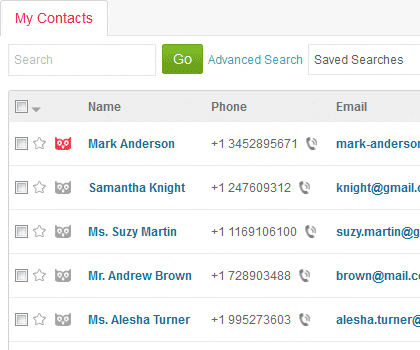
Discover a seamless and robust solution for organizing your business contacts in a unified, collaborative database. Easily input contacts manually or import them from external sources using our Import tool and Developer API. Access vital contact details, such as emails, phone numbers, meeting notes, to-do lists, and documents, all conveniently located in the Contact Details section. Gain insights into the communication history between your company and each contact to enhance customer service. Additionally, add tasks, comments, notes, and events, and attach files to contacts for comprehensive management. Stay connected with your contacts through email, phone, FAX, and SMS with effortless ease.

Intelligent Marketing Automation

One of ConvergeHub’s standout features is its intelligent marketing automation capabilities. It empowers eCommerce businesses to craft tailored marketing campaigns that resonate with individual customer segments.Get a real-time snapshot of key metrics from ConvergeHub dashboard. Users can know about the latest developments in marketing and sales activities from four different panels – Deals By Expected Close Date, Leads By Source, Lead Acquisition and Deal Acquisition.
Whether it’s sending targeted product recommendations, personalized discounts, or exclusive offers, ConvergeHub’s automation tools ensure that the right message reaches the right audience at the right time, significantly boosting conversion rates.

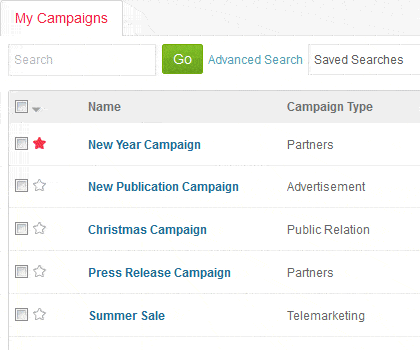
eCommerce businesses can easily target different priority markets by running automated marketing campaigns. 
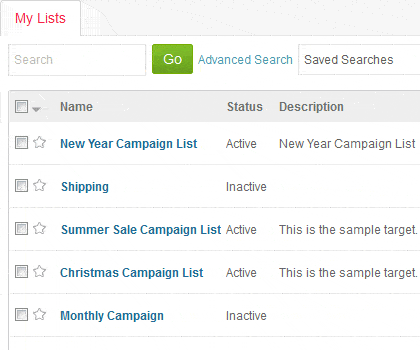
For example- Creating separate lists from targets, accounts, leads, and contacts and further link them to the campaigns. This way, it’s easier to reach out to a larger customer base at a time without even worrying about crafting tailored marketing messages for each of them. 

Simplified Sales Processes

ConvergeHub streamlines the entire sales process, from lead generation to conversion. Its intuitive interface enables sales teams to track leads, monitor sales pipelines, and forecast future sales trends. By providing real-time insights, ConvergeHub equips eCommerce businesses with the tools to make data-driven decisions, enhancing their sales strategies and, ultimately, their revenue.
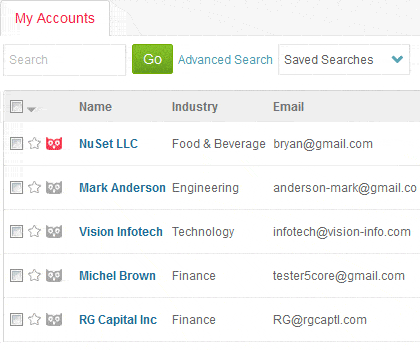
Collaborate seamlessly using ConvergeHub’s Account Management module. Empower sales representatives, managers, and authorized personnel to access a comprehensive account history from a centralized repository. Create tasks, schedule events, and add comments and notes to accounts for efficient management. Communicate with accounts effortlessly via email, phone, FAX, and SMS. Attach files directly from your computer or ConvergeHub Library to enhance account documentation. Gain a deeper understanding of accounts by linking them to relevant leads, deals, and contacts. Explore past deals to identify buying patterns, analyze opportunities for upselling and cross-selling, and establish loyalty programs for strategic growth.

Exceptional Customer Support

For any business, customer support is non-negotiable. And that’s true in the eCommerce realm as well. ConvergeHub enhances customer support experiences by centralizing all customer inquiries and issues (as already mentioned). Its ticketing system ensures that no query goes unanswered, leading to improved customer satisfaction levels. Swift and efficient support not only resolves problems but also builds trust, fostering long-term customer relationships. In the  eCommerce domain, customer queries are everyday affairs. From return policies to product  queries, a CRM software for eCommerce helps support teams have a look at everything from a single location.  

Integration Capabilities

ConvergeHub understands the importance of a seamless workflow. Its integration capabilities allow eCommerce businesses to connect ConvergeHub with other essential tools and platforms. Whether it’s integrating with email marketing software, payment gateways, or social media platforms, ConvergeHub ensures that businesses have a cohesive ecosystem, optimizing their operations for maximum efficiency and profitability.

The predefined email campaign templates in ConvergeHub helps enhance your email marketing strategy with targeted content using our range of predefined email templates. 
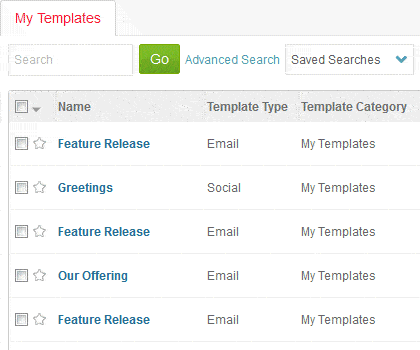
Select from six distinct categories: My Templates, Business, Seasonal Holiday, Newsletter, Showcase, and Press Release to align your communication effectively. Additionally, tailor or craft dynamic email templates effortlessly using ConvergeHub’s Rich-Text HTML Editor to suit your specific needs.

Data-Driven Decision Making

In today’s data-driven landscape, ConvergeHub equips eCommerce enterprises with vital insights. Harnessing advanced analytics and reporting tools, businesses can gauge the impact of their marketing endeavors, monitor customer interactions, and spot emerging trends. Armed with this knowledge, eCommerce entities can make well-informed choices, fine-tune their approaches, and maintain a competitive edge in the dynamic eCommerce realm. With detailed metrics at their fingertips, businesses can adapt swiftly, ensuring they remain ahead of the curve in the ever-evolving digital marketplace. Ultimately, advanced analytics and reporting tools are invaluable assets for businesses looking to gain a competitive edge in the ever-evolving digital marketplace.

Here are the eCommerce brands that have garnered success using CRM Software

Amazon: The eCommerce giant utilizes CRM software to analyze customer behaviors, recommend products, and personalize user experiences. Through its robust CRM system, Amazon achieved a 29% increase in sales within a year.

Shopify: Shopify, a leading eCommerce platform, leverages CRM tools to empower its merchants. By providing in-depth customer insights, Shopify enables businesses to tailor their offerings, resulting in a significant 20% growth in customer retention rates.

Zappos: Zappos, an online shoe and clothing retailer, attributes its exceptional customer service to CRM implementation. By centralizing customer data and integrating it with their support system, Zappos achieved a remarkable 75% customer satisfaction rate, leading to increased repeat business.

Last but not the least

ConvergeHub is a highly customizable cloud CRM solution that brings tailored features to suit your industry-specific needs. It is not just a CRM software; it’s a strategic ally that propels eCommerce businesses toward unparalleled success. According to a study by Nucleus Research, businesses earn $8.71 for every dollar spent on CRM software. By unifying customer data, automating marketing efforts, optimizing sales processes, providing exceptional customer support, enabling seamless integrations, and facilitating data-driven decision-making, ConvergeHub empowers eCommerce ventures to not only meet customer expectations but exceed them, thereby securing their position as industry leaders. As eCommerce businesses continue to evolve, ConvergeHub stands as the cornerstone upon which their success stories are built.

Are Your Qualified Leads Up for Sale? Learn How to Make the Call

Not all leads you are acquiring everyday are converted. As per MarketingSherpa’s findings, a significant 61% of B2B marketers forward all their leads to the sales team, despite the fact that only 27% of these are sales qualified leads. Additionally, a study conducted by the TAS Group indicates that sales representatives disregard approximately 50% of the marketing leads. This piece talks about how to identify your sales qualified leads.

There runs a blame game between the marketing and sales team when it comes to the question of Qualified Leads.  While the sales team believes the marketing team merely shared contacts (read: unqualified leads), the marketing team blames the sales team for failing to convert the potential leads they sent along.

Quite familiar it sounds, Right?

As per Marketing Sherpa’s findings, a significant 61% of B2B marketers forward all their leads to the sales team, despite the fact that only 27% of these leads meet the qualification criteria. Additionally, a study conducted by the TAS Group indicates that sales representatives disregard approximately 50% of the marketing leads.

You must be wondering why the percentage is so high?

Due to a lack of clarity regarding the criteria for a qualified lead, various teams have formulated their own definitions. This divergence not only leads to confusion but also results in frustration and financial setbacks.

In this blog, we will talk about your sales-ready leads and  how they fit into the buyer’s journey, how to rate the leads, and more. 

MQL Vs. SQL: Key Differences

One of the primary reasons marketers waste time on unqualified leads who don’t want to be sold is a lack of knowledge of the distinction.

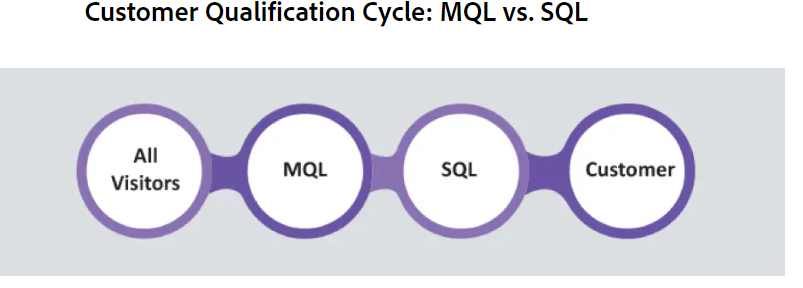
MQLs exhibit consistent interest in your website content (but not necessarily in your products or services) and are likely to become customers. Simply put, they have become your potential client pool’s hand-raisers. Remember, MQLs aren’t ready to buy yet, but they will respond to deliberate nurturing.

SQLs, on the other hand, are further along in the buying journey and are ready to make a deal. They correspond to your buyer persona profiles and are likely to speak with a sales representative.

One of the key distinctions between these two is their willingness to buy. An MQL is unlikely to be ready to buy your product right away, whereas a SQL is a qualified lead that may be approached by your sales team right away.

Pro Tip: Transitioning from MQL (Marketing Qualified Lead) to SQL (Sales Qualified Lead) is a time-critical process, and as a marketer, it’s crucial not to overlook this timeframe. Gaining a comprehensive grasp of the buyer’s journey and the qualification cycle enables you to assess the stage at which leads currently reside and subsequently relay them to the sales team.

How the Qualification of the Leads Fit in Your Buyers’ Journey

There’s three stages in the buyer’s journey: awareness, consideration, and decision. And a SQL passes through each of these stages before being a SQL.

It starts with the awareness stage. If you are dealing with a lead at this level, it means your lead begins to consider your product. They have progressed to MQLs. Finally, when leads begin to consider your product/service as a solution to their pain areas, they become a sales qualified lead and are ready to be approached by your sales team.

So, what is your first step in determining when to advise your salesperson if a lead is sales qualified?

Sync Sales & Marketing  for Better Results

According to a Marketo Research, when Sales and Marketing are synced they yield better results in terms of closing deals.

For a comprehensive analysis of the MQL to SQL conversion, it’s crucial to have a robust connection of sales and marketing teams. Sharing insights regarding target markets, customer profiles, and behavioral patterns enables a more accurate identification of leads that require further nurturing and those poised for advancement through the sales pipeline.

This collaborative effort seeks answers to key questions:

1. What are the characteristics of an ideal lead?

2. Why do certain leads become disqualified during the final stages?

3. Which content assets, and in what quantity, have successful leads engaged with?

4. Which referral sources exhibit the highest closing rates?

These inquiries naturally lead us to the next question: How can this collective knowledge be effectively leveraged to enhance conversion rates, thereby optimizing resource utilization?

Lead Scoring Metrics

Let’s get one thing clear. Not every lead is ready for sale. Leads, on the other hand, can be developed.

If your marketing staff begins forwarding every query to the sales team, you will just waste your sales team’s time, resulting in a less-than-satisfactory customer experience. Sometimes those leads are simply kids who need to read your ebook for an assignment or to prepare for an exam. Sometimes they are job searchers who are hurriedly gathering as much information as possible.

As a result, it is critical to carefully examine each lead’s intent. And, in order to discern this intent, you must have an effective behavioral yardstick—specific lead score measures.

As previously said, MQLs are the hand-raisers among the leads. They are more engaged, but not yet ready to buy or speak with a salesperson. As a result, you should exercise caution when selecting the basis, and only high-interest behaviours should trigger a change from lead to MQLs. For example, returning to the product/services specification page, the pricing page, reading the majority of your emails, leaving goods in the cart, and so on.

While the majority of your time will be spent developing accurate metrics for MQLs, the shift from MQL to SQL will be easier to recognise. It may look like signing up for free trials or scheduling a discovery call with sales representatives, or anything similar.

To eliminate all “guesswork” from the cycle, you must sit down with both sides and sketch the lead score measures. You may use your marketing automation software to create a lead scoring system that assigns a monetary value to each activity. These actions could include website visits, downloads, email activity, or social media engagements.

When a lead meets a predetermined threshold, it should be automatically allocated to the sales team.

Despite the fact that settling on a threshold may seem apparent, 46% of B2B marketers have NOT established a lead score threshold that will automatically alert or route leads to sales. Isn’t it strange?

While your lead scoring system will primarily consist of adding up scores, including negative scoring for specific activities (as seen in the figure above) will greatly assist you. For instance, if a qualified lead stops interacting with your product after signing up for a trial and does not react to any emails.

Here are some factors to consider while qualifying leads at each level:

Organizational level: At the organizational level, you are asking essential questions such as if the lead fits within the buyer profiles you have built.****

Opportunity level: This is critical for properly qualifying leads.

You’re probably wondering at this point:

  • If the potential lead needs your product or service,
  • Whether or not the lead can actually purchase and use
  • Whether your product can alleviate your leads’ pain points.
  • Involvement level: You are asking questions concerning BANT (budget, authority, need, and time) at this level.

Stakeholder level: At this level, you raise questions about BANT (budget, authority, need, and time).

Wrapping Up

You should be able to notify your salesperson if a lead is sales qualified by now.

Everyone is pleased when leads are correctly and strategically qualified. Customers believe you understand them, marketing teams believe their qualified leads were contacted effectively, and sales teams are pleased with lead quality since they closed the deal.

Finally, it prevents you from selling to folks who do not want to buy.

When should you inform your salesperson that the lead has sales qualification? Which of the following is one of the most essential lead metrics? Let’s discuss it in the comments area.

How To Improve Customer Service: 10 Crucial Tips

Are your customer service efforts not meeting the desired standards? Is it falling short in spite of your relentless efforts? Then, we are quite sure, your efforts are not in the right place. ConvergeHub experts are here to tell you the secrets of how to improve customer service

But, before everything else, it’s important to know that your customer support team is the face of your brand. They steer successful customer journeys and lead them in the right direction, and reroute them as required to reach the goal. 

In a growing company, the quality of your customer service is always under lenses. It evolves every single day as it is one of the most important drivers of corporate profitability. In fact, giving exceptional customer service results in 20% of sales growth and adds to the ROI. 

Fortunately, there are cool strategies to increase your team’s effectiveness. Implementing a quality assurance system, CRM Software, and responding to honest feedback from your customers will always contribute to a smooth customer journey from prospect to post-sale.

  1.  Identifying your Customers’ Needs

Identifying your customers’ needs is the most crucial advice when it comes to delivering top-notch customer service. Whatever your team performs, must focus on the needs of the customer. Even if it affects the interest of the team or company as a whole, keeping in line with your customers’ needs is all you need for a long term goal. Understanding what those needs are will help in the development of your customer service strategy. 

But, how do you do it? Well, asking them about their needs is the best approach to learn about them. Many companies run surveys, feedback email, a phone call, or other resources you have available to do this. Social media analytics also tells you a lot about the customer’s needs and preferences. 

  1. Put Yourself in your Customers’ Shoes 

Every customer’s personal and unique needs come to play here. To understand that you need to be a little empathetic towards their needs. Wear their shoes and listen to how you interact with them.What you say to them, and even more crucially, how you say it, is critical to the success of your customer service performance strategy. 

When firms consider enhancing their performance management systems, they are often motivated by the bottom line; nevertheless, customer support staff should recognize that how a customer feels after interacting with you will enhance customer loyalty. 

Empathy will help you focus on enhancing client satisfaction, which will improve your bottom line. Today, it’s as much about how you interact as it is the qualitative aspect of your product or service. So, you must be thoughtful about how you interact with your customers, irrespective of the fact whether they are your existing customers or the potential ones ( who could convert but have not yet).

  1. Be Ears to Honest Customer Feedback

Never let average customer reviews become your success parameter. In fact, honesty and integrity pays off more to maintain customer loyalty than displaying some publicity stunt on a billboard around the company. Effective customer service should be implemented in every meeting, emails you sent, and phone conversation that your customer service team has with your customers. 

Listening to your customers not only makes them feel valued, but also makes them feel good about your business. Positive feedback comes from satisfied customers. Bad customer feedback creates possibilities for change. In fact, poor reviews show you the room for improvement. 

Putting your customers at ease from the very beginning can transform difficult interactions into productive ones. Encourage your agents to uphold this culture, and you will eventually develop a strong customer-centric strategy that will help you and your team learn and improve performance. 

  1. Set KPIs for Customer Service Teams

Setting the performance tracking KPIs is a great way to measure the success of your customer service strategy. Focus on building a robust framework to guide you. 

Depending on the primary competences of your teams, you could choose to track:

  • Customer Satisfaction Scores (CSAT)
  • Negative Response Rate (NRR)
  • Reopen Rate First Contact Resolution (FCR)
  • Average Resolution Time (ART)
  • Employee participation

It’s important to track your KPIs right from the beginning and further use statistics to choose which actions to prioritize. 

  1. Set Goals that Matter

Once your KPIs are set, you may identify what your team and each individual are expected to accomplish. At this stage, set goals for yourself as well as your team. Because, that’s how you will be able to create a customer-centric ecosystem. This way, you can reach out to your customer satisfaction goals. Allow your agents to set and track their own personal goals based on what the team decided on. 

Setting goals for your team will help you achieve these as a brand. This sense of accomplishment leads to increased engagement and productivity. Your team’s customer service performance goals will naturally match with the company’s goals.

At the same time, you also need to be sure that your team might not accomplish the goals as expected. To get an accurate insight on how your team is performing, you can fetch the data from your CRM Software. Tracking their performance (together with having an honest and open culture) will help you support your team when problems develop, allowing you to overcome them together. 

  1. Automate each and every manual process

Process optimization can save you and your team time and eliminate errors in many circumstances. One alternative is to employ CRM Software that seeks to automate reports, reduce monotonous processes, and calculate trends. 

You can use the extra time to focus on more critical tasks such as team training, data analysis, and customer service. By eliminating these manual processes, agents can be encouraged to embrace technology that boosts their productivity. 

  1. Train Customer Service Team about Service Standards

Setting goals is not enough to achieve them. Create a structure for customer service quality assurance and ensure that your team is aware of your expectations. Give agents a quality assurance checklist that outlines what is most important while assisting consumers. 

Whatever method you use to provide quality feedback to your team, make sure it is consistent, consistent, and clear. This level of transparency can do wonders and motivate your team to make efforts for significant accomplishments. This way, your company’s goal becomes a collective goal which is easily achievable.

  1. Adopt Omnichannel Customer Service Strategy

Creating a sense of accessibility is critical in this fast-paced digital landscape. But then, it’s also difficult to assign and overstretch your resources at every touchpoint. Adopting omni channel service strategy comes to your aid, in this scenario. To improve the customer’s experience easier and faster, consider email, Facebook, WhatsApp, and Twitter. The first step towards achieving this accessibility is determining where your clients like to seek assistance and focusing your efforts on those channels. 

You can also set up a customer self-service (CSS) segment to reduce the number of times your team interacts with customers. A FAQ page, a help center, or a community forum often assist in this. Many companies implement AI chatbots to resolve issues on the basic level. The customer service personnel is only contacted if the issue is serious and not solved at the basic level.

  1. Practice Transparency

Transparency among your team, paired with regular, high-quality feedback, will strengthen your relationship. Allowing each team member to see their figures in real time will not only motivate them but will also instill a sense of responsibility in them.

These days, customer service has evolved thoroughly and agents are aware of their performance at every level. Also, when you set KPIs, it’s easier for each and everyone to know the performance. If any of your team members is falling behind in terms of the performance, opt for open communication. It leads to more efficient 1:1 sessions. This knowledge enables individuals to be more productive, make faster improvements to their performance, and be prepared for discussions about their achievements.

  1. Launch Rewards Programs

According to Maslow’s hierarchy of requirements, our fourth need, after food, safety, and love, is esteem. This involves feelings of acknowledgment, attention, confidence, and accomplishment.

Create an employee rewards programme to show your employees how much you value them. Anything from a $5 gift card to naming someone employee of the month can instill confidence in both the individual and the brand he represents. If you are not comfortable with monetary rewards, opt for the recognition only. It could spell the difference between a mediocre and a great results month for some.

The Takeaway Point

Keep in mind that irrespective of the smart tactics you adopt for delivering superb customer service, what always counts is the speed and efficiency of the resolution. Always encourage a culture where client issues are resolved at the very first time. Calculating and measuring your First Contact Resolution score (FCR) will help you appreciate the value of investing extra time up front to offer an excellent response the first time. However, make sure that the resolution you provide is effective. Otherwise, there will be a significantly higher rate of issue reopening and undermining all your efforts.

Marketing Automation Features and Requirements Checklist 

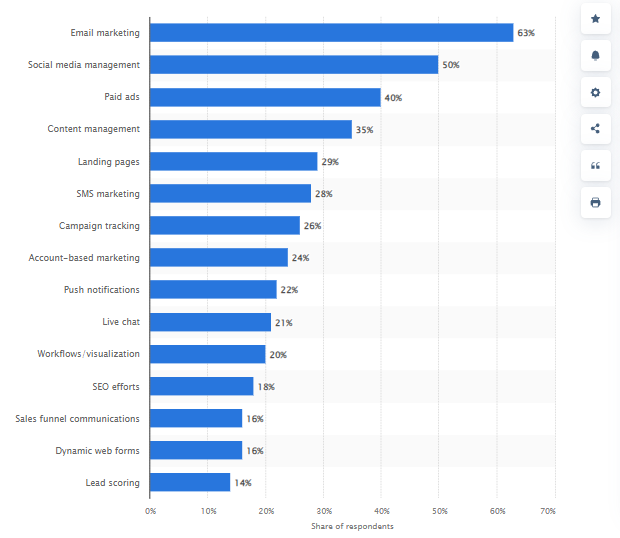
Automation is a thing nowadays in the B2B landscape. And when it comes to Marketing automation software, it’s a true game-changer in the current premises. Companies that are relentlessly struggling to streamline their marketing efforts to achieve the desired growth can leverage marketing automation. According to the recent reports in Statista, “the global marketing automation industry’s revenue is expected to increase by 22% between 2021 and 2023, reaching $5.86 billion USD. The market anticipates that by 2030, the revenue will reach $13.7 billion”. So. practically with the right mix of marketing automation features and a well-thought-out strategy, a CRM Software can help brands effectively nurture leads, increase customer engagement, and optimize their overall marketing campaigns.

Marketing Channels using Automation Globally 

Source: Statista

If you are considering the implementation of automation in your current marketing efforts, this article will serve as a comprehensive checklist of the key requirements of a marketing automation solution for your business. 

However, the question is why marketing automation software is needed all of a sudden, when your previous marketing moves are quite successful? Here’s why. 

Marketing scenario is rapidly evolving. Moreover with digitization becoming mainstream, automation is the only way to keep up with the changing trends. In fact, customer demand have also evolved with the rapid digitization. As a result, brands need to deliver customers exactly what they are looking for. To streamline the process, they need to manage multiple marketing campaigns simultaneously, so that there’s no shortage of consistent leads and conversions. With Marketing automation software, this is possible. Recent studies revealed that using marketing automation lead volumes can be increased by at least 27%, conversion by 30% and marketing return on investment (ROI) by more than 25%.

Marketing Automation Features: Key Requirements

  1. Campaign Management

 Omnichannel marketing is the need of the hour, but at the same time one of the most critical marketing moves. A marketer needs to plan, design, customize, track and analyze a campaign for multiple channels at a time. However with marketing automation software, half of the task is reduced because it helps marketers pcreate, plan and design marketing assets (messages, videos, images,documents, and more) and accordingly schedule, execute them as campaigns on multiple channels at the same time. What’s more? A marketer can easily customize the same campaign according to different marketing channel benchmarks from a single campaign management dashboard. 

Advanced analytics is one of the premium marketing automation features, which provide detailed insights into the efficacy of campaigns, allowing marketers to optimize strategies for higher conversion rates. These solutions also track multi-touch attribution to identify the most effective channels and campaigns, allowing for greater focus in those areas.

Marketers can create landing pages with dynamic content using an easy-to-use drag-and-drop interface. It’s easy to design and integrate call-to-action (CTA) buttons into landing pages, emails, websites, and microsites. Search engine optimization (SEO) delivers substantial value by enhancing site visibility and obtaining higher positions on search engine results pages (SERPs)..

  1. Reporting features with User-friendly Dashboard

Robust marketing automation software like ConvergeHub is featured with such widget-based interfaces. Users can get a 360-degree view of the campaigns and track the performance. Plus, you can download the performance tracking report in a customizable format, so that it can be used in the required areas. Marketers and executives create personalized dashboards that provide a snapshot of critical information.

Advanced reporting is one of the key marketing automation features. New age products like ConvergeHub come with advanced features which help in tracking and analyzing data in an actionable format. They can track and fetch analytical data from your email marketing efforts, SEO, SEM, website content, eCommerce, and text campaigns, among others. As a result, it becomes easier to evaluate the key performance indicators ( KPIs), such as website visitors, user engagement, readership, purchase/subscription rate, as well as bounce rate. In this context, integrating e-commerce marketing consultancy services can provide a structured approach to analyzing and leveraging these insights effectively. These services can assist in optimizing marketing strategies to better meet business objectives without overtly focusing on promotion.

ConvergeHub allows users to leverage the following features to ease and streamline the marketing efforts:

  • Custom Reports
  • Dashboard
  • Pre-Built Reports
  • Schedule Reports
  • Visualizations
  1.  Email Campaign Management

No marketers can ignore the role of email marketing in recent times. It can generate an ROI of $36 per $1 spend. No doubt, it offers a good potential to reach out to the customers and make the conversions. Using the marketing automation software, you can run a comprehensive email marketing strategy and the effective execution of campaigns.

One of the key features of the automation software is that it helps marketers to send personalized responses to the customers as per their needs. With marketing automation tools like Editpad Email Writer, it’s easy for the marketers to engage with customers with personalized messages without even writing those manually.

Editpad’s AI Email Writer generates highly engaging and tailored email content in seconds. The tool crafts impactful messages with minimal user input. Thus, it’s easier to promote higher levels of engagement and increase customer retention rates in a much shorter span of time.

This dynamic approach includes pre-scheduled, follow-up, instructive, and promotional emails. Its numerous advantages include strengthening customer relationships, recruiting new customers, spreading marketing, and increasing sales.

Convergehub, offers exceptional marketing automation facilities using the features like:

  • Email Templates and Drag-and-Drop Builder
  • Mass Email Scheduling
  • Pre-scheduled Triggered Emails
  • Drip email campaigns
  • Email Analytics

And more. 

  1. Lead Generation

Lead generation entails defining the target audience, comprehending their pain areas, and creating and delivering persuasive messaging to engage potential leads.

It also comprises campaigns implemented across numerous online and offline channels, including as search engine optimisation, content marketing, email marketing, paid search campaigns, webinars, corporate events, and more.

By leveraging smart marketing automation features of ConvergeHub, you can easily create sweepstakes, freebies, gated content, webinars, chat/hosted shows, and other online and offline events to attract and produce leads. Include lead source information as well as other profile information on contact cards linked with each lead.

Create registration, sign-up, pop-up, survey, and other forms to generate leads. Marketing automation enables marketers to construct personalized forms with several options for each form field – drop-down, short text, long text, and more.

They can also construct dynamic forms with progressive profiling that save, encrypt, and auto-fill data for returning visitors. Allow users to sign in and have their social network profiles or email accounts automatically complete form fields.

Convergehub’s marketing automation features enable lead scoring to identify the most qualified leads. As a result, marketers can prioritize and route them to the appropriate salesperson for follow-up. Look for automation software that supports scoring rules and flexible lead routing options.

To collect visitor information, these forms can be placed on websites, landing pages, and other microsites. Similarly, embedding pixels can collect data on anonymous users who do not fill out forms.

With ConvergeHub, users can take advantage of the following:

  • Auto-Fill Form Information for Repeat Visitors
  • Build a Customizable Form To Capture Visitor Information
  • Create Different Types of Forms, Such As Pop-Up Forms, Sign-Up Forms, etc.
  • Create Surveys To Collect Information or Feedback
  • Preview Form Before Finalizing
  • Share Surveys Through Social Media, Chat or Email
  • Track Anonymous Website Visitors
  1. Cross Platform Capabilities

While every marketing automation software comes with unique set of features, ConvergeHub has some features that are most needed at this point of time.

User access Permissions: Managers and administrators can configure access permissions to features and marketing assets depending on user roles and designations.

Multi-factor authentication: Many marketing automation platforms use multi-factor authentication to ensure maximum security and data protection.

Document Repository: For easy access, create and maintain a centralized repository of marketing assets such as papers, photographs, texts, notes, videos, PDFs, and more.

Custom Fields: Using custom fields, you can personalize and add extra details to features and data sets.

Workflow Automation: Precision automation of routine and repetitive processes.

Marketing Calendar Management: Create a comprehensive marketing calendar that contains campaign information such as delivery deadlines, approval dates, launch dates, triggers, and more.

Reminders: Set up notifications and reminders for key trigger-based events or essential marketing activity so that no task goes unfinished.

  1. Mobile Capabilities

You are clearly not in the business, if you are not in the mobile. So,  if a  product does not have mobile capabilities, don’t opt for it. In fact, it is one of the most crucial  marketing automation features. Studies reveal that mobile networking subscriptions are expected to reach 6.89 billion by the current year. It means, if the marketers do not tap this market now, they will be losing out more than  90% of the potential customers by 2030. 

At present, nearly all the marketing automation software in the market have a presence in iOS and Android environments. It means, marketers can easily create and personalize campaigns, landing pages, and responsive site design anytime anywhere. 

  1.  Customer Segmentation Capabilities

A modern  day  marketing automation software  helps in segmenting the  customers  based on the demographics, behavioral, and firmographic factors. And,  no manual effort s needed for the same. The best part is that it works wonders for the campaign’s success and can effortlessly target the certain client segments with personalized content and offers.

  1. Integration Capabilities

Marketing automation solutions include native and third-party connections with other systems to broaden their capabilities, improve customisation and automation, raise targeting and engagement rates, enable smooth workflows across all marketing channels, and maximize business profitability.

APIs and webhooks are used to facilitate these integrations. Webhooks are user-defined HTTP callbacks that are triggered by specific events. They collect and transmit real-time data updates from other systems and website activities to the marketing automation platform, ensuring smooth data flow and keeping the entire marketing ecosystem in sync.

Wrapping Up

If you are considering an investment in marketing automation software, consider these points thoroughly. Treat this as your checklist and make an informed decision. 

10 Best Software for Sales Force Automation Integration

A Sales Force automation has been quite in talks these days. Since a growing number of companies are now opting for CRM Software, they are automatically getting access to Sales Force Automation features. SFA software, or sales force automation software, is a top-notch feature to streamline and automate key sales operations. It aids sales teams in the management of customer interactions, the tracking of leads, the automation of sales processes, and the analysis of sales performance. Contact management, opportunity tracking, sales forecasting, pipeline management, and reporting are common functions of SFA software. It enables sales teams to improve their efficiency, strengthen their client relationships, and boost their sales productivity.

Here’s a look at the best software products for Sales Force Automation Integration which are known to deliver excellent customer satisfaction rates. 

1. Velocify Pulse

Velocify is a cloud-based lead management system for mortgage brokers, educational institutions, and insurance companies. The solution provides a variety of sales solutions, including Velocify pulse, Velocify lead manager, Velocify loan engagement, and dial IQ.

It is a Salesforce product. As well as smart Sales Force automation integration features that help sales teams manage calls, compose emails, and send to prospects and groups of recipients. Also, sales representatives can manage follow ups on the Velocify Portal by updating statuses and creating reminders using data automation.

By leveraging the lead management feature of Velocify, sales teams can manage leads by allowing them to conduct phone calls, send text messages, emails, and check conversation history in order to engage with prospects.

Workflow automation, lead scoring and prioritization, duplicate lead management tools, and lead routing capabilities are also available.

2. Soffront CRM 

Soffront CRM is an on-premise customer relationship management solution for small and medium-sized businesses in a variety of industries. Soffront CRM automates and optimizes all customer-related activities across the organization, including marketing automation, sales force automation, customer care, help desk, field service, and more.

Soffront CRM provides businesses with the tools they need to manage customer service while simultaneously tracking the productivity of their sales staff and the effectiveness of their marketing efforts. The solution incorporates self-service portals, forums, and live chat. It can also handle sales orders and customer service enquiries.

Saffron CRM can also be tailored to a company’s specific workflow, user numbers, and processes. Users can configure the solution using the solution’s drag-and-drop feature.

3. ConvergeHub

ConvergeHub is known for being the best software for Sales Force Automation Integration these days. It helps streamline and enhance sales processes for businesses, both at the enterprise level as well as SMBs. With seamless integration with sales force automation features, ConvergeHub enables sales teams to work smarter, close deals faster, and provide a superior customer experience.

Sales force automation methods linked with ConvergeHub result in smart optimisation of each step of the sales journey. Convergehub handles tasks, triggers activities, and assures timely follow-ups, all of which are automated. With workflow automation, sales people may focus on high-value activities while routine duties are handled automatically. This allows the team to prioritise relationship building and transaction completion, resulting in greater income.

ConvergeHub’s automation capabilities are enhanced by the incorporation of sales force automation technologies. ConvergeHub gives a comprehensive view of customer interactions and sales activity via seamless integration with Salesforce. Data may be transferred between platforms in real time with this interface, avoiding human data entry and reducing errors.

ConvergeHub’s email automation capabilities are one of its most notable features. Using drip campaigns, personalised templates, and automated follow-ups, sales professionals can connect prospects with tailored material at the correct time. Lead scoring and assignment automation deliver the correct leads to the right sales professionals, optimising resource allocation and response times.

Furthermore, ConvergeHub’s reporting and analytics services provide deep insights into sales performance and consumer behaviour. Automated reports can be generated and shared, allowing sales managers to make data-driven decisions.

ConvergeHub’s integration capabilities make it one of the top-notch SFA products. Offering an  array of automation features, this all-in-one CRM product comes with seamless data integration, which certainly enhances sales efficiency. ConvergeHub empowers sales teams to excel in a competitive landscape, fostering growth and customer satisfaction.

4. ClickPoint

ClickPoint is a cloud-based sales force automation and inside sales lead management solution that enables salespeople to engage with and reach more prospects and leads. ClickPoint collects inbound phone calls as well as web leads and automatically prioritizes their distribution to salespeople and teams. The system is easily configurable for any vertical and includes best practices for increasing sales productivity.

ClickPoint sales acceleration includes a powerful API and expert services to link with all of your favorite internal applications. Mobile applications for Android and iOS, animated scoreboard reporting, customized dashboards for management, workflow automation, lead routing, scripts, assisted selling, pre-built lead source integrations, and IVR phone capture and routing are also available. 

5. Insightly

Insightly is a modern CRM that comes with a lot of features including Sales Force Automation Integration features. This easy-to-use product is quick to customize, and scales with businesses as they develop, addressing typical pain points that legacy CRMs can’t. Insightly assists teams in developing and converting sales pipelines, increasing productivity, and developing long-term customer relationships. Insightly CRM clients can add partner products for marketing automation, customer service, and connectors to the same platform, making it powerful in any vertical. Over a million users worldwide rely on Insightly.  

6. Convoso

Using numerous communication channels, Convoso’s all-in-one CRM platform creates that especially deals with faster conversion of leads. To automatically pre-qualify leads, cloud-based solution comes with sales force automation integration features. 

Insurance, tourism, debt settlement, education, and other customer-centric companies benefit from such a solution. It assists users in managing call traffic, selling goods or services, conducting market research, and qualifying sales leads. 

7. Maximizer CRM

Maximizer CRM is a robust sales-focused system. We understand the particular issues that sales managers and sales teams encounter. That is why we provide a game-changing alternative to sophisticated CRM platforms and time-consuming spreadsheets for efficient sales activity management. With Maximizer’s sophisticated analytics and insights, you can effortlessly monitor and accomplish your revenue targets while successfully tracking activities and analyzing team effectiveness, all from a single centralized command center. 

Say goodbye to the dispersed data. Maximizer’s CRM system centralizes all account information in a single, easy-to-access area. Whether you’re at your desk or on the road, our solution is available on both desktop and mobile devices, ensuring you always stay connected. Experience Maximizer’s seamless integration capabilities and extensive customization choices, ensuring a smooth move without affecting your productivity. With over 35 years of experience, join the ranks of over 120,000 successful sales teams and unleash the power of Maximizer.  

8.  Bigin

Bigin by Zoho CRM is a pipeline-centric CRM designed and priced for SMBs. Bigin introduces spreadsheet-like simplicity to CRM and allows anyone to get started in under 30 minutes without any prior experience.

Bigin allows small businesses to streamline customer-centric operations and better manage their day-to-day activities by allowing them to construct various pipelines to manage different business processes. Bigin also has built-in phone and email, workflow automation, web forms, a product tracker, customised dashboards, and real-time notifications.  

Bigin connects with prominent third-party applications such as G Suite, Microsoft 365 (Formerly Office 365), Zapier, Zoho Desk, Zoho Campaigns, Zoho Meeting, Zoho Flow, and Zoho CardScanner. Bigin’s mobile apps for iOS and Android provide seamless access to customer information at any time and from any location, allowing businesses to close deals even while on the road.

9. FreshSales

Freshsales comes with exceptional Sales Force Automation Integration that helps companies of all sizes streamline lead handling, client contact, marketing insights, customer relationship management, and other processes. To automate repetitive operations, organizations can use the platform to create bespoke workflows with event-based triggers.

Freshsales enables teams to build bespoke sales pipelines based on regions, teams, procedures, or other criteria, as well as maintain a product catalog with pricing, discounts, and tax information. It includes features such as customized email templates, sales goal management, predictive contact scoring, sales forecasting, audit logs, role-based access, and more. Administrators can also use the analytics dashboard to examine and track key performance indicators (KPIs), team performance, sales, client communication, and other data.

10. Bitrix 24

Bitrix24 is an online workspace for SMBs. It comes with over 35 cross-integrated technologies, including sales force automation integration. 

Switching to Bitrix24 eliminates the need to subscribe to a slew of different SaaS solutions. You get everything you need in a single package for one low price.

The sales funnel functionality in Bitrix24 provides an overview of active sales transactions and their stages. The sales dashboard allows sales agents to view how many deals they’ve landed, how many clients haven’t been invoiced yet, and an agent’s ranking in comparison to other sales team members.

The Final Takeaway

When it comes to choosing software that supports sales force integration in the most hassle-free way, here are the best options of the season. Have a look and check out which one is in tune with your business needs before you make an investment. 

11 Questions to Ask During a CRM Demo

If you are currently looking to invest in CRM software, it’s obvious that you are checking out product features as well as CRM demo from various brands. Chances are you have come across many features that are more or less the same in the products. But, still there are some products on the market which offer a better bet than their counterparts. It could be anything-starting with the price to the features of the product. It’s important that you get a complete understanding during the demo session. For instance, over 91% of businesses with 11 or more employees use CRM software, and companies that adopt CRM systems can see a 25% increase in productivity.

Here’s a look at those 11 questions that you must ask during a CRM demo session.

 1. What are the key features of the product?

This is quite a product specific answer because every product is different in terms of features. But, during the demo session you must get the answer because that’s going to be a parameter to make a decision. You can start however by asking for an overview of the product’s core features. This will give you a clear understanding of a CRM product’s core capabilities. For example, in the demo session of ConvergeHub, we try to highlight the core features of our product that make it an all-in-one product that caters to marketing, sales, service and billing – all at the same time. Finally, do not forget to ask about features like contact management, lead tracking, sales forecasting, automation, reporting, and any unique features the CRM offers. Every CRM tool has its own USP and you get to know about it during the CRM demo session. 

 2. Is the product customizable? If it is, how much customization is possible?

Well, customization is one of the most fundamental considerations when you plan to invest in CRM software. The good news is most of the CRM products are customizable to a certain extent. But you need to properly understand during the CRM demo whether the product’s customization capabilities can effortlessly cater to the unique processes and workflows of your business. After all, there’s no one-size-fits-all solution when it comes to CRM products. Neither all products are equally customizable. There’s no point in believing that a particular product that has worked great for your competitor will work for you with the same competence. So, get to know about the customization capabilities of the product. As for ConvergeHub, it is extremely customizable and can be tailored to your specific needs. Take advantage of crucial features like custom fields, layouts, and automation workflows to make it adapt to your business processes.

 3. How User-Friendly is the Interface? 

With a user-friendly interface, it’s always great to do work. Also, it helps with the quick and hassle-free adoption of the product. During the CRM demo session, learn this and get an understanding thoroughly. Check out if the product is intuitive and easily navigable. Consider whether the layout aligns with your team’s needs and preferences. After all, a user-friendly interface helps you get the hold easily without much hassle. 

 4. What about integration capabilities? Does it match & integrate with any third party software?

Make sure that you choose a product that comes with smart integration features. Chances are, your organization already uses other software tools for various business processes. So, once you know the integration capabilities of your business, you will know whether the existing system in your organization will go with it. During the CRM demo session, find out if the product you are choosing can smartly connect with tools for emailing, marketing automation platforms, and e-commerce systems. Seamless integration results in streamlined processes and enhanced productivity.

 5. What automation capabilities are available in the product?

Automation can save time and reduce the number of manual activities. While most of the CRM products these days come with automation features, you need to know about them in detail. Because that’s what helps you figure out if it is really important for your business. Keep in mind that SMBs like you invest in CRM software to automate crucial tasks. If the product does not serve your business needs, don’t opt for the same. Inquire about the automation aspects of CRM during the CRM demo. However, if you choose the all-in-one CRM ConvergeHub, you can leverage the benefits of lead scoring, workflow automation, and automated email marketing. It helps streamline tasks that were otherwise impossible if there were no automation features. After all, it is always important to know about these automation features before you invest in a product.

 6. Does the product have reporting and analytics features? 

Who does not know that reporting and analytics features in your CRM software help you keep a tab on your business? And, if a CRM product does not have those crucial features, it’s better not to opt for this product. Your CRM product must be capable of fetching raw data and getting details from every department, so that you can make an informed decision. During the CRM demo session, make sure that you perfectly inquire about CRM’s reporting and analytics capabilities. Your CRM should be capable of providing reports in various formats. Ask about the types of reports available, customization options, and whether the CRM can visualize data in a meaningful way. ConvergeHub, being all-in-one CRM software offers all these reporting facilities along with detailed performance analytics of sales and marketing campaigns.

 7. Is there any support and training provided after implementation?

Keep in mind that a CRM is only effective when your team knows how to use it. And nobody knows the product better than the brains behind it. So, when you opt for a CRM product, it is extremely important that you get post-implementation training from the developers. During the CRM demo, ask the provider whether they will provide thorough training to help your team get started. Also, unique if there will be appropriate post-implementation support and the support resources of the CRM provider. Make sure that you get complete details regarding onboarding, training materials, and ongoing customer support options.

8. Is the product scalable enough to grow with the business?

Your business is likely to grow, there’s no doubt about it. So, it’s crucial that your CRM product also grows with it in the most hassle-free manner. When you choose a CRM product that can easily scale with your business, it becomes easier for you to streamline things in the future. It’s always recommended to ask about the CRM’s scalability, and if it’s flexible enough to effortlessly accommodate increased data volume, users, and additional features as your organization expands.

 9. How secure is the product? What kind of security measures are being implemented 

Data security is paramount and we are in no place to ignore the same. Whichever product you are opting for, make sure it comes with security measures, such as data encryption, user access Controls, and compliance with relevant regulations (e.g., GDPR) and others accredited by the Federal government. Get to know the provider during the CRM demo about the security features and how data will be protected.

 10. Are there any use cases or case studies? 

No matter how reputed the CRM provider is, ask them to provide you with real-world use cases or case studies. There’s no match for case studies when it comes to evaluating the reputation of the firm. Look for case studies or use cases that are from businesses similar to yours. Check out how the provider’s CRM product has helped the business reach their goal. This can give you insights into how CRM can address specific challenges and deliver value.

 11. What’s the total cost of ownership or ideally the budget?

Budgeting requires an understanding of the entire cost of ownership. Ask about any ongoing membership fees, customisation expenses, and potential additional payments for features or user licenses in addition to the upfront price.

Choosing the Right CRM Software Can Make Your Game

Choosing the appropriate CRM might be a game changer for the success of your company. These days, technology helps a lot in realizing your business goals. With the implementation of CRM software, you can streamline several segments of your business, starting from sales, marketing service, billing and a lot more. However, it’s important that you get a good product and acquire a full grasp of the system’s capabilities, customization possibilities, ease of use, and more to make sure that it is an overall fit for your organization. Ask these 11 key questions during a CRM demo. Remember that a CRM is a long-term investment, therefore gathering all relevant information is critical for making an informed decision that corresponds with your business goals.

The Final Takeaway

Customer Relationship Management (CRM) systems have become one of the most crucial business process management tools for firms wishing to efficiently manage and nurture their customer connections. Choosing the correct CRM is a key decision that can affect the efficiency, customer satisfaction, and overall growth of your organization. Attending a CRM demo is an important step in the decision-making process. It’s recommended that you get all the information well in advance to make an informed decision. 

ConvergeHub Gets Recognition in the Category of Best CRM Software of 2023 by CompareCamp

Recently, ConvergeHub received an esteemed industry award in the field of customer relationship management (CRM) software from a leading B2B review site.

Recently, ConvergeHub received an esteemed industry award in the field of customer relationship management (CRM) software from a leading B2B review site.

Recently, ConvergeHub was recognized by CompareCamp, a renowned B2B SaaS review portal, as one of the best customer relationship management (CRM) platforms of 2023. ConvergeHub was awarded the Rising Star Award by the software review site. This honor is granted to organizations that have seen an increase in positive feedback and social media followers in a short span of time.

The software review platform has published a comprehensive ConvergeHub review, concluding that ConvergeHub enhances and simplifies business operations in the most hassle-free manner. It caters to various industries to streamline teamwork and client communication across every touchpoint. The CRM product is designed to serve a wide range of users, from SMBs and startups to large enterprises and government agencies. 

CompareCamp has already highlighted ConvergeHub’s intuitiveness and flexible functionality in their report. For providing a smooth customer journey and a highly scalable CRM platform, ConvergeHub has earned most of its positive feedback. Precisely, it’s an all-in-one CRM solution for the business  

The review examined how the tool’s smooth customer journey makes it easy to manage and track every customer interaction, from start to finish. You can nurture prospects, convert them into satisfied customers, and transform them into loyal brand advocates. With absolute visibility and control, you won’t miss any opportunities. Monitor lead generation, follow-ups, conversions, and support activities closely. You can pinpoint customer pain points, personalize interactions, and deliver outstanding experiences to build solid and enduring relationships by keeping an eye on the customer journey.

Additionally, the tool has a flexible and scalable customer management platform, which makes it an enterprise-ready CRM solution loaded with cutting-edge features to support the expansion of a business. It means the product features can be tailored as per your business needs. Whether it’s automating workflows, tracking sales opportunities, or analyzing customer data, ConvergeHub has the tools to improve operations and drive business success.

Furthermore, the review mentioned ConvergeHub’s dedicated support in the post-sales phase. ConvergeHub provides a consolidated hub for teams to collaborate and manage clients across departments like marketing, sales, and support. Leads, sales possibilities, and client interactions can all be easily managed using ConvergeHub.

We at ConvergeHub express our sincere gratitude to CompareCamp for this incredible honor; it has been a powerful motivation for us to develop an even better CRM tool in the coming years. Furthermore, we are grateful to the businesses that have entrusted us with their CRM needs for so many years. 

Embracing UNCERTAINTY

We know that Business-as-usual does not work anymore. So, what can we do about it?

In a world where Disruption has become normal, how do we prepare for it?

How do we prepare to be DISRUPTED?

By building dynamic systems that don’t avoid uncertainty but actually expect them and are prepared for them.

The key is in not putting our head down and waiting for the turbulence to pass, but instead expecting the turbulence, treating it as normal and developing the necessary skills so that we can forge ahead despite the turbulence.

Corporate systems and processes are usually built around:
Analyzing…
Predicting…
Planning…
Controlling…

Such systems worked very well in stable times, like navigating a big ship in good weather.

In today’s environment, organizations are like rafts in white water.

The systems and skills we need to navigate are completely different.

Using old Systems and Skills we will not be able to keep our head above water, let alone reaching our destination.

The first thing we need to get rid of is the sense of control.

We need to accept that we cannot predict the future at all.

Therefore, we cannot plan for it.

Instead, we learn the skills to respond quickly to any change that happens, knowing fully well that change will happen.

What we need is the resilience to remain undisturbed by change.

And the agility to adapt and respond quickly to change.

Here are some principles that will help us build dynamic systems and be more prepared to deal with disruptions:

  1. Zooming out – Traditional organization approach always looked to narrow down to the root cause of any problem. But today it is more important to look at the bigger picture and understand any challenge based on the wider perspective.
  2. Get deeper insights – Most businesses listen to the powerful voices of their customers and investors. But these mostly provide common short-term opinions. But to build dynamic systems we need to keep the big long-term goals in mind and listen to the whole system, including communities who don’t have a voice.
  3. No silver bullet – Traditionally, executives simplify solutions and look for actions that will have the greatest impact. But now, instead of building one strong solution with the greatest impact, it is important to build a portfolio of strategies.
  4. Embrace contradictions – As corporate environments become more and more chaotic, executives are facing contradictory choices every day. Should you grow or downsize? Should you compete or partner? Should you spend on research or marketing? Sometimes it may be a matter of choosing between two opposing positions. Sometimes it may be about innovating so that we can do both. Always, it is about keeping an open mind and embracing paradoxes.

Meanwhile, if you would like to know more about how ConvergeHub can help you build systems that help your organization get ready for future disruptions without increasing the cost,talk to us.

Or, if you would like to check it out yourself, go ahead and create a free ConvergeHub account here.

The 7 C’s of Becoming an HR Thought Leader

While the term “thought leader” is quite a cliché, yet the status is still coveted in the business  landscape. According to Tamara Rasberry, SHRM-CP, principal HR consultant at Rasberry Consulting LLC- “A thought leader is someone who professionals look to for advice or insight.” Precisely, someone is considered a thought leader in his own right and contributions to the  field. If you are an HR professional who’s aspiring to be a HR thought leader in his space, this article is certainly for you.  

1. CARVE 

Carving your niche in today’s competitive landscape is essential for professional success. Avoid the trap of branding yourself as a generalist, as it can dilute your value proposition and confuse potential clients or employers. Katrina Kibben, the esteemed CEO of Three Ears Media in Boulder, Colo., stresses the importance of clear positioning: “People have to know what to go to you for.” To stand out and thrive, focus on honing your expertise in a specific sector or subject matter area.

Joey Price, the CEO of Jumpstart:HR LLC based in Baltimore and host of the renowned podcast “Business, Life, and Coffee,” urges aspiring professionals to find their passion within the vast realm of HR. But, we would recommend you discover a particular area that ignites your enthusiasm. No matter if it’s the broader area of HR as a whole or a specific subject matter like onboarding or talent acquisition, your specialized insight in the said field will make you a go-to expert in that field, attracting more opportunities and recognition.

In-depth research and developing your exclusive thoughts around the subject line helps you become a thought leader in that specific niche. You will be able to develop a distinct identity in the industry in this manner. And, over time, you can experience that people are more likely to seek your advice and check your insights when they research something. By demonstrating dedication and mastery and a focused approach, you gain the trust and credibility of your target audience.

Furthermore, as a specialized HR thought leader, you can keep up with the newest trends, best practices, and innovations in your field. The more you study, the more you will be able to develop relevant insights. This is what separates you from generalists who lack this level of expertise.

Despite the temptation to cater to a wider audience, specialists flourish by catering only to a specific interest group. That helps you get the best results in the long run. The best is to go with your exclusive skill sets, ideas, interests and experiences to uncover your niche within the HR premises. Channel your passion and commitment to solving specific problems, and over time  you will become a popular name across the industry, thus opening many avenues to new and exciting opportunities. In the end, finding and carving your niche will be the key to unlocking your true potential and achieving professional fulfillment.

2. CULTIVATE

According to Price, a thought leader needs to create and share content to boost his visibility and  build engagement around himself. It could start with a simple blog or may be sending out newsletters, publishing podcasts or utilizing LinkedIn’s self-publishing tool to comment on industry trends and express your thoughts. The idea is to build your presence in social media itself through which you can build more connections and reach out to more people in  your space as well as beyond. When you share articles on LinkedIn, they appear in the feeds of your connections and followers. If they, in turn, share your content, your reach can grow significantly. Additionally, people outside your network can choose to follow you, further increasing your exposure.

However, to extend your visibility (because that is the only way to present yourself as a thought leader) you need to ensure that your LinkedIn profile is set to “everyone.”

Recent studies reveal that when people regularly read your content, they become part of your community. They become your followers, they become your members. Price has been able to exhibit their expertise and the value they provide to the market as a result of publishing information on social media. The ability to expand your influence in this way also opens up opportunities to connect with recruiters.

3. CONNECT

Gathering a social media fan base is one of the primary responsibilities of a thought leader. Whether you are an emerging thought leader in HR premises or something else, it’s important to build and stay connected with your community. At this point of time, we simply cannot deny that the world of social media is ever-evolving and a substantial amount of fan following in social media is undoubtedly the crucial first step towards gaining visibility and recognition. However, merely accumulating numbers won’t transform you into a thought leader; you must actively engage your audience in meaningful conversations. The key to achieving this lies in posing thought-provoking questions that spark dialogue and encourage interaction.

One of the most important steps to becoming a HR thought leader is to seek out other influencers and thought leaders within your sphere. By responding to their posts and engaging with them on social networks, you open up a great opportunity to learn and grow from their insights. Building a connection with them can be immensely beneficial to your own journey. By sharing their content or tweets, you can get noticed by them, but don’t forget to add value to the conversation. Replying or sharing won’t suffice; instead, add your comments or opinions to enrich the conversation.

Including hashtags in your posts is a great strategy to increase visibility and reach a larger audience. It ensures that people interested in comparable topics for debate will see your material. However, avoid focusing too much on self-promotion. Maintain a 3-1 ratio in your social media content strategy, according to Kibben’s advice. Three of every four tweets or posts you publish should highlight others and their excellent contributions, with only one advertising your own brand. This balanced approach demonstrates real concern for the community and positions you as a thought leader who prioritizes collaboration above self-centeredness.

As an HR thought leader, connecting with your tribe on social media is a reliable and great place to start. Remember, at the end of the day, engagement with your audience is the key to your success. To do this, you can run meaningful conversations through thought-provoking QA sessions, and by interacting with other influencers, you can elevate your online presence and reputation.

4. CALL

Joining trade organizations and labor unions provides you with resources and networking opportunities. You should take on a leadership role or volunteer on a committee to set yourself apart from your peers. This will increase your exposure to other influencers and possible employers, and it may even lead to job offers, as recruiters frequently poach talent at industry meet-ups and conferences.

Pro tip: When attending networking events, avoid wasting time by focusing on people you already know. Encourage yourself to make new contacts. If you don’t enjoy approaching individuals cold, schedule in-person encounters ahead of time via e-mail. 

You may, for example, send a brief email to someone you’d like to meet, saying something like, “I read your book and saw you’re going to be speaking at the summit.” I’d want to meet with you for coffee to learn more about your job.”

Examine the individual’s social media feeds for shared interests that you can utilize as discussion topics in person.

5. CONFERENCE

Use your position to become a speaker or to moderate a panel on your area of expertise at industry events to maximize your visibility. 

Do not wait to be contacted for these possibilities; instead, contact conference organizers and request to speak, or “talk to people who are already speaking and find out how they got on the docket,” Kibben advises. Keep in mind, the more you push, the more it’s likely to get the results.

It’s normal to feel anxious. It is beneficial to practice- “Start slow if you need to, and speak at an event for your local chapter, then work your way up to bigger events,” Paradiso advises. 

6. CLASSIFY

You can also gain visibility and position yourself as a thought leader by appearing in news articles or TV segments within trade and mainstream media outlets. Contact reporters who cover topics relevant to your expertise directly by taking the initiative. In addition, journalists seeking sources with specific experiences or knowledge can use the website “Help a Reporter Out” (HARO), a reputable database. HARO provides valuable experts to prominent publications, such as The New York Times and The Washington Post.

7. CONVEY

Above all, while this may seem apparent, stay true to yourself. Be yourself and approach the situation with positive intentions. “Becoming a thought leader isn’t just about selling yourself, making money, or amassing tens of thousands of followers,” Kibben explains. “It’s about thinking creatively and contributing to the evolution of your industry.”

Finally, even if your goal is to become a thought leader, don’t refer to yourself as one. Those who have been impacted declare true thought leaders to be influencers. This refers to their peers, not to themselves. 

How CRM Helps Address Shifting Customer Behavior

Customer behavior analysis provides valuable insights into how customers interact with a business. Behavioral analysis delves deeper into customers’ behavior patterns and trends that impact their success. For instance, if customers make a purchase for the first time and do not come back, behavioral analysis can shed light on the underlying reasons. Accordingly, businesses can make informed decisions to enhance their products, services, or marketing strategies in order to drive additional sales. Precisely, behavioral analysis serves as a guide for companies to identify improvement areas and make targeted changes that align with customers’ preferences and maximize customer satisfaction and loyalty.

Here’s how ConvergeHub helps SMBs with the toughest job of customer behavior analysis and how it helps them achieve better results.

Advantages of Customer Behavior Analysis 

  • Provide seamless service: Behavioral analysis helps businesses delve deeper into customer needs, preferences and requirements and accordingly identify opportunities to improve customer experience. 
  • Personalization at its best: Personalization can make all the difference when it comes to customer service. Studies reveal that 71% of customers now expect personalization when they shop. Behavioral analysis gives you insights into the customers’ mindset and accordingly creates personalized offers that are aligned to their needs. 
  • Serve better content: Better tailor content to be more relevant and engaging for your customers, leading to increased conversions.
  • Find new customers: Knowing the behavioral traits of your customers can help identify potential customers who can eventually become your loyal customers.
  • Retain customers: Time to time customer behavior analysis helps in understanding if your existing customers are satisfied with your product offerings, if they are making repeat purchases or they are not interested any more.
  • Increase marketing ROI: Optimize your marketing campaigns to reach the right people with the right message.

10-Steps to Perform a Successful Customer Behavior Analysis

A customer behavior analysis generally involves multiple steps to collect and evaluate data. Here’s a rundown of the involved:

1. Get the goals straight: Decide on the precise insights that you are planning to get from your data sources. It can be about better understanding customer preferences, recognizing purchase patterns, as well as increasing user retention.

2. Data collection: Your data sources of customer analysis should be multiple. No single data source can serve the facts in detail. Most of the credible data sources are customer transaction records, social media interactions, website analytics, customer surveys, CRM software, and various other relevant data sources that are great for data collection. All you need to check is that the data source is detailed, accurate and accurate, and spans a long enough time period to yield useful insights.

3. Data sanitization: For behavioral analysis you need accurate data. For error-free analysis, you can remove duplicates, mistakes, and inconsistencies from the available data. Accordingly, format the data to help streamline the analysis process. 

4. User/Customer Segmentation: Effective customer segmentation helps you understand how to tailor make your product offerings. Not all your customers are interested in the same line of products from the same brand. The best you can do is customer segmentation. It allows you to have a clear idea about different customer profiles, their tastes, preferences and more. Segmenting your customers into small groups gives you the much needed understanding of your audience without much hassle. Common segmentation approaches include demographic segmentation, behavioral segmentation, and psychographic segmentation.

5. Analyze customer behavior: Deploy relevant analytical strategies to understand customer behavior. It involves descriptive analytics (e.g., summary statistics, data visualization), predictive analytics (e.g., regression, classification models), or may be advanced techniques such as clustering or association rule mining. However, the choice of Analysis Techniques you follow depends on the objective of your customer behavior analysis and the specific objectives and the nature of the data.

6. Identify patterns and trends: Analyze trends, patterns and correlations with data to gain insights into customer behavior. You can check and analyze purchase frequencies, browsing patterns, seasonal variations, or any other relevant things that might appear relevant from the data. 

7. Interpret insights: After the insights are extracted, it’s crucial to interpret the key findings from the data. It helps you gain actionable insights which you can use to make the most of your acquired information.

8. Reporting and visualization: Get clear, concise, comprehensible visualizations, reports, and dashboards that deliver key findings to the concerned stakeholders. With comprehensive data visualization techniques you can also present complex information in a concise manner

9. Implement strategies and measure outcomes: Customer data help businesses form informed decisions pertaining to customer profiling, segmentation and more. According to that, you can implement strategies to improve customer experiences, boost engagement, and improve their loyalty. With real-time data at your hand you can also apply actionable metrics to measure the impact of these strategies over time. 

10. Continual improvement: Consumer behavior in marketing is a repetitive process and it goes through a series of trials and errors. To get the detailed, day-by-day process, you need to check customer data regularly. Regularly review and update your analysis based on new data, changing customer behavior, or evolving business goals. Continuously refine your analysis techniques to adapt to the dynamic nature of customer behavior.

Remember, the specific steps and level of attention required for each step may vary depending on the objectives, available resources, and the complexity of your customer behavior analysis.

Get a Detailed Customer Behavior Analysis with CRM Software

Using CRM software can drastically transform and enhance your data collection capabilities. It brings a centralized platform to store, monitor, and analyze data. When it comes to selecting CRM Software for behavioral analysis, ConvergeHub stands out as an excellent option. It not only allows seamless integration with your existing tools but also offers extensive customization options, enabling you to design boards that precisely align with your business’s unique analytical requirements.

While using CRM software for your customer behavior analysis several factors come into play.  

  • The quantity of information you collect
  • The data’s accuracy
  • The process of comparison
  • How you will apply the findings to your campaigns

But, it is also crucial to have a platform that will help you manage all the data you’re using clearly and efficiently. That’s where ConvergeHub comes in.

What are the 4 types of customer buying behavior?

Consumer behavior in marketing has four different varieties and depending on these product offerings are designed. Here’s a detailed insight into different types of customer behavioral analysis which further helps you understand how to tailor your product offerings for reaching out to different customer segments.  

1. Complex Buying Behavior

Complex buying behavior is the result of a behavioral trend in which a customer is engaged with frequent purchases from different brands and perceives the products in many different ways. Practically, they do not reflect any uniform behavioral pattern and at the same time they are into extensive research. As a result, they are into making more comparisons, based on product quality, user reviews, brand reputation, price and every other thing that comes into the process of buying decision. While this behavior is pretty apparent in buying highly expensive products, modern customers reflect this particular pattern in buying day-to-day products as well.  

2. Dissonance-Reducing Buying Behavior

Dissonance-reducing buying behavior occurs when customers experience post-purchase doubts or anxiety. It typically happens when customers make expensive or significant purchases. To reduce this dissonance, customers seek reassurance by conducting additional research or seeking positive feedback and reviews. Marketers can address this behavior by providing after-sales support, warranties, and guarantees to alleviate customer concerns.

3. Habitual Buying Behavior

This particular purchase pattern is reflected in your everyday customer base, who are brand loyal and make repeat purchases when they need something that you sell. Their repeat purchase decision is not driven by much thought or evaluation. It often occurs with low-cost, frequently consumed items such as household products, groceries, or personal care items. They are your loyal brand advocates who can be targeted by offering incentives from time to time. Employing effective branding strategies can help businesses grow this customer base..

4. Variety-Seeking Behavior

This is one of the most stunning customer behaviors which is also difficult to address. They seek variety at everything they consider buying. Customers reflecting this behavioral pattern often  seek new experiences or alternatives. These customers exhibit a low level of brand loyalty and enjoy exploring different options. They are open to trying new products and brands to break their routine or find novelty. Marketers can target these customers by introducing new products, offering promotions, or emphasizing unique features to attract their attention.

Understanding these four types of customer buying behavior can help businesses tailor their marketing strategies, messaging, and product offerings to better align with the needs and preferences of their target audience, thereby increasing the likelihood of successful customer acquisition and retention.

What affects consumer behavior?

Customer behavior is driven by both external and internal factors and analyzing these helps marketers decode the  behavior of their ideal customer group and build strategies accordingly. 

1. Personal factors: The demographics, lifestyle, personality, perception, motivation impact the consumer decision to a large extent. It defines the personality of an individual and impacts the way he/she perceives a product.  

2. Psychological factors: These are the factors that influence the mental process of the customers in the buying process. It includes perceptions, learning, attitudes that shape the feelings and opinions of customers.

3. Social factors: The influence of society and social groups impact consumer behavior to a great extent. In this case, the socio-economic condition of the customers impacts customer behavioral patterns.

4. Economic factors: Economic conditions can significantly impact consumer behavior. Based on their spending habits and purchasing power, their behavior is perceived. 

5. Technological factors: Advancements in technology can alter consumer behavior: The rise of ecommerce and unlimited access to product information have influenced customer behavior.

Wrapping Up

Keep in mind that consumer behavior at any given time is extremely complex and varies as per their customary and cultural changes. Moreover, several factors come into play in tandem to shape consumer decisions, eventually the customer decisions. Accordingly SMBs can tailor their marketing efforts and product offerings to create better decisions based on the consumer needs and preferences.

From Service to Billing: How CRM Software Can Improve Your Entire Customer Journey

Nowadays, providing stellar customer service is equivalent to success in businesses of all sizes. From the moment a customer becomes aware of a product or service to the buying and post-sales stages, every interaction molds their perception and loyalty. This is where Customer Relationship Management (CRM) software plays an important role. CRM software is a powerful tool catering to businesses seeking to level up their customer journey. It is a revolutionary way to engage with customers. It also enhances customers’ overall experience by seamlessly integrating service and billing processes, among others.

CRM software is a centralized platform that helps businesses manage customer relationships effectively. It has a wide range of features and functions, including but not limited to contact management, sales automation, customer support, analytics, etc. With CRM software, organizations can streamline their operations as well as gain valuable insights into customer behaviors, preferences, and needs. Moreover, CRM software allows businesses to deliver personalized and timely service while ensuring smooth and accurate billing processes.

A customer’s journey cannot be overstated enough. It consists of different stages, beginning with the initial awareness of a product or service and progressing through consideration, decision-making, purchase, and loyalty. In every stage, there are challenges as well as opportunities to leave a lasting impression on customers. Unfortunately, many businesses face hurdles in the service and billing aspects. These problems can negatively impact the overall customer experience. Some of these issues include long response times, inefficient processes, and billing inaccuracies. Fortunately, CRM software offers a comprehensive solution by addressing these pain points and changing the way businesses engage with their customers throughout the entire journey.

Understanding the Customer Journey

As explained above, the customer journey is the process that a customer goes through when interacting with a business. Understanding the customer journey is crucial for businesses to thrive, from the initial awareness of a product or service to the final decision-making and post-purchase stages. This provides a lot of insights including customer behavior, needs, and preferences. Organizations can then align their efforts strategically to establish a seamless and personalized customer experience.

CRM software can do all these things and more. According to 22% of sales personnel who use CRM, one of its biggest benefits is “helping you understand your customers and their needs.” Indeed, CRM software is a valuable contributor to the entire customer journey.

Stages of the Customer Journey

The customer journey can be broken down into distinct stages that customers progress through during their interactions with a business. While the specific names and number of stages may vary depending on the industry and business model, the fundamental stages typically include the following:

Awareness

Customers become aware of a business or its offerings through marketing efforts, advertising, or referrals.

Consideration

Customers research and evaluate different options, comparing features, pricing, and reviews to determine the best fit for their needs.

Decision

Customers make a purchase decision and select a specific product or service based on their evaluation and preferences.

4. Loyalty

Once a lead becomes a paying customer, customer loyalty is very important to continue engagement once the sale is over. Great customer service is one way to achieve this loyalty.

Customer service level can make or break your business. In fact, a report by Accenture revealed that an average cost of $1.6 trillion is lost due to customers switching over to competitors. Thus, studying the customer journey is essential as it enables businesses to map out touchpoints and interactions, identify pain points, and uncover opportunities for improvement. When businesses align their efforts with the different stages of the customer journey, they can optimize their customer experience, build strong relationships, and drive customer loyalty.

Challenges in Service and Billing

While the customer journey encompasses multiple stages, the service and billing parts of these stages are critical touchpoints that can significantly impact customer satisfaction and loyalty. Businesses often need help in these areas, hindering their ability to deliver a seamless customer experience. Organizations need to understand and address these challenges as part of unlocking the full potential of their customer journey. 

Common Issues in the Service Stage

1. Long response times

Customers always expect timely and efficient service. However, businesses often struggle to meet these expectations, leading to frustrated customers and missed opportunities. Response times delays are usually caused by manual processes, inefficient routing of customer inquiries, or a lack of real-time visibility into customer interactions.

2. Inconsistent service experiences

When customers deal with different departments or agents within a company, they expect consistent and personalized experiences. However, when businesses have disorganized systems, they often have inconsistent service delivery. Understands, this lack of cohesion can make customers feel frustrated and angry.

3. Limited customer insights

Understanding customer needs, preferences, and purchase history is crucial for delivering personalized service. Without comprehensive customer insights, businesses may struggle to anticipate customer requirements and tailor their interactions accordingly. This lack of knowledge can lead to generic and impersonal customer experiences.

CRM software is a powerful solution that can address these service challenges. With the best CRM software, organizations can improve their customer service operations and efficiency. Additionally, CRM software also has customer information centralization, ensuring that every transaction is logged and accessible in real time. This enables customer service representatives to respond promptly since they are equipped with complete information of the customer’s history. Lastly, CRM software provides tools for customer journey mapping. It allows businesses to visualize the customer’s path from initial contact to resolution. From there, they can optimize their strategies further. The CRM software tutorial aspect also assists employees in studying customer interactions much easier.

Challenges in the Billing Stage

1. Inaccurate and delayed invoicing

Billing errors such as incorrect charges or delayed invoices can leave a negative  impact on a customer’s trust and satisfaction. Some reasons behind these mistakes include manual billing processes, lack of integration between systems, and more often, human errors. Inefficient billing practices can also lead to more serious incidents such as financial discrepancies, etc.

2. Complex payment tracking

Businesses often need help to track and manage customer payments efficiently. In turn, this usually results in delayed or missed payments. Without an organized system to monitor payment status, follow up on outstanding balances, and reconcile payments, businesses are prone to making errors, risking customer relationships and financial status.

To overcome these billing challenges, CRM software automates and streamlines all activities in the billing processes. The best CRM software for small businesses provides functionalities for invoice generation, payment tracking, and automated reminders for overdue payments. This integration eliminates manual data entry, reduces errors, and enables seamless financial management. Lastly, CRM software has transparency in billing which allows customers to access their billing history, thereby minimizing disputes.

How CRM Software Improves Service and Billing

CRM software proves as a powerful tool for businesses who seek to level up their service and billing processes. Leveraging the capabilities of CRM software enables organizations to maximize operations, increase efficiency, and deliver world-class experiences to customers. 

Enhancing Service with CRM Software

1. Efficient customer communication and support

CRM software provides a centralized platform for managing customer interactions, enabling businesses to respond promptly and effectively. It consolidates customer data, including communication history, preferences, and previous interactions, allowing customer service representatives to have a complete view of the customer. With CRM software, businesses can track and manage customer inquiries, assign tasks, and escalate issues, ensuring efficient and consistent service delivery.

2. Simplifying service processes and workflows

CRM tools allow businesses to automate their customer service. These tools removes manual tasks and cuts the corresponding response times. Companies are guaranteed that customer queries are designed to the proper agen or team, enhancing efficiency and reducing wait periods. CRM solutions also supports team collaboration, which boosts their problem-solving efficiency and facilitates the delivery of quicker solutions to customer concerns.

Applying CRM Tools to Streamline Billing

1. Automating billing processes

CRM platforms offers various advantages to any business, and foremost among these is billing automation. Most of these tools offer automation capabilities that facilitates the reduction of delays and errors in the billing process. You can also integrate CRM with accounting platforms to automatically generate invoices by using your CRM’s customer data and purchase information. This setup removes the need for manually entering customer data, which guarantees enhanced billing precision.

2. Precise and timely invoicing and payment tracking

CRM tools also offers the ability to accurately monitor and manage invoices. These tools enables business to easily create and send invoices. They also allow effortless payment status tracking and automated sending of reminders for overdue accounts. This significantly improves your company’s cash flow and the overall billing cycle. These benefits also lets businesses to easily resolve payment discrepancies and payment issues.

Aside from these features, On top of these features CRM software offers integration capabilities with other systems such as email marketing platforms e commerce platforms, and customer feedback systems. This allows businesses to leverage customer data and insights across different channels. 

Enhacing the Customer Journey: Leveraging CRM Software for Improved Service, Billing, and Long-Term Efficiency

CRM software is a game-changer in managing customer relationships as it can transform the customer journey. By leveraging its features, you can deliver personalized experiences, improve customer communication, and simplify business operations. Automating all processes, from service to billing, simplifies and enhances the entire customer journey. Ultimately, this results in better cash flow and higher customer satisfaction.

By selecting the right CRM platform, business can easily map their customer journey, acquire important insights, and customize interactions properly. Adopting CRM software empowers businesses to elevate customer satisfaction, cultivate customer loyalty, and reach sustainable success.